Quick Answer: How Long Does Hotspot Data Last?
Under typical mixed use, a 5 GB hotspot lasts 1 to 2 days of work, 10 GB lasts 3 to 5 days, 15 GB lasts roughly one full workweek, and 50 GB supports up to a month of moderate remote work.
Streaming video is the single fastest way to drain tethered data. A single hour of 4K streaming consumes up to 7 GB, while standard definition video uses only 0.6 GB per hour.
Hotspot Data Longevity Table
Compare total hours of continuous activity across standard carrier hotspot allowances (5 GB to 100 GB):
| Hotspot Plan | Web & Email | Music (Spotify) | SD Video (480p) | HD Video (1080p) | Zoom Meetings | Online Gaming |
|---|---|---|---|---|---|---|
| 5 GB | 40 hours | 42 hours | 8.3 hours | 2.0 hours | 5.0 hours | 62 hours |
| 10 GB | 83 hours | 85 hours | 16.6 hours | 4.0 hours | 10.0 hours | 125 hours |
| 15 GB | 125 hours | 128 hours | 25.0 hours | 6.0 hours | 15.0 hours | 187 hours |
| 20 GB | 166 hours | 170 hours | 33.3 hours | 8.0 hours | 20.0 hours | 250 hours |
| 30 GB | 250 hours | 255 hours | 50.0 hours | 12.0 hours | 30.0 hours | 375 hours |
| 50 GB | 416 hours | 425 hours | 83.3 hours | 20.0 hours | 50.0 hours | 625 hours |
| 100 GB | 833 hours | 850 hours | 166.6 hours | 40.0 hours | 100.0 hours | 1,250 hours |
Why Mobile Hotspot Runs Out So Fast on Laptops
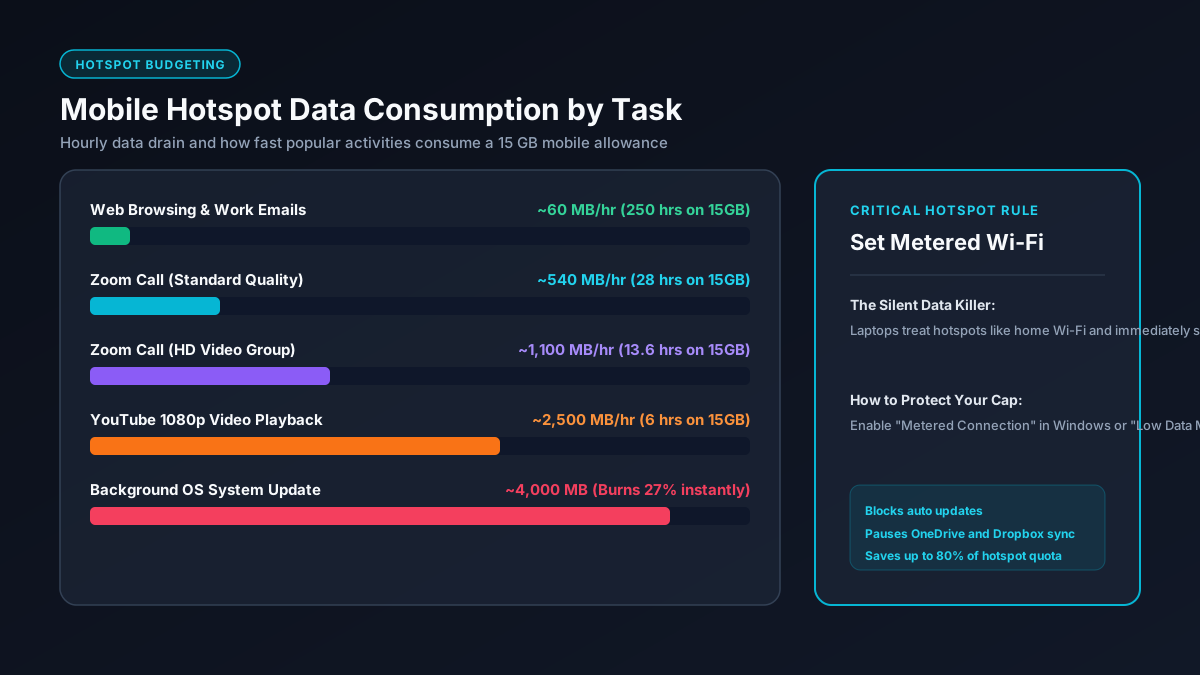
The most common surprise for mobile hotspot users is how fast data vanishes when connecting a laptop or MacBook compared to using a smartphone. While a phone operates in an aggressive battery saving state that restricts background traffic, desktop operating systems treat Wi-Fi as an unlimited pipeline.
Silent Operating System Updates
Windows Update and macOS software updates regularly download cumulative security patches ranging from 1 GB to 5 GB without prompting the user, consuming your entire daily allowance in minutes.
Cloud Storage Synchronization
Background synchronization clients including Microsoft OneDrive, Google Drive, Dropbox, and Apple iCloud immediately start uploading local file modifications and downloading remote folder changes.
Desktop Browser Video Autoplay
Desktop websites serve uncompressed high resolution assets, background video advertisements, and tracking scripts that can cause a single news page to weigh over 25 MB.
Game Launchers and App Stores
Platforms such as Steam, Epic Games Launcher, and the Microsoft Store check for game patches automatically, queueing downloads that can exceed 30 GB without explicit manual confirmation.
How to Stretch Your Hotspot Data: Step-by-Step Settings
With a few essential configuration changes, you can cut background data consumption by up to 80% and make limited hotspot allowances last significantly longer.
1. Enable Metered Connection on Windows 10 and Windows 11
Marking your mobile hotspot network as a Metered Connection is the single most effective protection on Windows. This setting instantly halts automatic Windows Updates, pauses OneDrive sync, and suspends live start menu tile updates. Follow the official Microsoft Metered Connection guidelines to configure your network:
- Open Settings and select Network & Internet.
- Click on Wi-Fi, then select the name of your mobile hotspot network.
- Toggle the switch labeled Metered connection to On.
2. Enable Low Data Mode on macOS and iOS
On Mac computers running macOS Monterey, Ventura, or Sonoma, you can activate Low Data Mode on specific Wi-Fi connections. This limits background network usage, pauses iCloud Photos synchronization, and restricts automatic system updates:
- Open System Settings and click Wi-Fi.
- Click Details next to your connected mobile hotspot network.
- Turn on the toggle for Low Data Mode and click OK.
3. Adjust Video Playback Quality to 480p or 720p
Streaming in High Definition (1080p) consumes approximately 2.5 GB to 3.0 GB per hour, whereas 4K Ultra HD burns up to 7.0 GB per hour. By manually dropping the video player resolution to 480p or 720p inside Netflix or YouTube, you save over 70% of your data without making the video unwatchable on a laptop screen. Check our guide on how to reduce streaming data usage for device specific settings.
4. Turn Off Video Camera During Group Meetings
If you participate in work conferences via Zoom, Microsoft Teams, or Google Meet, receiving and transmitting HD video streams consumes up to 1.8 GB per hour. Turning off your webcam reduces consumption to audio levels (around 40 MB to 60 MB per hour). For comprehensive video call bandwidth numbers, see our in-depth Zoom data usage guide.