You upgraded your plan, the bill went up, and the box on your router blinks the same as it always did. Then you run a speed test expecting to see 1000, and instead you get 400, or 600, or some number that feels like a rounding error on what you are paying for.
Before you call your ISP and sit on hold, it helps to know that this is one of the most common frustrations in home networking, and in most cases the actual cause is simple, fixable, and has nothing to do with your ISP lying to you. Let's go through the real reasons in the order they are most likely to be the culprit.
Quick Answer: The 7 Most Common Causes
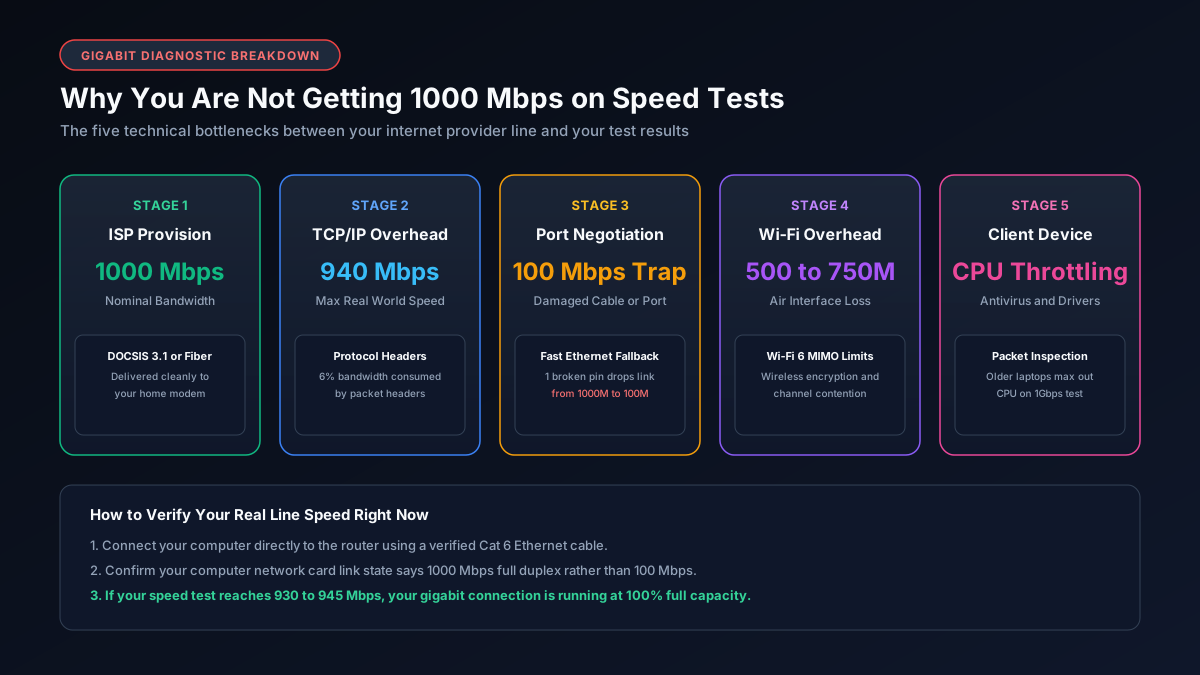
If you only read one section, read this one. The most common causes of not getting gigabit speeds, ranked from most to least likely, are:
- You are testing over Wi-Fi instead of a wired Ethernet connection.
- Your Ethernet cable is old, damaged, or the wrong category for gigabit speeds.
- Your router has 100Mbps ports even though your internet plan is 1Gb.
- Your ISP's "typical speed" during peak hours is genuinely lower than the advertised number.
- Another device on your network is quietly using most of your bandwidth.
- The website or server you are testing against cannot push data fast enough on its end.
- Protocol overhead is eating a small, completely normal percentage of your speed.
We will walk through each one below, along with how to check which one applies to you.
1. You Are Testing Over Wi-Fi, Not a Wired Connection
This is by far the most common reason, and it catches even people who consider themselves fairly tech savvy. Wi-Fi has a theoretical maximum speed, but real world Wi-Fi speeds drop significantly based on distance from your router, the number of walls in between, interference from neighboring networks, and how many devices are connected at once.
How to check: Run a speed test on a device connected directly to your router with an Ethernet cable, not over Wi-Fi. If that number jumps dramatically closer to your plan speed, Wi-Fi was the bottleneck all along, and no cable or router upgrade related to wired networking will fix that specific gap. You would need a Wi-Fi 6 or Wi-Fi 6E router, or a mesh system, to meaningfully improve wireless speeds.
2. Your Ethernet Cable Cannot Actually Handle Gigabit Speeds
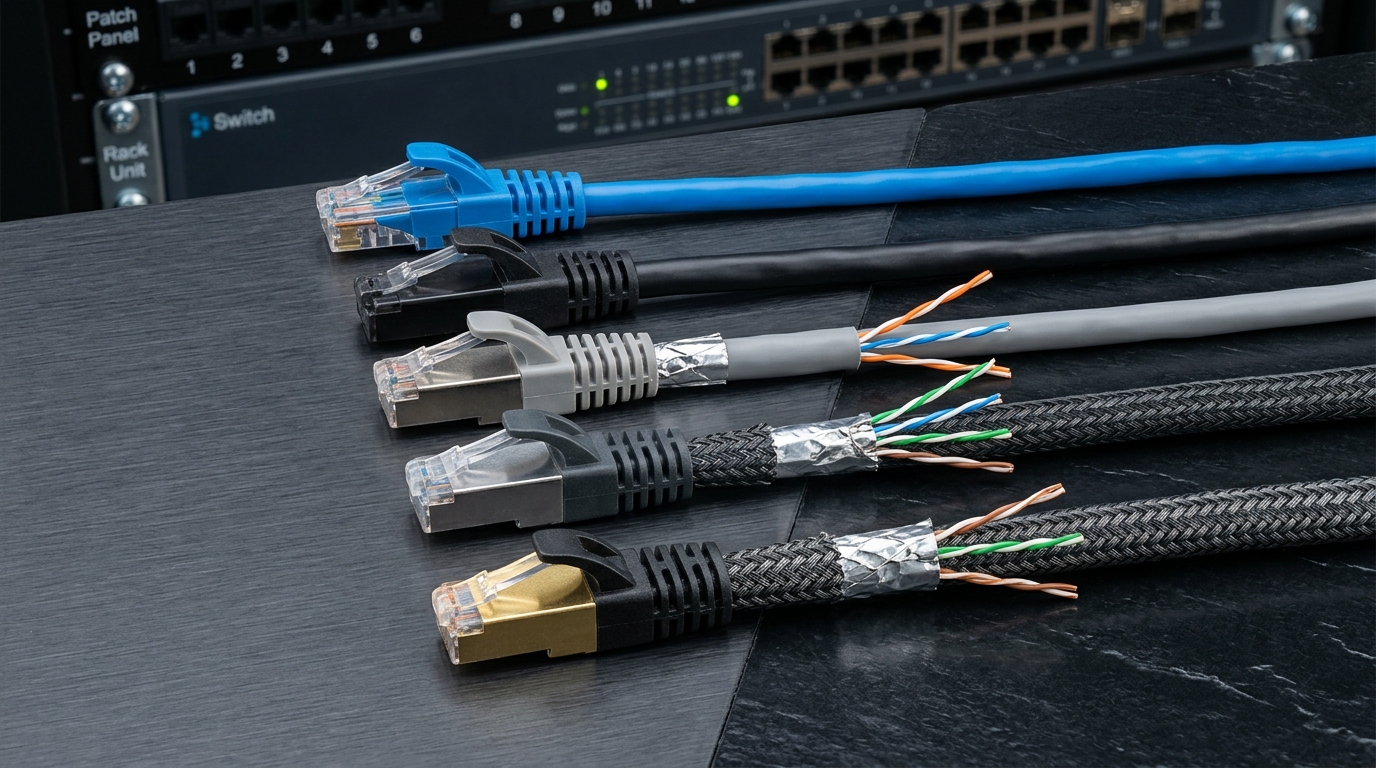
Here is where things get relevant if you already tested on a wired connection and are still not seeing full speed. Not every cable that plugs into an Ethernet port is built the same, and a cable that is old, damaged, poorly shielded, or simply the wrong category can silently cap your speed well below what your plan and router are both capable of delivering.
This is especially common with cables that came free with a router years ago, cables run long distances through walls, or cables coiled tightly near power outlets and other electronics.
How to check: Look at the cable itself. It should have a category printed directly on the jacket, something like CAT5E, CAT6, or CAT6A. If you see CAT5 with no "e," or no category printed at all, that is a strong candidate for your bottleneck.
We put together a full breakdown of exactly which cable categories support full gigabit speeds reliably, what real world throughput actually looks like on each one, and which specific cables are worth buying, in our guide to the best cable for 1Gb Ethernet. If you suspect this is your issue, that is the next page to read, it includes a comparison table of advertised versus real speeds so you can see exactly how much you are likely losing.
3. Your Router Has 100Mbps Ports, Not Gigabit Ports
This one is sneaky because the router itself might otherwise look perfectly modern. Some budget routers, and especially older routers provided free by ISPs, use "Fast Ethernet" ports rated for 100Mbps rather than true Gigabit Ethernet ports, even while broadcasting Wi-Fi speeds that sound much faster.
If this is the case, no cable, no matter how expensive, can push past that 100Mbps ceiling on that specific port.
How to check: Flip your router over or check the manual for its port specifications. Look for the phrase "10/100/1000" or "Gigabit Ethernet" next to the LAN ports. If it only says "10/100," that is your answer.
| Router Port Label | What It Means | Max Wired Speed |
|---|---|---|
| 10/100 | Fast Ethernet only | 100Mbps |
| 10/100/1000 | True Gigabit Ethernet | 1000Mbps |
| Multi-Gig (2.5G, 5G, 10G) | Beyond gigabit | 2500Mbps and up |
4. Your ISP's "Typical Speed" Is Lower Than the Advertised Number
Most ISPs now list two numbers, a maximum advertised speed and a "typical" or peak hour speed in smaller print. During busy evening hours, it is normal and expected for actual throughput to sit somewhere between 80 and 95 percent of the advertised maximum, and that is not a sign anything is broken.
How to check: Run speed tests at a few different times of day, early morning, midday, and peak evening hours. If your speed is consistently strong in the morning but dips predictably every evening, that pattern points to normal network congestion rather than a hardware problem.
5. Something Else on Your Network Is Using Your Bandwidth
A single device downloading a large update, a smart TV auto-updating in the background, or a housemate streaming in 4K on another device can all eat into the bandwidth available for your speed test, especially on smaller home plans.
How to check: Most modern routers have an app or admin panel showing connected devices and their current usage. Pause or disconnect everything except your testing device, then run the test again.
A few quick things worth ruling out at the same time:
- Cloud backup software running silently in the background.
- Game consoles downloading updates overnight.
- Multiple streaming devices left logged in and idle but still checking in periodically.
- Smart home cameras uploading continuous footage.
6. The Speed Test Server Itself Is the Bottleneck
Occasionally the issue is not your network at all. The server you are testing against, whether that is a speed test site or a specific download you are trying to benchmark against, may not be capable of sending data as fast as your connection can receive it.
How to check: Try two or three different speed test providers (like Speedtest.net), and if possible, choose a server location physically closer to you. If one test consistently shows much higher numbers than another, the slower test's server was likely the limiting factor, not your home network.
7. A Small Amount of Overhead Is Completely Normal
Even with a flawless setup, a perfect cable, a proper gigabit router, and zero congestion, you will still typically see something in the range of 930 to 970Mbps rather than a flat 1000, and that gap is not a problem to fix. Every network transmission carries a small amount of protocol overhead for error checking and routing, and that is simply how gigabit Ethernet works in practice, not a sign of a faulty setup.
Putting It Together: A Simple Testing Order
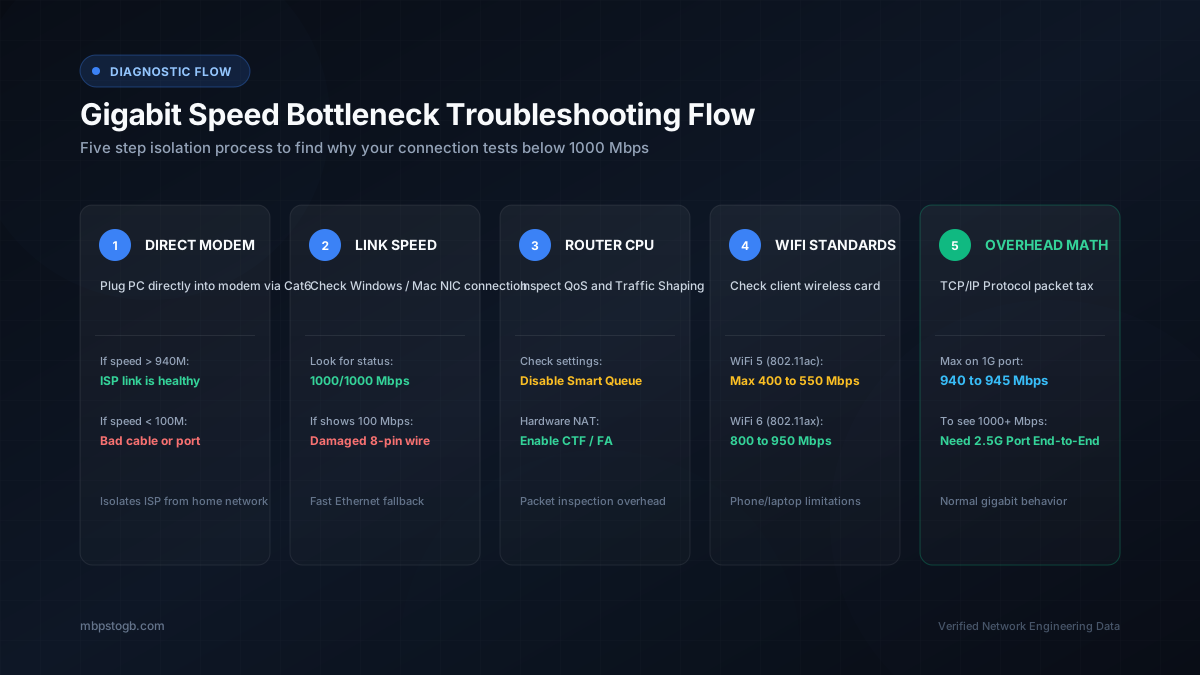
If you want to actually diagnose this rather than guess, work through it in this order, it isolates each variable one at a time.
- Test on Ethernet, directly into the router, with nothing else running on the network.
- Check your router's port speed rating in its manual or spec sheet.
- Inspect your cable for its printed category, and swap it for a known good Cat6 or Cat6A cable if it looks questionable or is not marked at all.
- Retest at a different time of day to rule out peak hour congestion.
- If you are still short, contact your ISP with your wired, off peak results in hand, that gives them (and you) something concrete to work from.
In our experience, steps one and three resolve the majority of "why is my gigabit internet so slow" cases before you ever need to pick up the phone. If step three is where you land, our Cat6 vs Cat6A vs Cat8 cable buying guide walks through exactly which cable to buy for your specific setup, along with real speed comparisons so you know what to expect afterward.
Frequently Asked Questions
Why am I not getting gigabit speeds on Wi-Fi?
Wi-Fi has theoretical maximums that drop significantly due to distance, walls, interference, and device limits. To see true gigabit speeds, you typically need a wired Ethernet connection directly to your router.
Does my Ethernet cable affect my internet speed?
Yes. Old, damaged, or poorly shielded cables (or anything below Cat5e) can silently bottleneck your connection to 100Mbps, even if your plan and router are capable of 1000Mbps.
Is 940 Mbps considered gigabit?
Yes. Due to standard network protocol overhead for error checking and routing, a perfect gigabit connection will typically show a usable throughput of around 930 to 970 Mbps.
Why does my internet slow down at night?
During peak evening hours, network congestion in your neighborhood can cause typical speeds to drop below your ISP's advertised maximum. This is normal and expected on most residential cable plans.
Explore More Network and Speed Tools
- Mbps to GB Calculator — see what your speed actually means in real data terms.
- Best Cable for 1Gb Ethernet — the fix for cause #2 above, with tested recommendations.
- What Is a Good Mbps for Gaming — a benchmark guide if you are unsure your plan speed was ever enough to begin with.