Quick Answer: How Much Data Do Security Cameras Use?
Security camera data usage depends fundamentally on your recording configuration:
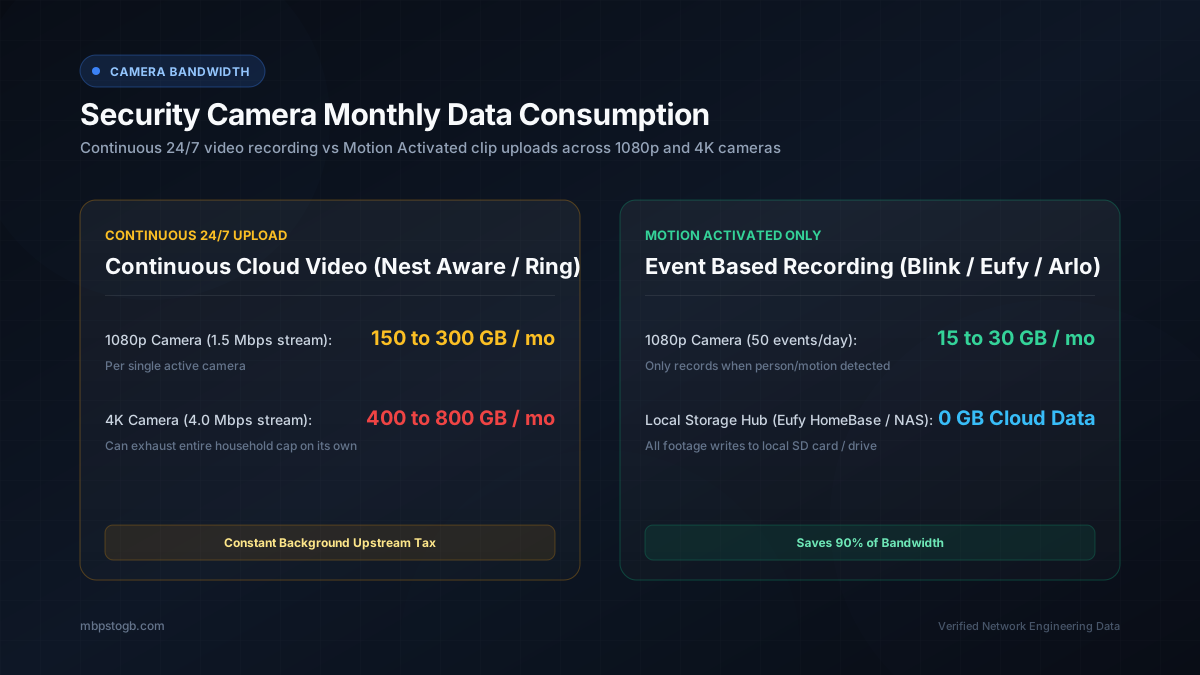
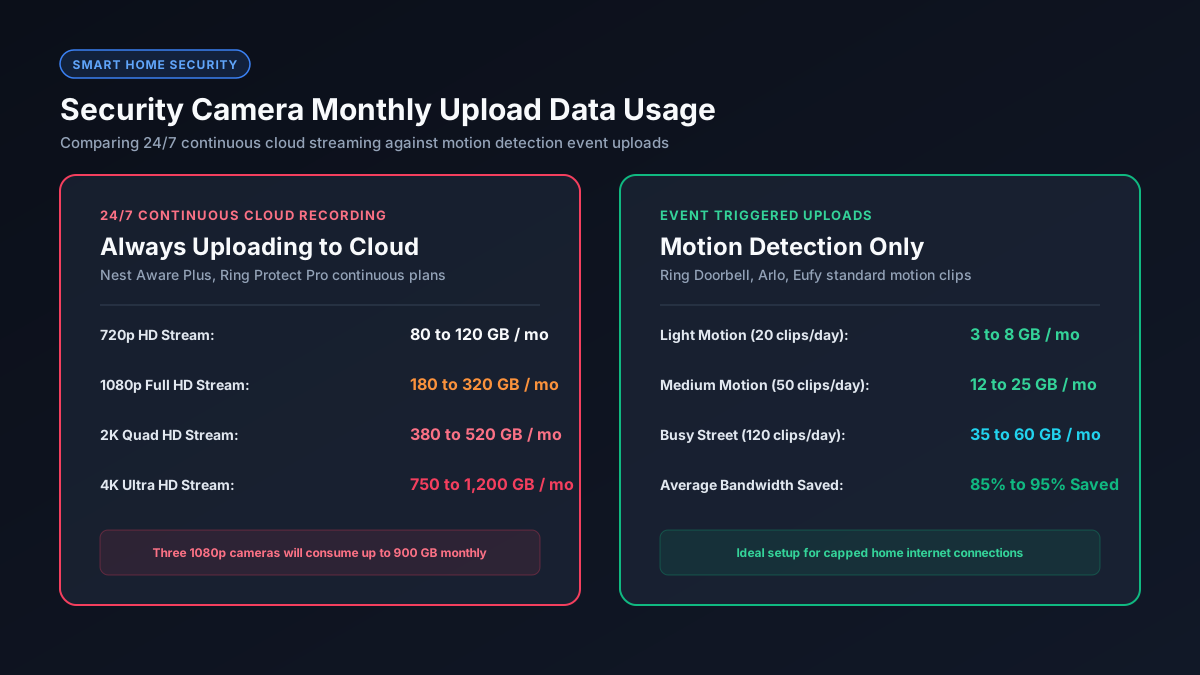
Uses 10 GB to 30 GB per month per camera. The camera only streams video when people, animals, or vehicles enter designated detection zones.
Uses 300 GB to 480 GB per month per camera at 1080p, and up to 1,300 GB per month at 4K. Three continuous cameras alone can blow through an entire 1.2 TB home data cap.
Security Camera Data Usage Comparison by Popular Brand
Different manufacturers utilize distinct recording philosophies and compression algorithms. The table below details real world monthly data consumption across the leading smart security ecosystems:
| Brand & Model | Resolution | Recording Architecture | Monthly Data (Per Cam) |
|---|---|---|---|
| Ring Video Doorbell 4 | 1080p Full HD | Motion event clips only | 15 GB to 35 GB |
| Google Nest Cam (Nest Aware Plus) | 1080p Full HD | 24/7 Continuous Cloud (CVR) | 300 GB to 450 GB |
| Arlo Pro 4 / Pro 5S | 2K Quad HD | Cloud event clips (Arlo Secure) | 40 GB to 80 GB |
| Arlo Ultra 2 (Continuous CVR) | 4K Ultra HD | 24/7 Continuous Cloud | 900 GB to 1,300 GB |
| EufyCam 3 / SoloCam (HomeBase) | 4K Ultra HD | Local storage on HomeBase / SD | 1 GB to 5 GB (Live view only) |
| Wyze Cam v3 / v4 (Cam Plus) | 2K / 1080p | Cloud motion events | 20 GB to 45 GB |
As documented in the official Google Nest camera bandwidth and data usage guide, a Nest camera set to maximum video quality requires a continuous upload rate of 2.0 to 4.0 Mbps and consumes hundreds of gigabytes per month.
The Hidden Upload Bottleneck: Why Cameras Lag Your Network
Most residential internet connections are asymmetrical. For instance, a cable internet plan may provide 200 Mbps download speed but only 10 Mbps or 15 Mbps upload speed. You can verify your connection characteristics using our app data usage charts and check our guide on what is a good upload speed.
When you install three continuous 1080p security cameras, each camera constantly transmits roughly 1.5 Mbps of upstream data, totaling 4.5 Mbps of non stop upload traffic. On a 10 Mbps upload plan, security cameras consume nearly 50% of your total upstream capacity. This constant saturation fills the router packet queue, causing latency spikes in multiplayer games, distorted audio on Zoom calls, and sluggish web page requests.
H.264 vs H.265: The Codec Efficiency Revolution
Video compression determines how efficiently surveillance footage translates into network packets:
- H.264 (Advanced Video Coding): The legacy standard found in older smart cameras. It requires higher bitrates to maintain picture clarity, resulting in greater monthly data accumulation.
- H.265 (High Efficiency Video Coding / HEVC): The modern standard utilized in newer 2K and 4K cameras. It compresses video data up to 35% to 40% more effectively than H.264 while preserving identical image sharpness and facial recognition detail.
Five Practical Strategies to Cut Security Camera Data Usage
If your household approaches its monthly internet data cap, implement these proven configuration adjustments:
- Switch from Continuous Recording to Motion Only: Unless you run a retail storefront requiring unbroken legal video archives, motion detection captures every relevant security event while slashing monthly data consumption by up to 95%.
- Customize Detection Zones: Mask out public sidewalks, tree branches swaying in the wind, and busy streets. Preventing false motion triggers keeps cameras in ultra low power standby mode.
- Adopt Local Storage Systems: Systems equipped with local hard drives, HomeBase hubs, or onboard microSD cards record full quality video directly to physical media inside your house, eliminating ongoing cloud uploads.
- Schedule Video Quality Profiles: Lower camera stream resolution during peak daytime hours when family members are working from home, and schedule high resolution recording only overnight.
- Verify Internet Cap Thresholds: Review our comprehensive guide on unlimited versus capped data plans to avoid monthly overage penalties from your internet provider.