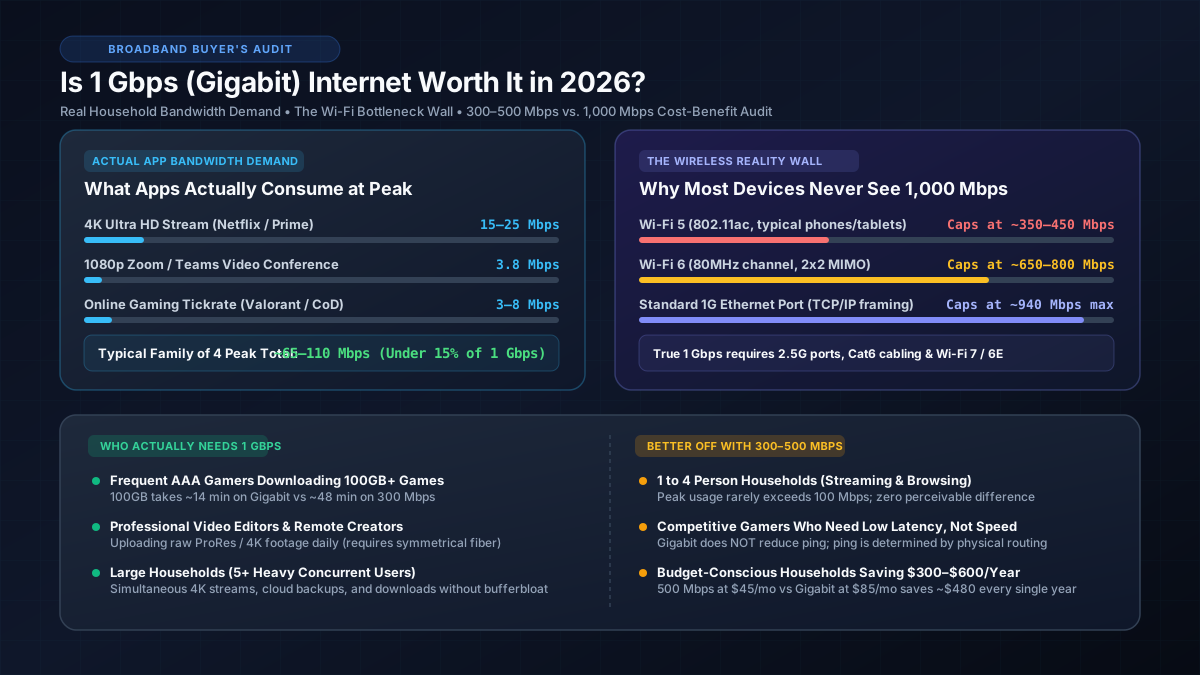
Executive Summary: For 85%+ of households, paying an extra $30–$60 per month for 1 Gbps (1,000 Mbps) is unnecessary. Everyday activities like 4K streaming (25 Mbps), video calls (4 Mbps), and multiplayer gaming (8 Mbps) consume less than 100 Mbps combined during peak family usage. Unless you frequently download 100GB+ game files or upload large video archives on symmetrical fiber, a 300 to 500 Mbps tier offers the exact same real-world responsiveness while saving $360–$600 every year.
1. The Broadband Reality: What Household Apps Actually Consume
The primary reason gigabit internet feels no faster than a 300 Mbps connection for basic web surfing and media consumption comes down to application architecture. Web browsers and streaming platforms fetch data in short, bursty requests or rely on small, steady bandwidth buffers. Once an application receives the few megabits needed to fill its playback buffer, additional raw bandwidth provides zero perceptible benefit.
| Activity | Bandwidth Needed | Max Streams on 500 Mbps | Max Streams on 1 Gbps |
|---|---|---|---|
| 4K Ultra HD Streaming (Netflix, Disney+) | 15–25 Mbps | 20 concurrent streams | 40–50 concurrent streams |
| 1080p HD Video Calling (Zoom, Teams) | 3–4 Mbps | 125 concurrent calls | 250+ concurrent calls |
| Competitive Gaming (Valorant, CS2, CoD) | 3–8 Mbps | 60+ concurrent players | 120+ concurrent players |
| High-Res Audio Streaming (Lossless) | 1–2 Mbps | 250+ concurrent streams | 500+ concurrent streams |
| Social Media Scrolling (TikTok, Reels) | 5–10 Mbps | 50 concurrent devices | 100 concurrent devices |
In a busy four-person home where two family members stream 4K movies simultaneously (50 Mbps total), a third conducts a Zoom business conference (4 Mbps), and the fourth plays competitive online games (8 Mbps), the total peak bandwidth draw hovers around 62 Mbps. Even when accounting for smart home cameras and background cloud syncing, peak residential bandwidth consumption rarely breaches 120 Mbps. Check our benchmark on how many Mbps a family of 4 needs for deeper usage profiles.
2. Speed Tier Comparison: 100 Mbps vs. 300 Mbps vs. 500 Mbps vs. 1 Gbps
To understand the tangible real-world difference, look at theoretical and real throughput in Megabytes per second (accounting for the 8:1 bit-to-byte ratio and ~8% TCP/IP networking overhead) alongside large file download times. You can verify how speeds convert using our Mbps to Gbps conversion calculator.
| Broadband Plan | Real Download Speed | 100GB Game Download | Typical Monthly Cost | Verdict |
|---|---|---|---|---|
| 100 Mbps Plan | ~11.5 MB/s | 2 hrs 25 mins | $30–$40/mo | Great for budget solo users |
| 300 Mbps Plan | ~34.5 MB/s | ~48 mins | $40–$50/mo | Best overall value sweet spot |
| 500 Mbps Plan | ~57.5 MB/s | ~28 mins | $50–$65/mo | Ideal for heavy households & gamers |
| 1,000 Mbps (1 Gbps) | ~115.0 MB/s | ~14 mins | $75–$110/mo | Enthusiasts, creators & large homes |
| 2,000+ Mbps (Multi-Gig) | ~230+ MB/s | ~7 mins | $110–$160/mo | Overkill for 98% of users |
As the matrix illustrates, the primary benefit of gigabit internet is time compression on massive file transfers. Downloading a modern 100GB game (like Call of Duty: Warzone or Baldur's Gate 3) takes approximately 14 minutes on Gigabit compared to 28 minutes on 500 Mbps and 48 minutes on 300 Mbps. You can calculate precise transfer timelines with our 100GB game download time calculator. If you only download a new AAA title once every few weeks, saving 14 to 34 minutes per month rarely justifies paying hundreds of dollars more per year.
3. The Wi-Fi Bottleneck: Why Most Devices Never See 1,000 Mbps
A widespread point of friction among gigabit subscribers is discovering that their wireless speed tests rarely exceed 400 to 700 Mbps. This discrepancy is not caused by ISP throttling; it is an inherent limitation of radio frequency physics and consumer device antennas:
Wi-Fi 5 (802.11ac) Devices
Smart TVs, older laptops, smart home hubs, and smartphones from 2019 or earlier use Wi-Fi 5. Even with a theoretical link rate of 866 Mbps on an 80 MHz channel, real-world protocol overhead and environmental interference cap practical download speeds to 350–450 Mbps.
Wi-Fi 6 (802.11ax) Client Antennas
Modern iPhones, Samsung Galaxy phones, and MacBooks feature 2x2 MIMO Wi-Fi 6 chips. On standard 80 MHz channel widths, real-world speeds max out around 650–800 Mbps right next to the router. Moving one room over drops speeds to 400–500 Mbps.
Standard Gigabit Ethernet Overhead
Even over a wired network cable, traditional 1 Gbps Ethernet ports deliver a theoretical maximum throughput of 940–945 Mbps after TCP/IP frame headers and inter-packet gap deductions. Reaching full 1,000 Mbps requires 2.5G ports on both your router and PC.
Multi-Gig Hardware Upgrades Required
To actually deliver gigabit bandwidth to multiple wireless devices simultaneously, you need a high-performance router with a 2.5 Gbps WAN port, Cat6 cabling, and Wi-Fi 6E or Wi-Fi 7 access points. Review our guide on the best routers for gigabit internet for hardware specifications.
If you are currently paying for a 1 Gbps plan but running speed tests in the 400–600 Mbps range, read our troubleshooting guide on why you are not getting gigabit speeds to isolate hardware and patch cable bottlenecks.
4. The Latency Myth: Why Gigabit Does Not Lower Your Ping
One of the most persistent misconceptions in consumer networking is that a higher bandwidth plan automatically lowers ping and improves multiplayer gaming responsiveness. It is essential to understand the difference between bandwidth and latency:
- Bandwidth (Mbps): Measures the width of the data highway—how much total data can be transferred per second.
- Latency (ms / Ping): Measures the speed of the car on that highway—how many milliseconds it takes for a single data packet to travel from your gaming device to the game server and back.
Latency is governed primarily by physical distance (data traveling through fiber optic glass moves at roughly two-thirds the speed of light, introducing ~5ms of delay per 1,000 kilometers) and the number of ISP routing hops along the path. Because multiplayer gaming data streams only require ~50 to 100 packets per second (equating to roughly 0.05 to 0.1 MB/s), upgrading from 100 Mbps to 1,000 Mbps does not change the physical transit route or reduce your ping by even a single millisecond.
5. Symmetrical Fiber vs. Asymmetrical Cable Gigabit
Not all gigabit plans are created equal. The delivery medium determines whether 1 Gbps delivers transformative utility or marginal gains:
- Fiber Optic Gigabit (FTTH): Symmetrical 1,000 Mbps download and 1,000 Mbps upload. Because fiber uses light pulses over glass lines, upload speeds are equal to download speeds, and base loaded latency is typically 1 to 5 ms. This is transformative for remote video editors, content creators, and engineers pushing massive datasets to cloud storage.
- Cable Gigabit (DOCSIS 3.1): Asymmetrical 1,000 Mbps download, but severely restricted upload speeds of 20 to 40 Mbps. While downloading large files is fast, uploading large 4K video files or cloud backups will still suffer significant delays. Furthermore, cable lines share neighborhood coaxial nodes, making them susceptible to evening peak congestion.
6. Decision Matrix: Who Actually Needs 1 Gbps?
According to the official FCC Consumer Broadband Speed Guide, basic broadband recommendations for moderate-to-heavy use households range from 25 to 100+ Mbps. Here is our engineering-tested rubric for choosing the right speed tier in 2026:
1 Gbps IS Worth It If You Match These Criteria:
- Frequent Game Downloaders: You routinely install 80GB–150GB game patches multiple times a week on PC, PS5, or Xbox Series X, and waiting an extra 20–30 minutes is unacceptable.
- Professional Content Creators & Remote Media Editors: You have access to symmetrical fiber and frequently upload 10GB–50GB raw video projects, CAD files, or database backups to cloud clients.
- Homes with 5+ Heavy Concurrent Users: A household with 5 or more active tech users running simultaneous 4K streams, remote desktop sessions, game streams, and cloud backups.
- Local Home Lab & Remote Access Enthusiasts: You host self-hosted servers, remote Plex media streams, or virtualized environments accessed externally.
A 300 to 500 Mbps Plan IS Better If You Match These Criteria:
- 1 to 4 Person Households: General internet usage consisting of streaming Netflix/YouTube in 4K, social media, Zoom video calls, and regular web browsing.
- Competitive Online Gamers: Players who prioritize stable, jitter-free ping over file download speeds. (Ping will be identical on 300 Mbps and 1 Gbps).
- Primarily Wireless Homes: Households where all or most devices connect over standard Wi-Fi 5 or Wi-Fi 6 without multi-gigabit wired infrastructure.
- Budget-Conscious Consumers: Saving $30–$50 per month ($360–$600 per year) by downgrading from Gigabit to 300–500 Mbps provides immediate financial return with zero noticeable drop in daily performance.