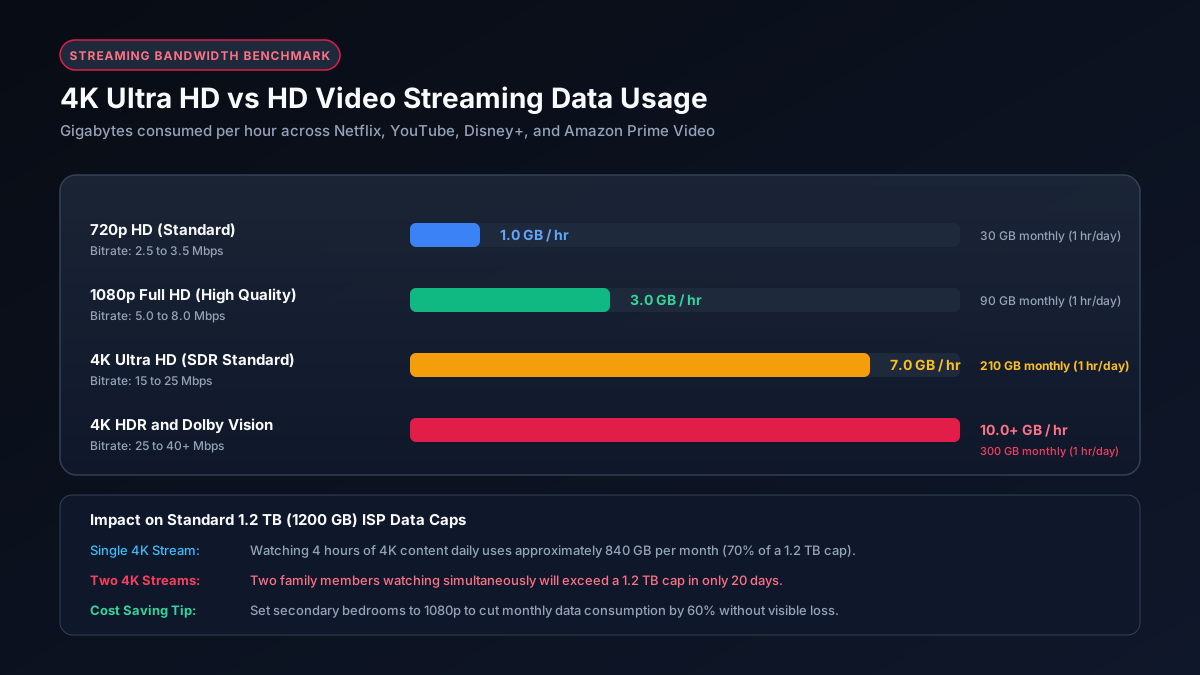
Quick Summary: 4K Streaming Data Rates
Streaming in 4K uses roughly four to five times more data than 1080p Full HD (3 GB per hour) and over twenty times more data than 480p standard definition (0.7 GB per hour). Official recommendations from major streaming services, including the Netflix Help Center connection speed requirements, confirm that continuous Ultra HD playback demands steady internet throughput of at least 15 to 25 Mbps.
The Bitrate Math: How Mbps Converts to Gigabytes per Hour
Internet speed is measured in Megabits per second (Mbps), while data consumption on your monthly billing statement is recorded in Gigabytes (GB). Understanding the relationship between these two units clarifies why 4K video consumes such massive amounts of data.
Because there are eight bits in a single byte, you divide your connection bitrate in Megabits by eight to obtain Megabytes per second. Over one hour (3,600 seconds), the mathematical formula works as follows:
- 15.6 Mbps stream (Netflix 4K average): 15.6 × 3,600 ÷ 8,000 = 7.02 GB per hour
- 25.0 Mbps stream (Disney+ 4K peak buffer): 25.0 × 3,600 ÷ 8,000 = 11.25 GB per hour
- 35.0 Mbps stream (YouTube 4K 60fps HDR): 35.0 × 3,600 ÷ 8,000 = 15.75 GB per hour
- 40.0 Mbps stream (Apple TV+ premium 4K): 40.0 × 3,600 ÷ 8,000 = 18.00 GB per hour
You can test custom speeds and file downloads directly on our Mb vs MB conversion tool to see real world throughput calculations.
Platform Comparison: 4K Streaming Data by Service
Not all 4K streams are encoded equally. Different streaming platforms employ distinct compression codecs (such as HEVC, VP9, and AV1) and target different average bitrates. The table below outlines real world hourly data usage across every prominent video platform:
| Platform | 480p SD | 1080p Full HD | 4K Ultra HD | 4K HDR / 60fps |
|---|---|---|---|---|
| Netflix | ~0.7 GB/h | ~3.0 GB/h | ~7.0 GB/h | ~9.5 GB/h |
| YouTube | ~0.5 GB/h | ~1.9 GB/h | ~7.2 GB/h | ~15.0 GB/h |
| Disney+ | ~0.6 GB/h | ~2.5 GB/h | ~7.7 GB/h | ~10.0 GB/h |
| Apple TV+ | ~0.8 GB/h | ~3.6 GB/h | ~12.0 GB/h | ~16.5 GB/h |
| Amazon Prime Video | ~0.4 GB/h | ~2.2 GB/h | ~6.8 GB/h | ~9.0 GB/h |
| Max (HBO) | ~0.6 GB/h | ~2.7 GB/h | ~8.0 GB/h | ~11.0 GB/h |
Visual Comparison: 1080p vs 4K Data Consumption
Many viewers wonder whether upgrading their subscription to 4K Ultra HD is worth the added bandwidth burden. The jump from standard High Definition to Ultra High Definition increases pixel density from 2 million pixels to over 8.2 million pixels. The bar chart below illustrates the dramatic increase in monthly data when streaming three hours each day:
Monthly Consumption (3 Hours Daily Streaming)
Switching from 4K down to 1080p saves 360 GB every month on a single television. For households with two or three screens operating simultaneously, streaming exclusively in 4K can easily push total internet usage above 1,500 GB per month.
The HDR and Audio Overhead Factor
Resolution is not the only variable that dictates streaming data size. Two additional factors can substantially increase data draw:
- High Dynamic Range (HDR10 and Dolby Vision): Standard video is encoded using an 8 bit color palette, representing 16.7 million distinct hues. HDR content utilizes 10 bit or 12 bit color depth, expanding the color spectrum to over one billion shades. Transmitting this color data alongside scene by scene brightness metadata adds between 15% and 30% to the overall stream size.
- Spatial Audio and Dolby Atmos: High fidelity surround audio tracks are bundled into modern streaming files. Uncompressed or high bitrate Dolby Atmos streams add between 400 MB and 700 MB of audio data to a two hour feature film.
ISP Data Caps and 4K Streaming Limits
Many major internet service providers, including Comcast Xfinity and Cox, enforce a 1.2 TB (1,228 GB) monthly data cap on residential plans. The table below reveals how many hours of 4K entertainment you can consume across common data plan allowances before running out of data:
| Monthly Data Cap | Hours of 4K (7 GB/h) | Movies (2h length) | Daily Watch Allowance |
|---|---|---|---|
| 200 GB (Mobile Hotspot) | ~28 hours | ~14 movies | 0.9 hours per day |
| 500 GB (Basic Home Internet) | ~71 hours | ~35 movies | 2.3 hours per day |
| 1,000 GB (1 TB Standard) | ~142 hours | ~71 movies | 4.7 hours per day |
| 1,228 GB (1.2 TB Xfinity Cap) | ~175 hours | ~87 movies | 5.8 hours per day |
| Unlimited (Fiber / No Cap) | Unlimited | Unlimited | No restrictions |
Notice that while 175 hours on a 1.2 TB cap sounds generous, it represents total household bandwidth. If two family members stream 4K video for three hours every evening, they will exhaust 1,260 GB in 30 days from video streaming alone, leaving zero data for work Zoom meetings, game updates, or smartphone browsing. For larger families, reviewing our guide to household data usage and exploring an unlimited data add on is strongly recommended.
5 Proven Strategies to Prevent 4K Data Overages
If you want to enjoy sharp picture quality without triggering expensive ISP overage fees, implement these five practical steps:
- Adjust Playback Quality in Account Settings: Rather than leaving video quality set to Auto, log into your streaming account via a web browser and lock video resolution to High (1080p) or Medium (720p). On Netflix, this single setting reduces data draw from 7 GB per hour down to 3 GB per hour.
- Reserve 4K for Cinematic Features: Watch big budget blockbuster movies and nature documentaries in 4K Ultra HD on your primary living room screen, but use 1080p for sitcoms, news broadcasts, and background casual viewing.
- Turn Off Autoplay Features: Streaming apps often continue playing episode after episode when you fall asleep or leave the room. Disabling autoplay prevents hours of wasted 4K data transmission.
- Download Content Over Unmetered Connections: If you travel or use mobile hotspot connections, download movies to local storage on your tablet or laptop ahead of time while connected to uncapped home or office WiFi.
- Configure Smart TV Sleep Timers: Ensure your television or streaming box automatically goes to sleep after thirty minutes of inactivity, ensuring streams do not run silently in an empty room.
For more actionable bandwidth saving techniques, visit our in depth walkthrough on how to reduce streaming data usage across smart TVs, gaming consoles, and mobile devices.