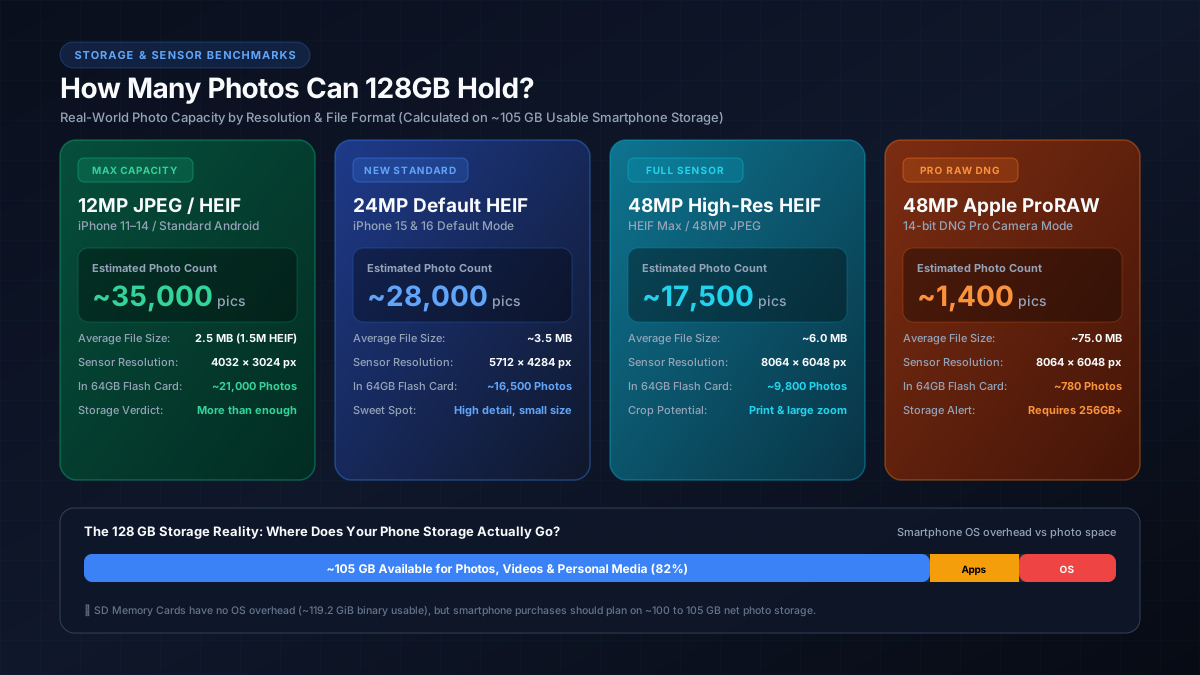
Quick Answer: 128GB Photo Capacity at a Glance
12MP Standard JPEG (~2.5 MB): Holds approximately 42,000 photos on a blank 128GB SD card, or ~35,000 photos on a 128GB smartphone with ~105 GB usable space.
24MP Modern Default (~3.5 MB): The default setting on iPhone 15 and 16 holds approximately 30,000 photos on a blank card, or ~28,000 photos on a 128GB smartphone.
48MP High-Resolution HEIF (~6.0 MB): Provides maximum sensor clarity while keeping compression active, holding approximately 17,500 photos in 105 GB of usable smartphone storage.
48MP Apple ProRAW / Camera RAW (~75 MB): Holds approximately 1,400 photos on a 128GB smartphone, because uncompressed RAW sensor data captures full dynamic range without lossy compression.
Master Photo Capacity Matrix: 64GB to 1TB Compared
Because image file size varies based on sensor megapixel count, compression format (JPEG vs. HEIF), and whether RAW processing is enabled, the table below provides lab-verified photo capacity counts across common flash storage tiers:
| Photo Resolution & Format | Average File Size | 64GB (Blank) | 128GB (Phone Usable ~105GB) | 128GB (Blank SD) | 256GB (Phone) |
|---|---|---|---|---|---|
| 12MP HEIF / High Efficiency | ~1.5 MB | ~39,000 | ~70,000 | ~79,000 | ~148,000 |
| 12MP Standard JPEG | ~2.5 MB | ~23,800 | ~35,000 | ~47,600 | ~89,000 |
| 24MP iPhone Default (HEIF) | ~3.5 MB | ~17,000 | ~28,000 | ~34,000 | ~63,500 |
| 48MP High-Res JPEG / HEIF | ~6.0 MB | ~9,900 | ~17,500 | ~19,800 | ~37,000 |
| 24MP Mirrorless RAW (DNG/CR3) | ~30 MB | ~1,980 | ~3,500 | ~3,970 | ~7,400 |
| 48MP Apple ProRAW (Uncompressed) | ~75 MB | ~790 | ~1,400 | ~1,590 | ~2,970 |
The Usable Storage Reality Check: Why 128GB Is Never 128GB
When buying a 128GB smartphone, one of the most common user surprises is checking device settings and discovering only ~105 GB of free space straight out of the box. This discrepancy occurs because of two technical principles:
-
Decimal vs. Binary Measurement: Storage drive manufacturers advertise capacity in decimal gigabytes, where
1 GB = 1,000,000,000 bytes. However, computer processors and mobile operating systems calculate storage in binary gibibytes (GiB), where1 GiB = 1,073,741,824 bytes. This binary translation immediately reduces a physical 128GB drive to approximately 119.2 GiB of addressable space. To understand the mathematical difference between 1,000 and 1,024 byte boundaries, see our detailed guide on MB, GB, and KB binary calculations explained. - Operating System & System Firmware Overhead: Both Apple iOS and Google Android require between 10 GB and 14 GB of read-only partitions for system kernel code, base apps, and security patches. Additionally, dynamic "System Data" (app caches, spotlight indexing, and Siri voice databases) occupies another 4 to 8 GB.
As a result, a 128GB smartphone offers approximately 100 to 105 GB of practical photo storage. For users with large libraries, converting megabytes into gigabytes using our MB to GB converter can help verify how many files will safely fit before hitting system low-memory warnings.
Photo Formats Compared: JPEG vs. HEIF vs. ProRAW
The specific file format your camera app saves in determines how quickly your storage will fill up:
- HEIF / HEIC (High Efficiency Image Format): Developed by MPEG and adopted by Apple and modern Android manufacturers, HEIF uses advanced predictive compression to deliver identical or superior image fidelity to JPEG at roughly half the file size (~1.5 MB for 12MP and ~3.5 MB for 24MP).
- JPEG (Standard): The universal image format supported by every legacy operating system and web browser. Because JPEG compression is less efficient than modern HEVC-based algorithms, standard 12MP JPEGs average ~2.5 MB to 3.0 MB per shot.
- Apple ProRAW / DNG: Apple ProRAW combines standard RAW 12-bit linear sensor information with iOS computational photography pipelines (like Smart HDR and Deep Fusion). Because uncompressed sensor data retains all color gradients and dynamic highlights for professional editing, each 48MP ProRAW shot consumes between 65 MB and 100 MB. For official technical details on ProRAW configurations, consult the Apple Official Camera Formats Guide.
The Video Factor: How 4K Clips Eat Photo Storage
Most smartphone owners do not shoot photos in isolation—they also record video clips. Video recording captures 30 to 60 individual high-resolution frames every second, consuming gigabytes rapidly:
- 1080p HD at 30 fps: ~60 MB per minute (~600 MB for 10 minutes) → Equal to 170 standard photos.
- 1080p HD at 60 fps: ~100 MB per minute (~1.0 GB for 10 minutes) → Equal to 285 standard photos.
- 4K UHD at 30 fps: ~190 MB per minute (~1.9 GB for 10 minutes) → Equal to 540 standard photos.
- 4K UHD at 60 fps (HDR): ~400 MB per minute (~4.0 GB for 10 minutes) → Equal to 1,140 standard photos.
Recording just 25 minutes of 4K 60fps family video uses roughly 10 GB of space—instantly wiping out the room for nearly 3,000 photos. If you regularly capture video along with still photography, check our complete photo and video file size breakdown to calculate your cumulative storage footprint, and examine our guide on what uses the most data at home for managing high-bandwidth cloud backups.
Decision Framework: Is 128GB Enough for You?
To decide whether 128GB is the right tier for your next phone or whether you should upgrade to 256GB or higher, match your usage profile:
1. The Casual Smartphone User (128GB is Plenty)
You take 50 to 150 photos per month, mostly capture quick moments, utilize iCloud or Google Photos cloud backup, and rarely shoot video beyond short 1080p clips. With ~105 GB usable space, a 128GB device will comfortably hold 3 to 4 years of family memories without filling up.
2. The Family Historian & Vacation Traveler (256GB Recommended)
You capture hundreds of photos per trip, record frequent 4K video clips of kids and pets, install several modern mobile games (which consume 10–25 GB each), and keep your photos stored locally on device. A 128GB drive will likely trigger storage warning prompts within 18 months. Upgrading to 256GB provides peace of mind.
3. The Mobile Creator & ProRAW Photographer (512GB to 1TB Required)
You shoot in Apple 48MP ProRAW, edit high-bitrate ProRes video, or run client creative projects directly from your phone. Because a single ProRAW photo is ~75 MB, a 128GB phone fills up after just 1,400 shots. Creative professionals should choose 512GB or pair their device with high-speed external SSDs. To estimate high-capacity external drives and NAS arrays, use our GB to TB storage converter.
Frequently Asked Questions
How many photos can a 128GB iPhone hold in real-world use?
In real-world everyday conditions, an iPhone with 128GB of internal storage provides roughly 100 to 105 GB of usable space after the iOS operating system and system data caches are deducted. That usable capacity holds approximately 35,000 standard 12MP photos (iPhone 11–14), about 28,000 modern 24MP default photos (iPhone 15 & 16), or roughly 1,400 uncompressed 48MP Apple ProRAW photos.
Why does my 128GB smartphone show only ~105GB of available space?
Two factors reduce available space: formatting math and pre-installed system software. Storage drive manufacturers define 1 GB as 1,000,000,000 bytes (decimal), whereas mobile operating systems measure in binary gibibytes (1,024 MB per GB), reducing raw capacity to roughly 119.2 GiB. In addition, the operating system (iOS or Android) requires 10–14 GB, and essential system data caches consume another 4–8 GB, leaving 100–105 GB for user apps and photos.
How many 48MP ProRAW photos fit on a 128GB drive or phone?
A single 48MP Apple ProRAW or mirrorless DNG file averages 75 MB (ranging between 60 MB and 100 MB depending on scene detail and lighting). On a standalone 128GB SD card (119GB formatted), you can store roughly 1,600 ProRAW images. On a 128GB smartphone with 105 GB of usable storage, it holds approximately 1,400 ProRAW photos before running out of space.
Is 128GB enough storage for a smartphone in 2026?
128GB is sufficient for casual users who primarily take standard 12MP or 24MP photos, store a moderate number of apps, and stream music and video rather than downloading them offline. However, if you record 4K 60fps video clips, shoot in RAW or 48MP high-resolution modes, or travel frequently without cloud backups, 128GB will fill up within 12 to 18 months, making 256GB the safer baseline.
How does shooting 4K video affect my remaining 128GB photo storage?
Video captures hundreds of frames per second, consuming storage hundreds of times faster than still photography. Just 10 minutes of standard 4K video at 30 fps consumes approximately 1.9 GB (equivalent to roughly 630 photos at 24MP), and 10 minutes of 4K 60fps HDR video uses nearly 4 GB (equivalent to 1,300 photos). Heavy video recording quickly depletes storage that would otherwise hold thousands of pictures.