Upgrading to a 500 Mbps or 1,000 Mbps gigabit broadband plan feels like it should permanently eliminate gaming lag and video call stutter. Yet millions of users run a speed test showing blazing download rates, only to boot up a multiplayer game and suffer from a frustrating 120 ms ping, erratic hit registration, and rubberbanding.
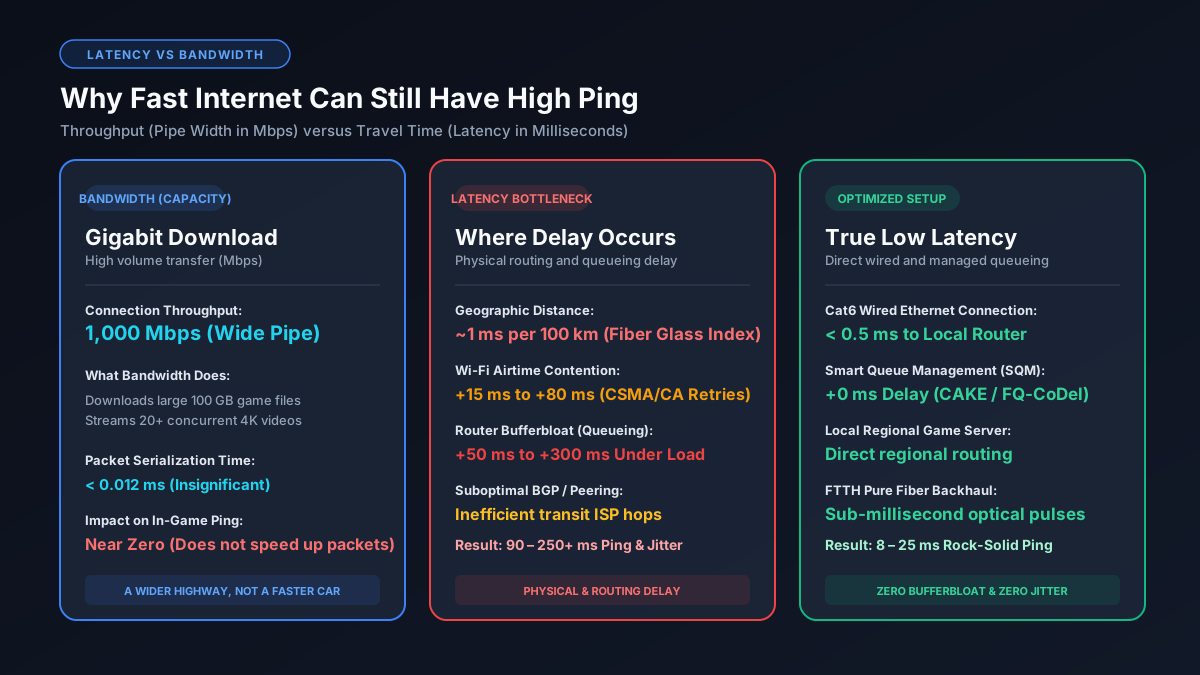
This paradox stems from a fundamental misunderstanding of networking physics: bandwidth is not speed. Bandwidth is volume capacity, while latency is physical transit time. Below is the comprehensive technical breakdown of why fast internet connections still suffer from high ping, and how to systematically diagnose the root cause.
1. Throughput vs Latency: The Pipe Width vs Travel Speed Analogy
To understand why high download speeds do not prevent lag, consider the classic highway analogy:
- Bandwidth (Mbps / Gbps): The number of lanes on the highway. A 1,000 Mbps fiber line is an 8-lane superhighway capable of moving hundreds of cars (packets) simultaneously without bumper-to-bumper gridlock. You can measure your raw transfer capacity on our Mbps to MB/s converter.
- Latency / Ping (ms): The physical speed limit of the vehicles. Whether the highway has 2 lanes or 16 lanes, every vehicle still travels at the same speed. A single packet cannot exceed physical propagation limits.
Online gaming consumes surprisingly little bandwidth: competitive titles like Valorant, Fortnite, or Call of Duty typically require between 2 and 6 Mbps of throughput. Having a 1,000 Mbps plan gives you massive headroom for downloading game patches, but it does not make a single 64-byte UDP coordinate packet travel across the continent any faster.
2. Physical Distance and the Speed of Light in Fiber Optic Glass
The single largest component of baseline network latency is geographical distance. Light in a vacuum travels at approximately 300,000 kilometers per second. However, fiber optic cables do not transmit light through a vacuum; they use solid silica glass cores with a refractive index of approximately 1.47.
In silica glass fiber, photons travel at roughly 204,000 kilometers per second (about two-thirds the speed of light in a vacuum). Taking into account real-world optical routing curves, signal regeneration amplifiers, and optical switches, a reliable rule of thumb is:
Every 100 kilometers (62 miles) of fiber distance adds approximately 1.0 ms of round-trip latency (RTT).
If you live in Los Angeles and connect to a game server located in Frankfurt, Germany (roughly 9,300 km physical cable distance), the absolute theoretical minimum physical ping is roughly 90 to 110 ms under perfect conditions. No 10-gigabit residential broadband connection can circumvent the physics of light propagation.
3. Bufferbloat: Why Active Downloads Create Massive Ping Spikes
While geographic distance dictates your unloaded ping, your local router hardware often destroys your loaded ping through a phenomenon known as bufferbloat.
Standard consumer routers are equipped with large First-In, First-Out (FIFO) packet buffers. When someone on your network streams 4K video, uploads large files, or downloads a game update on Steam, the router's queue fills to maximum capacity. Your latency-critical gaming or voice packets are forced to sit behind thousands of large bulk data packets, waiting their turn to be serialized.
This queueing delay can instantly inflate your ping from a crisp 18 ms up to 250 ms or higher, accompanied by severe packet jitter. According to research standardized in IETF RFC 8290, unmanaged router buffers represent the primary cause of latency degradation in high-speed broadband. You can learn how to eliminate this in our deep dive on what bufferbloat is and how to fix it with SQM.
4. Wi-Fi Contention: CSMA/CA Jitter and Airtime Packet Queuing
Connecting your gaming PC or console over Wi-Fi instead of a direct Ethernet cable is the most common home network mistake. Wi-Fi is a shared half-duplex medium governed by CSMA/CA (Carrier Sense Multiple Access with Collision Avoidance).
Before your wireless card can transmit a packet, it must perform a clear channel assessment (CCA). If a neighbor's router, a smart television, or a family member's smartphone is currently broadcasting on the same wireless channel, your device pauses and backs off for a random microsecond window. This causes:
- Unpredictable Jitter: Your ping constantly swings from 25 ms to 80 ms to 140 ms, creating erratic character movement.
- Packet Retries: Radio frequency interference causes dropped frames over the air, forcing TCP or application-level retransmissions.
- Physical Obstacle Attenuation: Walls, furniture, and microwave interference degrade the Signal-to-Noise Ratio (SNR), dropping your connection to lower modulation schemes.
Switching from 5 GHz Wi-Fi to a reliable Cat6 wired Ethernet cable instantly eliminates local airtime queueing and reduces in-home ping jitter down to less than 0.5 ms. Read our guide on why Ethernet is occasionally slower than Wi-Fi when cables are damaged.
5. Suboptimal ISP Peering and Inefficient BGP Routing Hops
Once your packets leave your modem, your ISP controls their path across the global internet using the Border Gateway Protocol (BGP). ISPs prioritize economic cost rather than lowest physical latency when routing data across third-party transit backbones.
If your ISP lacks direct peering agreements at major Internet Exchange Points (IXPs) near game servers, your packets may be handed off to cheaper Tier-2 transit carriers. This can route your traffic on a convoluted detour: a packet from Dallas destined for Atlanta might be routed up through Chicago and Washington D.C. before reaching Georgia, adding 30 to 50 ms of completely avoidable network transit delay.
6. Carrier-Grade NAT (CGNAT) and Local Double NAT Processing
Due to the global exhaustion of IPv4 addresses, many fiber, cable, and 5G fixed-wireless ISPs utilize Carrier-Grade NAT (CGNAT, RFC 6598). Under CGNAT, your router does not receive a dedicated public IP address; instead, thousands of customer routers share large enterprise NAT gateways at the ISP headend.
CGNAT introduces two distinct latency penalties:
- Hardware Translation Delay: Massive carrier NAT routers must inspect, track, and rewrite packet headers for thousands of simultaneous user sessions, adding processing latency during peak evening hours. Check our analysis of why internet speed and latency drop at night.
- Inability to Establish Direct P2P Connections: In peer-to-peer multiplayer games, strict NAT prevents direct socket connections to other players, forcing games to route sessions through remote relay servers.
Gaming Benchmark: Expected Ping by Region and Server Distance
The table below provides real-world expected ping ranges across modern broadband connections when hardware is properly configured and wired via Ethernet:
| Physical Distance to Server | FTTH Fiber Ping | DOCSIS Cable Ping | 5G Home Internet Ping | Competitive Viability |
|---|---|---|---|---|
| Local Metro (< 50 miles) | 2 – 8 ms | 12 – 20 ms | 25 – 45 ms | Tier-1 Competitive (Flawless) |
| Regional (100 – 300 miles) | 12 – 22 ms | 20 – 35 ms | 35 – 60 ms | Competitive Esports Ready |
| Cross-Country (1,000 – 2,500 miles) | 45 – 65 ms | 55 – 80 ms | 70 – 110 ms | Good (Slight input compensation) |
| Transatlantic (US to Europe) | 85 – 115 ms | 95 – 130 ms | 120 – 160 ms | Casual play only (Noticeable delay) |
| Transpacific (US to Asia/Aus) | 140 – 200 ms | 160 – 230 ms | 180 – 270 ms | Severe rubberbanding and latency penalty |
Diagnostic Algorithm: How to Isolate and Lower Your Ping
Follow this step-by-step diagnostic checklist to identify whether your high ping is inside your house, on your ISP node, or on the game server:
- Ditch Wi-Fi and Run a Direct Wired Ping Test: Connect your computer to your router using a known-good Cat6 patch cable. Open Command Prompt (Windows) or Terminal (macOS/Linux) and ping your local router gateway:
ping 192.168.1.1. Your average latency should be under1 ms. If your ping to your own router is 10 ms or higher, your local network adapter, cable, or router switch is faulty. - Test for Bufferbloat Under Full Load: Visit a waveform bufferbloat test tool while a high-bitrate download is running. If your unloaded ping is 20 ms but jumps to 150 ms under load, you must enable Smart Queue Management (SQM) with CAKE or FQ-CoDel in your router firmware.
- Run an MTR or Traceroute to the Target Server: Run
tracert [server-ip]or install PingPlotter. Look at the latency progression across each hop:- Hop 1 (Local Router): Must be under 1 ms.
- Hop 2 (ISP Gateway / CMTS / OLT): Should be 5–15 ms on cable, or 2–5 ms on fiber. A surge here indicates local node congestion.
- Hop 4–7 (Transit Backbones): If latency jumps by 80 ms on a specific transit hop, your ISP is using suboptimal BGP routing.
- Select In-Game Server Regions Manually: Never rely on "Auto Matchmaking." Set your server region explicitly to your nearest geographic zone (e.g., US-East, US-West, EU-Central) to avoid being placed in cross-continent lobbies.
- Bypass Upstream ISP Bandwidth Throttling: Learn how bandwidth limitations choke active latency in our analysis of good Mbps speeds for competitive gaming.
Explore Network Calculators & Troubleshooting Guides
- What Is Bufferbloat & How to Fix It — deploy Smart Queue Management to lock in stable, spike-free ping under 100% network load.
- Good Mbps for Gaming Guide — find out exactly how much download and upload bandwidth modern games actually consume.
- Why Is Ethernet Slower Than Wi-Fi? — diagnose auto-negotiation faults and damaged 8-pin Ethernet patch cables.
- Mbps to MB/s Converter — calculate real-world megabytes per second throughput for game downloads and telemetry.