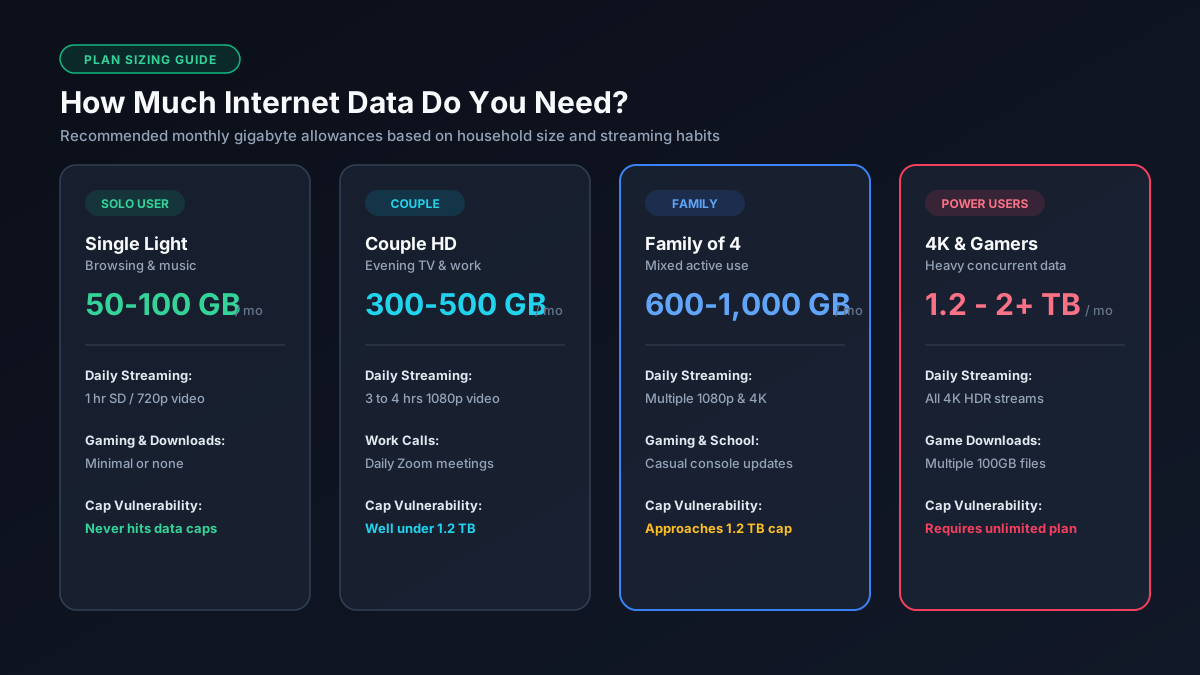
Here's how to size it properly for your own situation.
Data Needs by Household Type
| Household Type | Typical Monthly Use | What That Looks Like |
|---|---|---|
| Single, light user | 50 to 100 GB | Browsing, email, occasional SD video |
| Single, moderate user | 150 to 300 GB | Regular HD streaming and video calls |
| Couple, moderate streaming | 300 to 500 GB | HD streaming most evenings |
| Family of 4, mixed use | 500 GB to 1 TB | Multiple streams, some gaming, remote work or school |
| Family of 4+, heavy use | 1 to 2 TB+ | Multiple 4K streams, frequent gaming, several smart home devices |
Visual Monthly Data Comparison (GB)
Streaming is almost always the biggest single driver in these numbers, since it uses far more data per hour than browsing or messaging ever will. If you want the exact per-app figures behind these estimates, our full breakdown of what Netflix, YouTube, Zoom, and other apps actually use has the details.
Curious specifically about a family of four? We built out three real household scenarios, light, moderate, and heavy, with the math behind each one in our dedicated family-of-4 data usage guide.
What's Actually Driving Your Usage
If your bill or router shows a number that feels too high, it's almost never the smart bulbs or the thermostat. It's 4K streaming and big game downloads, in that order, followed by cloud gaming and video calls. We ranked every major category by real impact in our full guide to what uses the most data at home.
Checking Your Real Numbers
Estimates are useful for planning ahead, but your router or your ISP's own app will show you the actual number, which is worth knowing before you commit to a bigger plan than you need. The exact steps differ depending on whether you're on a mesh system like Eero or a standalone router, and we've laid out both in our step-by-step guide to checking data usage on your router.
Cutting Usage If You're Close to a Cap
The single biggest win is dropping streaming quality one notch, from 4K to HD usually cuts that category's usage by 60 to 75 percent with a difference you'll barely notice on anything under 55 inches. There's a full list of settings changes, app by app, in our guide to reducing data usage while streaming.
Is Your Plan Actually Capped?
This depends heavily on your connection type. Fiber plans are almost always unlimited. Cable is a mixed bag, some providers cap around 1 to 1.3 TB, others don't cap at all. Fixed wireless, 5G home internet, and satellite plans usually use a soft cap that slows your speed rather than charging you extra. We go through exactly how each connection type handles this in our unlimited vs. capped data plans guide.
Do the Math for Your Own Household
If you'd rather work it out yourself than use the table above:
- Add up daily streaming hours across everyone in the house, multiplied by their usual quality. Our per-app data usage guide has the hourly rates for each service.
- Add video call hours for anyone working or schooling from home, at roughly 1 GB per hour.
- Add a buffer of 50 to 100 GB a month for downloads, updates, and background devices.
- Multiply your daily total by 30, then add the buffer.
If you know your connection speed and want to see what it's actually capable of moving, our Mbps to GB converter does that conversion directly.
Related guides: How Much Data Does a Family of 4 Use? · What Uses the Most Data at Home? · How to Check Data Usage on Your Router · How to Reduce Streaming Data Usage · Unlimited vs. Capped Data Plans
Related: How Much Data Do Streaming Apps Use? · How Long Will This Download Take? · Mbps to GB Converter