MB to GB RAM & Memory Converter
Computer memory (RAM) and graphics card video memory (VRAM) are physically wired using base-2 binary addressing, meaning 1 GB of RAM is always exactly 1,024 MB — never 1,000 MB. Whether you are provisioning memory for a VMware or VirtualBox virtual machine, tuning Minecraft Java server flags (-Xmx), checking your BIOS memory timings, or diagnosing why Windows Task Manager reports hardware reserved memory, this calculator and engineering reference provides exact binary conversions.
Core RAM Memory Conversion Rule
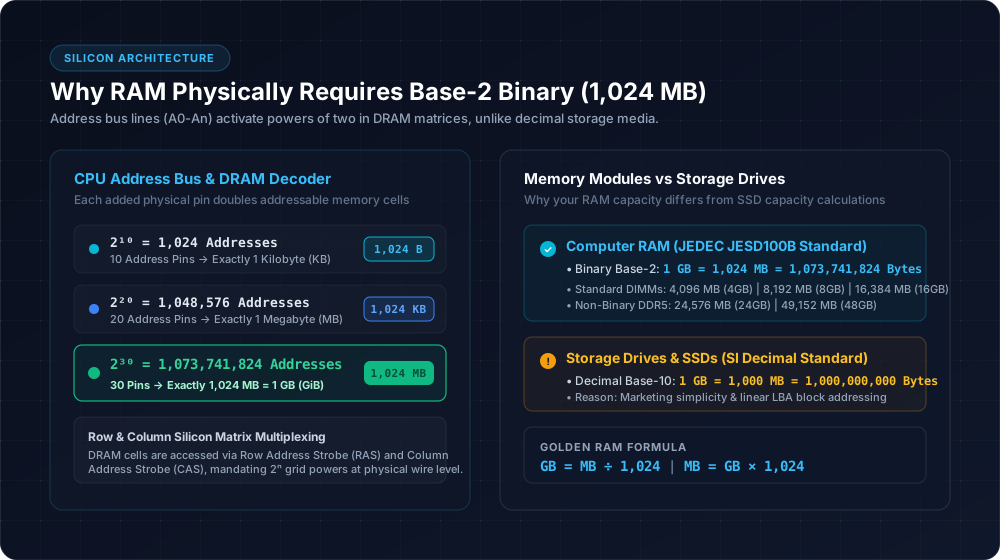
RAM uses binary multiples because physical DRAM address bus decoders operate strictly in powers of two. To convert MB to GB for computer memory, divide by 1,024. To convert GB to MB, multiply by 1,024.
Instant RAM & VRAM Memory Calculator
Calculate exact byte boundaries for RAM sticks, JVM heaps, and hypervisors.
Why RAM Exclusively Uses 1,024 MB (The Physics of Silicon)
When hard drive and SSD manufacturers advertise storage, they use decimal multiples based on the International System of Units (SI), where 1 GB = 1,000 MB (1,000,000,000 bytes). However, computer Dynamic Random Access Memory (DRAM) cannot function on decimal boundaries. DRAM chips consist of microscopic capacitive cells arranged in rectangular grids of rows and columns.
To access any individual byte in memory, the CPU's memory controller energizes binary address lines (labeled A0 through An). Because each binary pin has only two electrical states (high voltage 1, low voltage 0), adding one address pin doubles the addressable space. Ten address pins yield exactly 2¹⁰ = 1,024 discrete addresses. Thirty address pins yield exactly 2³⁰ = 1,073,741,824 bytes, which constitutes one true binary Gigabyte (technically a Gibibyte or GiB under IEC 60027-2, though the telecommunications and hardware industry standardizes on calling it GB for RAM).
The JEDEC Solid State Technology Association, the primary global standardization body for computer memory, formally codified in JESD100B that memory prefixes (K, M, G) are binary powers of 1024 when referring to DRAM capacity. For official terminology, refer to the JEDEC memory standards documentation.
Master RAM & VRAM Conversion Reference
Standard JEDEC DIMM, SO-DIMM, and Non-Binary DDR5 modules with exact byte counts and common deployments.
| Megabytes (MB) | Gigabytes (GB) | Physical Bytes | Typical Hardware & Use Case |
|---|---|---|---|
| 512 MB | 0.5 GB | 536,870,912 B | Legacy BIOS, microcontrollers, embedded routers |
| 1,024 MB | 1 GB | 1,073,741,824 B | Raspberry Pi Zero 2 W, lightweight Docker instances |
| 2,048 MB | 2 GB | 2,147,483,648 B | Entry-level headless Linux servers, smart TVs |
| 4,096 MB | 4 GB | 4,294,967,296 B | Budget Chromebooks, basic office PCs, entry VRAM |
| 6,144 MB | 6 GB | 6,442,450,944 B | Mid-range GPU VRAM (GTX 1660, RTX 3060 Laptop) |
| 8,192 MB | 8 GB | 8,589,934,592 B | Standard baseline for Windows 11 and office productivity |
| 12,288 MB | 12 GB | 12,884,901,888 B | Modern graphics card VRAM (RTX 4070, RX 7700 XT) |
| 16,384 MB | 16 GB | 17,179,869,184 B | The gold standard sweet spot for modern PC gaming |
| 24,576 MB | 24 GB | 25,769,803,776 B | Non-Binary DDR5 modules & flagship GPU VRAM (RTX 4090) |
| 32,768 MB | 32 GB | 34,359,738,368 B | Heavy multitasking, 4K video editing, modded simulations |
| 49,152 MB | 48 GB | 51,539,607,552 B | Dual 24GB non-binary DDR5 memory kits for creators |
| 65,536 MB | 64 GB | 68,719,476,736 B | High-end 3D rendering, local LLM inference, virtualization |
| 98,304 MB | 96 GB | 103,079,215,104 B | Dual 48GB non-binary DDR5 kits on Intel/AMD platforms |
| 131,072 MB | 128 GB | 137,438,953,472 B | Enterprise workstations, engineering simulations |
Virtual Machine Memory Allocation (VMware, VirtualBox, Proxmox)
When creating a Virtual Machine (VM) in hypervisors such as VMware Workstation/ESXi, Oracle VirtualBox, Proxmox VE, or Microsoft Hyper-V, the wizard asks for RAM capacity in Megabytes (MB). Entering arbitrary decimal numbers (like 8,000 MB instead of 8,192 MB) creates memory page fragmentation and prevents the guest operating system from properly aligning its 4 KB and 2 MB memory pages with physical CPU cache lines.
VMware & Hyper-V Rule
Always enter exact multiples of 1,024 MB. For a 4 GB guest, enter 4096. For an 8 GB guest, enter 8192. For a 16 GB guest, enter 16384.
VirtualBox Slider Advice
Ensure the memory slider does not exceed your host system's physical green zone. Leave at least 4,096 MB for your host Windows or macOS environment.
Minecraft & Game Server JVM Heap Flags (-Xms and -Xmx)
Dedicated game servers written in Java — most notably Minecraft, Palworld, and Project Zomboid — configure memory allocation pools using Java Virtual Machine (JVM) startup arguments. The -Xms flag defines the initial starting heap, while -Xmx sets the maximum allowable memory before garbage collection cycles trigger.
Vanilla Minecraft (1–4 Players)
2048 MB-Xms2048M -Xmx2048MPure vanilla survival without mods or complex automation
Small Community Server (5–15 Players)
4096 MB-Xms4096M -Xmx4096MPaper/Purpur server with basic optimization plugins
Modded Server (Fabric / Forge 50+ Mods)
8192 MB-Xms8192M -Xmx8192MHeavy modpacks (All the Mods, Better MC, SevTech)
Mega Modpack / High View Distance
12288 MB-Xms12288M -Xmx12288M100+ mods with automated tech factories and shader chunk caches
Why Windows Task Manager Shows Less Usable RAM Than Installed
A very common user question is: 'I installed two 8GB sticks (16,384 MB total), but Windows Task Manager reports 15.8 GB or 13.9 GB usable. Where did my missing RAM go?'
1. Integrated GPU (iGPU) Hardware Reservation
If your processor has integrated graphics (such as AMD Radeon Vega/RDNA or Intel UHD/Iris Xe), your motherboard BIOS automatically carves out a slice of system RAM as dedicated Video RAM (UMA Frame Buffer). This typically reserves between 512 MB and 2,048 MB, locking it away from general Windows applications.
2. Motherboard Memory Mapped I/O (MMIO)
Peripheral devices like PCIe NVMe SSDs, network cards, and audio controllers require physical address ranges mapped below the 4GB boundary. BIOS firmware reserves a small portion of RAM addresses to manage communication channels.
3. Single vs Dual Channel Physical Slot Mismatch
If you install two RAM sticks in adjacent slots (e.g. slots 1 and 2) instead of alternating channels (slots 2 and 4 on most motherboards), the motherboard may boot in single-channel mode or mark an entire stick as hardware reserved if XMP/EXPO profiles fail memory training.
System RAM vs Dedicated Video RAM (VRAM)
While both are measured in Megabytes and Gigabytes, system RAM and GPU VRAM serve radically different computational pipelines.
System DDR4 / DDR5 RAM
System RAM (DDR4 or DDR5) is optimized for ultra-low latency random access by the central processing unit (CPU). It communicates over a 64-bit or 128-bit bus, offering transfer speeds between 25 GB/s and 80 GB/s.
Dedicated GPU VRAM
Video RAM (GDDR6, GDDR6X, or HBM3) is soldered directly onto discrete graphics cards. It is optimized for massive parallel throughput across a wide 128-bit to 384-bit bus, delivering memory bandwidth upwards of 500 GB/s to 1,000+ GB/s. When modern games exceed available VRAM (e.g. demanding 10,000 MB on an 8,192 MB card), the game is forced to spill over into system RAM over the PCIe bus, causing severe 1% low frame drops and stuttering.
The Non-Binary DDR5 Revolution: 24GB (24,576 MB) and 48GB (49,152 MB)
Historically, DRAM chips progressed strictly by doubling silicon bit density: 8Gb to 16Gb dies (yielding 8GB, 16GB, 32GB, and 64GB DIMMs). With DDR5, memory silicon foundries (Micron, SK Hynix, Samsung) developed 24Gb (gigabit) memory dies. An array of eight 24Gb dies creates a 24GB (24,576 MB) DIMM, and sixteen dies yield a 48GB (49,152 MB) DIMM. Dual-channel kits of 48GB (2×24GB) and 96GB (2×48GB) now provide ideal middle grounds for power users without paying for expensive 64GB or 128GB kits.
Frequently Asked Questions About RAM & Memory Sizes
How many MB are in 8GB of RAM?+
How many MB is 16GB of RAM?+
How many MB is 32GB of RAM?+
Why do hard drives use 1,000 MB per GB while RAM uses 1,024 MB?+
What is the difference between GB and GiB?+
Explore Related Storage & Bandwidth Tools
MB to GB Storage Converter
→Convert file sizes and hard drive storage using both decimal and binary standards.
1000 vs 1024 Standards Guide
→Learn the full history of why Windows and macOS calculate disk capacities differently.
Storage Unit Hierarchy (KB, MB, GB, TB)
→See the complete scale of digital data from bits and bytes up to terabytes.
All Bandwidth & Speed Tools
→Browse our complete suite of network throughput, VRAM, and data calculators.