1. The Fundamental Difference: Bandwidth vs. Latency vs. Jitter
Internet service providers advertise broadband almost exclusively based on download speed (bandwidth), boasting numbers like 200 Mbps or 300 Mbps. However, bandwidth simply measures data volume capacity per second—how quickly a 100GB game installer downloads. Once you launch an online multiplayer match, your console or PC typically transmits only 3 to 10 Mbps of data. Discover the full technical breakdown of game data transfer in our benchmark on what is a good internet speed for gaming.
What truly determines whether your game feels crisp and responsive or laggy and unplayable are two distinct network metrics:
- Round-Trip Latency (Ping): The time in milliseconds (ms) it takes for a game packet to travel from your gaming device to the multiplayer game server and back. Lower latency means faster hit registration and quicker visual updates.
- Jitter (Packet Variance): The deviation in latency over consecutive packets. A steady 50ms connection delivers a smooth gaming experience, whereas a connection fluctuating erratically between 35ms and 110ms causes noticeable stuttering, weapon desync, and "rubberbanding," even if the average ping looks acceptable on paper.
- Packet Loss: The percentage of transmitted packets that fail to reach their destination. In fast-paced games running over UDP, lost packets result in skipped animations, phantom hits, or outright disconnections. Learn actionable troubleshooting techniques in our guide on how to fix packet loss in online games.
2. Cellular Physics: Why 5G Has Ping Spikes and Bufferbloat
Unlike fiber optic cables (which transmit photons through glass at near light-speed) or coaxial cables (which carry shielded electrical frequencies), 5G Fixed Wireless Access broadcasts electromagnetic radio waves over the open air. This wireless transmission introduces inherent physical vulnerabilities that do not exist on wired infrastructure:
- RF Airtime Contention: Cellular towers share a finite slice of radio frequency spectrum among hundreds of active mobile smartphones and residential gateways connected to the same cell sector. When mobile users in your sector stream 4K videos or initiate large uploads, your packets must wait in queue for airtime slots.
- Environmental Obstructions & Multipath Fading: High-frequency 5G signals (Sub-6 GHz mid-band n41/n77 and mmWave) are easily attenuated by low-emissivity (Low-E) window glass, concrete walls, dense tree canopies, and heavy rain, causing transient signal drops and retransmissions.
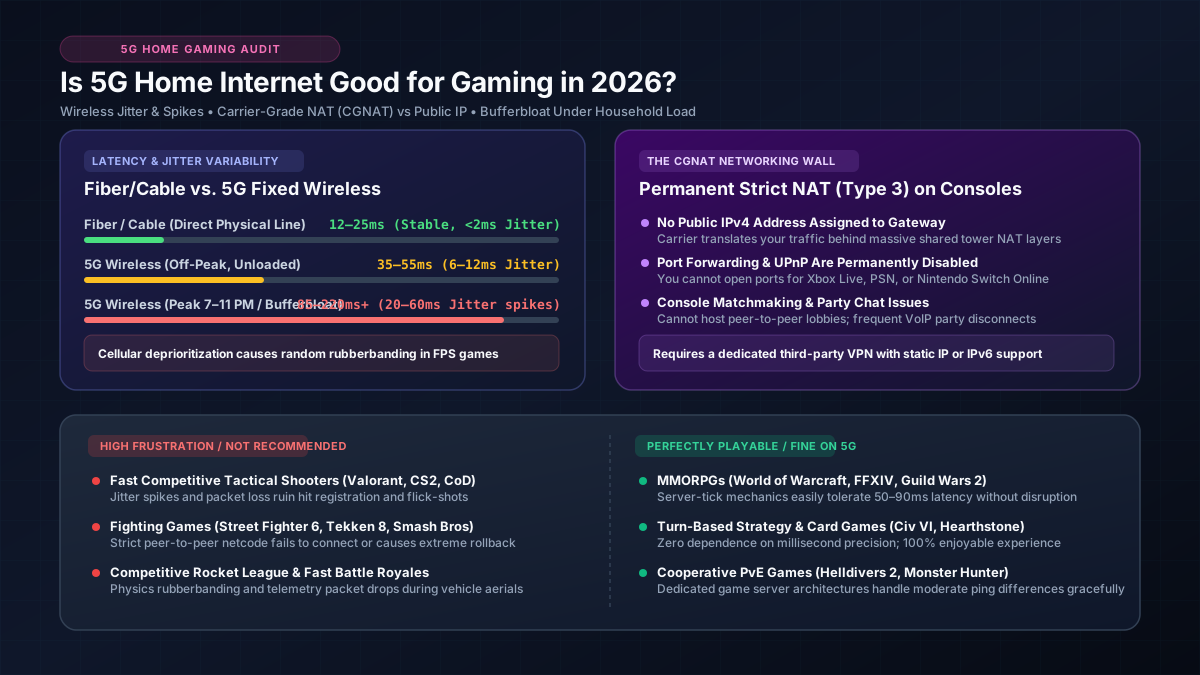
- Cellular Bufferbloat: When cellular base stations experience congestion, their network buffers fill up to prevent dropped packets, introducing massive artificial delays. A 5G gateway with an idle ping of 35ms can easily surge to 150ms to 250ms under load when another family member streams video. Read our detailed analysis on what bufferbloat is and how to fix it.
| Connection Type | Typical Idle Ping | Loaded Ping (Bufferbloat) | Jitter Range | Packet Loss Rate | Gaming Grade |
|---|---|---|---|---|---|
| Fiber (FTTH) | 2 – 15 ms | 5 – 25 ms | < 2 ms | < 0.1% | A+ (Flawless) |
| Cable (DOCSIS 3.1) | 15 – 35 ms | 30 – 80 ms | 2 – 8 ms | < 0.5% | B+ (Solid) |
| 5G Home Internet (FWA) | 35 – 60 ms | 80 – 180+ ms | 10 – 35+ ms | 0.5% – 2.5% | C (Marginal) |
| Copper DSL (VDSL2) | 25 – 50 ms | 70 – 150 ms | 5 – 15 ms | 0.5% – 1.5% | C+ (Playable) |
| LEO Satellite (Starlink) | 35 – 55 ms | 75 – 140 ms | 8 – 20 ms | 0.5% – 2.0% | C+ (Playable) |
| GEO Satellite (HughesNet) | 600 – 900 ms | 1,000+ ms | > 80 ms | > 3.0% | F (Unplayable) |
3. The Console Killer: CGNAT and Strict NAT Type 3
Beyond latency and packet jitter, the biggest operational obstacle for console gamers using 5G home internet is Carrier-Grade NAT (CGNAT), specified in RFC 6598. Because the global pool of public IPv4 addresses was exhausted years ago, cellular telecom providers do not assign a unique public IPv4 address to individual home gateways. Instead, your gateway is assigned a private shared address in the 100.64.0.0/10 range, sharing a single public address with dozens of other customers in your area.
This architecture creates a severe networking limitation identical to Double NAT:
- Inbound Port Forwarding Fails: Because the carrier's upstream router sits between you and the public internet, you cannot open or forward incoming TCP/UDP ports to your PC, PlayStation, or Xbox.
- UPnP Does Not Work: Universal Plug and Play (UPnP) can only request port mappings from your local gateway, but it has no control over the cellular provider's upstream CGNAT translation tables.
- Strict NAT (Type 3) on PlayStation & Xbox: Your console reports NAT Type: Strict or Type 3. In peer-to-peer (P2P) hosted multiplayer games (such as Call of Duty, FIFA/EA FC, GTA Online, and Monster Hunter), players with Strict NAT cannot connect to other players with Strict or Moderate NAT. This results in failed matchmaking, inability to hear teammates in voice chat parties, or getting kicked from game lobbies.
4. Peak-Hour Deprioritization & Tower Congestion
Cellular carriers engineer their networks primarily to support high-margin mobile phone contracts. Home internet gateways are explicitly designated as deprioritized traffic (using lower Quality of Service Class Identifier, or QCI, priority rankings).
During evening prime time (between 7:00 PM and 11:00 PM), when residents in your neighborhood return home and use cellular data, the tower automatically throttles residential 5G gateways to preserve mobile phone bandwidth. As explained in our guide on why internet speed drops at night, this deprioritization does not just reduce download speed—it creates severe packet queues at the tower, spiking your in-game ping by 40ms to 100ms exactly when you want to game.
According to the official FCC Measuring Broadband America Report, terrestrial wired networks consistently maintain lower latency variations and lower packet loss rates under heavy consumer load than fixed wireless technologies.
5. Gaming Genre Suitability Matrix
Whether 5G home internet is acceptable depends heavily on the specific genres you play. Turn-based strategy titles tolerate latency fluctuations easily, while competitive first-person shooters punish every millisecond of jitter. Here is how 5G handles major gaming categories:
| Game Genre & Examples | Latency Sensitivity | 5G Real-World Experience | Verdict |
|---|---|---|---|
|
Tactical FPS Valorant, CS2, Rainbow Six Siege |
Extreme (<30ms needed) | Jitter and micro-packet loss cause peekers disadvantage, ghost bullets, and erratic hit registration. | Poor / Not Recommended |
|
Fighting Games Street Fighter 6, Tekken 8, Smash Bros |
Extreme (Frame-exact) | Rollback netcode stutters heavily when packet arrival times fluctuate. Peer-to-peer matchmaking fails due to CGNAT. | Unplayable |
|
Battle Royale & Shooters Apex Legends, Warzone, Fortnite |
High (30–60ms preferred) | Playable during off-peak hours on dedicated servers, but noticeable desync and rubberbanding during evening peak hours. | Mediocre / Inconsistent |
|
MOBAs & Action RPGs League of Legends, Dota 2, Diablo IV |
Moderate (40–80ms tolerated) | Generally smooth on centralized dedicated servers. Minor latency spikes rarely cause catastrophic gameplay failures. | Good / Playable |
|
MMORPGs & Co-op World of Warcraft, FFXIV, Helldivers 2 |
Low to Moderate | Server-authoritative architecture absorbs mild jitter. Large patch downloads complete rapidly via 5G bandwidth. | Very Good |
|
Turn-Based & Strategy Civilization VI, Baldur's Gate 3, Hearthstone |
None (Turn-based) | Flawless experience. Fast download speeds allow rapid game installations with zero impact from ping spikes. | Excellent |
|
Cloud Gaming GeForce NOW, Xbox Cloud Gaming |
Extreme (Continuous video stream) | Combines input latency with 60 FPS video decoding. Packet loss induces severe pixelation and control sluggishness. | Poor / Frustrating |
6. Optimization Checklist: How to Improve 5G Gaming Performance
If 5G home internet is your only viable broadband option, you can significantly reduce jitter and stabilize your connection by following these engineering best practices:
1. Connect via Wired Cat6 Ethernet (Never Wi-Fi)
Gaming over Wi-Fi adds a second wireless hop, stacking indoor 2.4/5 GHz packet contention on top of outdoor cellular jitter. Running a direct Ethernet cable from your 5G gateway to your PC or console eliminates internal packet collisions, immediately shaving 5ms to 15ms off your latency and removing local Wi-Fi bufferbloat.
2. Strategic Gateway Placement (Line-of-Sight to Tower)
Place your 5G gateway on the highest floor of your home, directly against an exterior window that faces your nearest carrier cell tower. Avoid positioning the gateway near metal window screens, Low-E glass coatings, brick fireplaces, or microwave ovens. Use your carrier app's signal placement tool to check your RSRP (Reference Signal Received Power) and aim for -80 dBm or better, with a SINR (Signal-to-Interference-plus-Noise Ratio) above 10 dB.
3. Enable Native IPv6 to Bypass CGNAT
While cellular carriers use CGNAT for IPv4, they operate dual-stack or IPv6-first backbones. Ensure IPv6 is enabled on your 5G gateway and configured on your Windows PC, PlayStation, or Xbox. When connecting to modern multiplayer games that support IPv6 servers, your console will bypass IPv4 translation entirely, establishing direct end-to-end routing without Strict NAT restrictions.
4. Consider an External 4x4 MIMO Directional Antenna
If your home sits in a fringe coverage zone where signal levels fluctuate, third-party external directional antenna kits (such as a Waveform 4x4 MIMO antenna mounted on your roof) can directly hook into gateway antenna ports. This dramatically increases signal-to-noise ratio, reduces packet retransmissions, and stabilizes your ping under fluctuating atmospheric conditions.