Gamers often assume that faster internet leads to better gameplay. It is easy to look at a gigabit internet plan and think it will automatically eliminate latency. Internet service providers certainly encourage this exact belief. The reality of online gaming is much more nuanced. Raw download speed plays a surprisingly small role in actual multiplayer performance.
Your internet connection needs to excel at two entirely different tasks. First, it must download massive game files as quickly as possible. Second, it must rapidly transmit tiny amounts of data back and forth during live gameplay. These two scenarios require very different network conditions.
In this guide, we will break down exactly how many Mbps you need for gaming. We will explore the critical difference between bandwidth and latency. We will also show you how to optimize your home network for the best possible experience.
How Much Bandwidth Does Gameplay Actually Use?
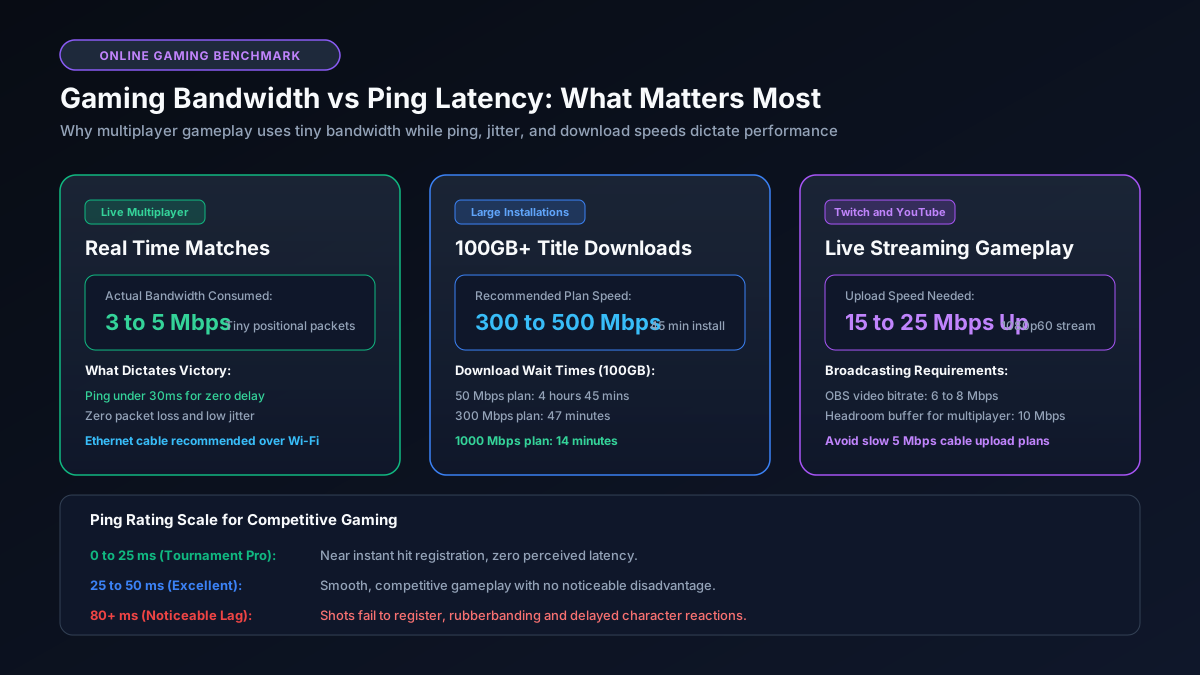
Playing a modern multiplayer game uses a shockingly small amount of data. When you play Call of Duty or Fortnite, your console is not downloading graphics or sound from the internet. All of those heavy assets are already installed on your local hard drive.
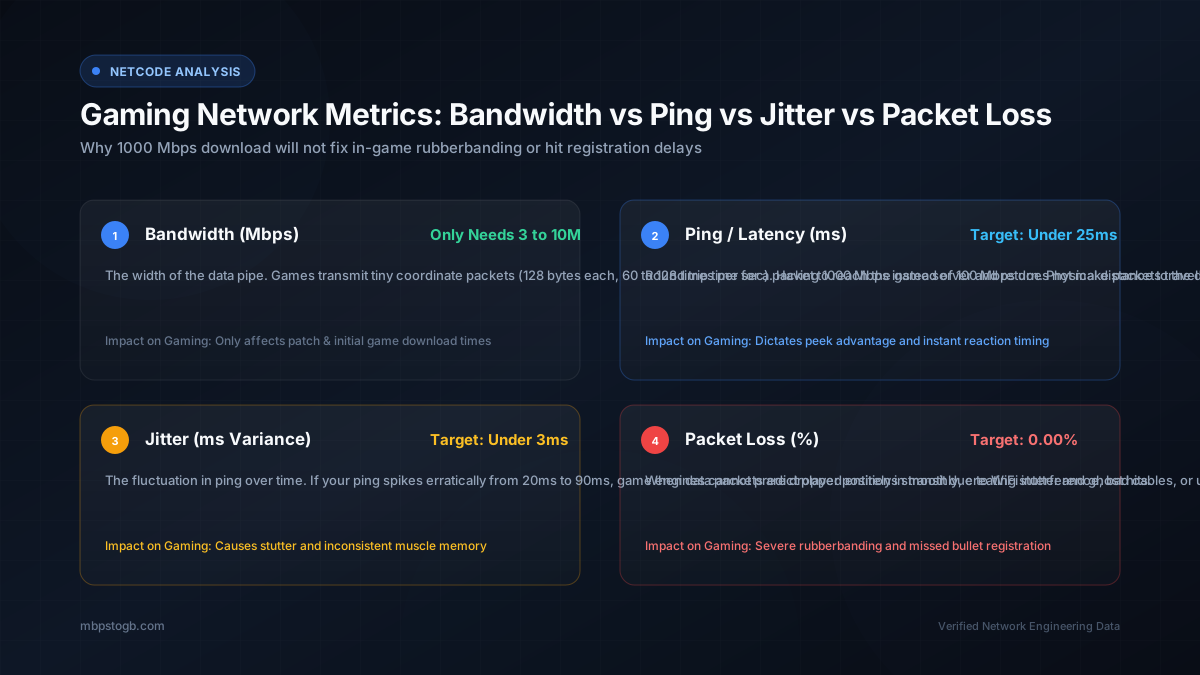
Your internet connection only handles tiny positional updates. It tells the server where you are standing, where you are aiming, and if you pulled the trigger. These tiny packets of data require incredibly little bandwidth. Most online games consume only 3 to 5 Mbps of download speed and 1 to 2 Mbps of upload speed. You can see detailed breakdowns of this in our online gaming data usage guide.
Because the actual data volume is so low, a basic 25 Mbps internet plan is theoretically fast enough to play any game on the market. However, problems arise when other people in your house start using the internet at the same time.
The Real Hero of Gaming: Ping and Latency
If speed does not matter for gameplay, what does? The answer is latency. Gamers often refer to this as ping. Latency is the amount of time it takes for a data packet to travel from your console to the game server and back again. It is measured in milliseconds.
Think of latency like postal delivery time. Bandwidth is the size of the delivery truck. A massive truck can carry thousands of packages at once. However, a massive truck does not arrive any faster than a tiny sports car. In gaming, you only send a tiny envelope of data. You want the sports car. You need that envelope to arrive instantly.
An ideal gaming connection has a ping below 30 milliseconds. Anything between 30 and 60 milliseconds is highly acceptable. Once your ping climbs above 80 milliseconds, you will start noticing a delay. Your character might feel sluggish. Your shots might not register properly. If your ping spikes over 150 milliseconds, you will experience severe rubberbanding and disconnection errors.
The Heavy Lifter: Downloading Game Files
We just established that playing a game requires very little speed. Downloading that same game requires a massive amount of speed. This is where your Mbps plan truly matters.
Modern video games are enormous. Major titles routinely surpass 100 Gigabytes. Massive day one patches often add another 20 Gigabytes. A slow internet connection turns game night into a frustrating waiting game. This is why understanding the relationship between Mbps and GB is so important. You can read our explainer on the difference between Mbps and GB to fully grasp this concept.
Let us look at how long a massive 100GB game takes to download at different speeds. At 50 Mbps, you will wait nearly five hours. At 300 Mbps, the wait drops to about 45 minutes. At 1000 Mbps, you can start playing in under 15 minutes. You can calculate precise wait times for your own connection using our 100GB download time calculator.
The Recommended Speed for Gaming Households
So what is the magic number? If you live alone and just want to play online games, a stable 50 Mbps connection is perfectly adequate. However, very few people live alone in a digital vacuum.
If you live with family members or roommates, we highly recommend a speed between 300 Mbps and 500 Mbps. This buffer ensures your gameplay remains flawless even if someone else is streaming a 4K movie in the living room. It provides enough overhead to handle background updates without completely ruining your ping.
If you regularly broadcast your gameplay to Twitch or YouTube, your upload speed becomes incredibly important. Streaming live video demands a constant outward flow of data. A minimum upload speed of 10 Mbps is required for a decent 1080p stream. We strongly suggest finding a plan with at least 20 Mbps of upload bandwidth to ensure a stable broadcast.
Wi-Fi vs Ethernet: The Ultimate Upgrade
The single best upgrade you can make for your gaming setup has nothing to do with your internet plan. You must stop using Wi-Fi for competitive gaming. Wireless connections are inherently unstable. They are prone to interference from other electronics, thick walls, and even your neighbor's router.
An Ethernet cable provides a direct, uninterrupted path for your game packets. It completely eliminates wireless packet loss and drastically stabilizes your ping. If your router is in another room, consider running a long cable along the baseboards. It is the cheapest and most effective way to improve your gaming experience instantly.
When selecting a wire for your setup, make sure you choose the right category. A poor quality wire can throttle your speeds. Read our comprehensive guide on the best cable for 1Gb Ethernet to ensure maximum performance.
Network Overhead and Bufferbloat
Sometimes your internet speeds are great, you use an Ethernet cable, and you still lag. This is often caused by a phenomenon known as bufferbloat. Bufferbloat happens when your router gets overwhelmed by too much data at once.
Imagine your sibling starts downloading a massive file. The router focuses entirely on that enormous download task. Your tiny gaming packets get stuck waiting in line behind the massive file chunks. This causes a massive, sudden spike in your ping. You can learn more about how routers manage data traffic in our network overhead guide.
To fix bufferbloat, you need a router with excellent Quality of Service features. Quality of Service allows you to prioritize gaming traffic above everything else. Your gaming packets skip the line and travel instantly, regardless of who else is downloading large files.
Conclusion
Do not buy a ridiculously expensive gigabit plan just to improve your latency. Upgrading your raw download speed will not magically make your bullets register faster in a competitive shooter. Focus on stability first.
A reliable 300 Mbps connection paired with a high quality Ethernet cable provides an absolutely perfect gaming environment. It guarantees fast downloads and buttery smooth gameplay. If you want to see exactly how quickly you can download the latest blockbuster title, head over to our Mbps to GB download calculator.
Frequently Asked Questions
Do I need gigabit internet for gaming?
No, gigabit internet is not required for playing online games. Actual gameplay uses very little data, usually under 5 Mbps. However, a gigabit connection dramatically reduces the time it takes to download massive game files.
Why am I lagging if my internet speed is fast?
Lag is caused by high latency or ping, not low download speeds. Your data packets are taking too long to travel to the game server and back. Switching to an Ethernet cable usually fixes high ping.
How many Mbps do I need to stream on Twitch while gaming?
You need a very strong upload speed to stream to Twitch or YouTube. A minimum of 10 Mbps upload speed is required for a reliable 1080p stream. A 20 Mbps upload speed provides a much safer buffer.
Is Wi-Fi good enough for competitive gaming?
Wi-Fi is acceptable for casual gaming but problematic for competitive matches. Wireless signals are prone to interference and packet loss. An Ethernet cable is always superior for stable online gameplay.
Does download speed affect my ping?
Download speed rarely affects your ping unless your network is completely congested. If your household is maxing out the available bandwidth, your game packets will wait in line. This phenomenon is called bufferbloat.
More Helpful Resources
- PS5 Game Download Calculator, instantly check how long modern console games take to install.
- Warzone Download Time Guide, prepare for massive multi gigabyte updates.
- Why Am I Not Getting Gigabit Speeds, troubleshoot issues when your connection feels abnormally slow.
- Best Modem for Xfinity Gigabit, ensure your hardware can keep up with your internet plan.