Millions of broadband subscribers pay for a premium "Gigabit" internet plan, expecting blazing-fast performance across every online activity. Yet when they run a speed test, they notice a bizarre disparity: the download needle rockets past 1,000 Mbps, while the upload needle struggles to crawl past 35 Mbps.
This dramatic asymmetry is not an accident, nor is it a temporary billing error. It is a calculated architectural legacy embedded into copper coaxial and telephone networks decades ago. Below is the engineering breakdown of why upload speeds lag so far behind downloads, the physics of radio frequency spectrum allocation, and why modern fiber optics permanently solves the problem.
1. Historical Architecture: Why the Web Was Built for Asymmetric Consumption
When residential internet access expanded in the late 1990s and early 2000s, consumer usage patterns were overwhelmingly unidirectional. Users downloaded web pages, fetched images, downloaded MP3 files, and streamed video clips from remote web servers to their personal computers.
In contrast, the only data home users sent back upstream consisted of tiny keyboard inputs, mouse clicks, and 64-byte TCP ACK (acknowledgement) packets requesting the next chunk of website content. Network engineers at internet service providers (ISPs) designed broadband networks with an asymmetric ratio—often 10:1 or 20:1—allocating virtually all available physical capacity to the downstream path where consumer demand was concentrated. You can calculate your raw upload versus download transfer rates using our Mbps to MB/s converter.
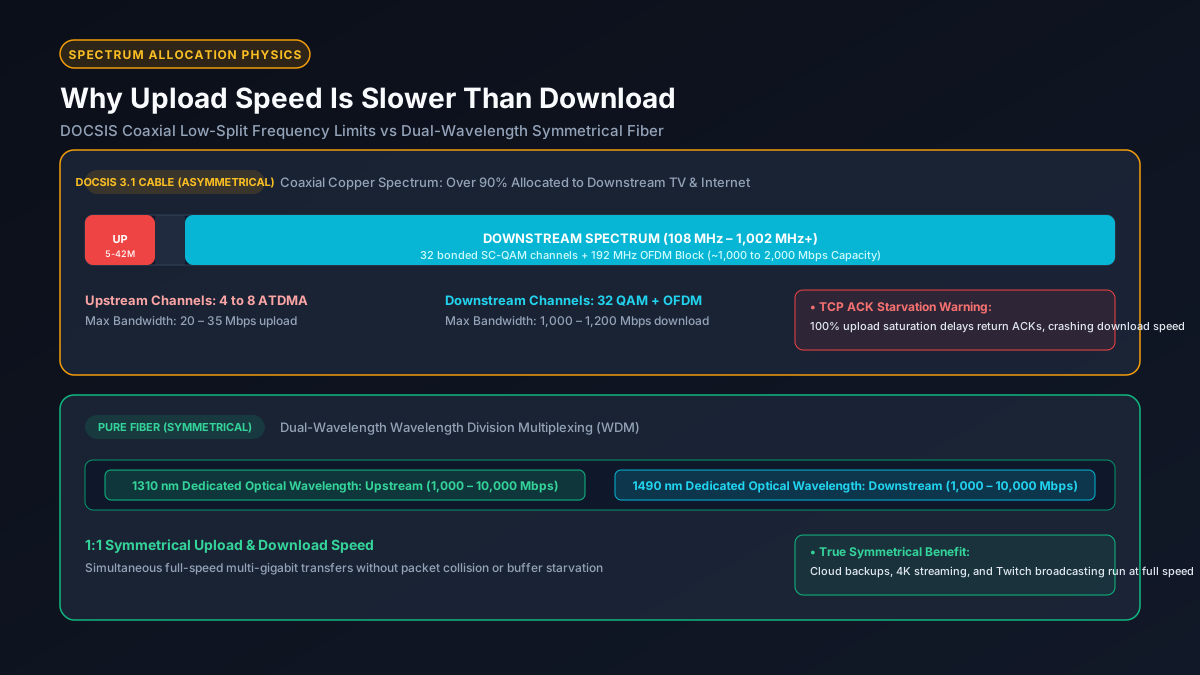
2. The DOCSIS Spectrum Bottleneck: Upstream vs Downstream Frequency Splits
Most non-fiber residential broadband operates on Hybrid Fiber-Coaxial (HFC) networks governed by standards published by CableLabs under the Data Over Cable Service Interface Specification (DOCSIS).
Coaxial copper cable has a finite physical radio frequency spectrum. In traditional DOCSIS 3.0 and DOCSIS 3.1 deployments, the cable spectrum is split into two non-overlapping frequency bands:
- Legacy Low-Split Upstream (5 MHz to 42 MHz): A tiny 37 MHz slice of spectrum reserved for all homes on the street to transmit upload data back to the Cable Modem Termination System (CMTS). Because this window is so narrow, cable modems can only bond 4 to 8 upstream channels (typically 64-QAM modulation), capping real-world neighborhood upload throughput between 35 and 50 Mbps.
- Downstream Spectrum (108 MHz to 1,002 MHz+): Nearly 900 MHz of clean, high-frequency spectrum dedicated entirely to downloading data. This massive slice allows cable operators to bond 32 downstream channels plus wide OFDM channels (using 1024-QAM or 4096-QAM), easily pushing download speeds past 1,000 Mbps.
Simply put: your cable wire is a physical radio conduit, and your ISP has dedicated 95% of the radio dial to downloads while squeezing all upload traffic into a tiny frequency sliver at the very bottom.
3. The RF Noise Funnel: Why Upstream Capacity Is Severely Constrained
You might wonder why cable companies did not simply split the spectrum 50/50. The answer lies in electrical engineering and a phenomenon known as the upstream RF noise funnel.
In a cable neighborhood, the downstream signal originates from a clean, laser-powered optical node and branches out cleanly to hundreds of homes. However, the upstream path works in reverse: hundreds of separate coax cables, splitters, wall plates, and loose connectors from hundreds of houses converge back into a single shared receiver at the neighborhood node.
Every damaged coaxial cable, loose connector, unshielded appliance, and shortwave radio transmitter in the neighborhood leaks electrical ingress noise into the wire. All of this background interference funnels upstream simultaneously into the 5 to 42 MHz sub-band. Because the signal-to-noise ratio (SNR) in the upstream band is notoriously poor, cable modems are forced to use robust, lower-order modulation schemes that transmit far less data per Hertz.
4. Symmetrical Fiber (FTTH): How Wavelength Division Multiplexing Changes the Rules
If you have fiber optic internet (FTTH / Fiber-to-the-Home), the download vs. upload bottleneck vanishes entirely. Fiber does not use coaxial copper cables or radio frequency modulation; it transmits pure laser light through microscopically thin silica glass strands.
Modern Gigabit Passive Optical Networks (GPON and XGS-PON) utilize Wavelength Division Multiplexing (WDM) to provide true symmetrical speeds:
- Downstream Wavelength (1490 nm or 1577 nm): One specific color (frequency) of infrared laser light carries download data from the Optical Line Terminal (OLT) at the central office to your home.
- Upstream Wavelength (1310 nm or 1270 nm): A completely separate infrared laser wavelength inside your Optical Network Terminal (ONT) sends upload data back to the provider.
Because photons traveling on different optical wavelengths do not collide or interfere with one another, a 1 Gbps fiber line provides 1,000 Mbps download and 1,000 Mbps upload simultaneously without sacrificing bandwidth or suffering from copper ingress noise. Read our comprehensive analysis on how fast fiber internet really is.
5. The Hidden Danger of Weak Upload: TCP ACK Starvation and Download Stalls
Most users believe that slow upload only matters when sending large files to Google Drive or uploading YouTube videos. In reality, a severely bottlenecked upload speed can cripple your download speeds and cause massive in-game lag spikes.
The core protocol powering the internet is TCP (Transmission Control Protocol). When you download a 50 GB game, your computer must constantly send tiny TCP ACK (Acknowledgement) packets back to the host server confirming that each packet arrived intact without checksum errors. If the server does not receive an ACK packet in time, it assumes network packet loss and drastically cuts download throughput.
If someone in your home begins uploading a smartphone backup to iCloud on a meager 10 Mbps upload pipe, the upload queue saturates 100%. Your outgoing TCP ACK packets get delayed behind video data in router buffers (bufferbloat). This phenomenon, known as ACK starvation, causes your blistering 1,000 Mbps download stream to suddenly choke and drop to 15 Mbps. Learn how to prevent this in our guide to what bufferbloat is and how to fix it.
6. Broadband Technology Matrix: Asymmetry Comparison Across Cable, Fiber, and 5G
The table below compares the physical symmetry, typical speeds, and latency characteristics of the primary consumer broadband technologies:
| Broadband Technology | Typical Download Tier | Typical Upload Tier | Symmetry Ratio | Underlying Physical Medium |
|---|---|---|---|---|
| FTTH Fiber (GPON / XGS-PON) | 1,000 – 5,000 Mbps | 1,000 – 5,000 Mbps | 1:1 (Symmetrical) | Silica glass laser pulses |
| Cable Broadband (DOCSIS 3.1) | 300 – 1,200 Mbps | 10 – 35 Mbps | 30:1 (Highly Asymmetric) | Hybrid fiber-coaxial RF copper |
| Next-Gen Cable (DOCSIS 4.0) | 2,000 – 10,000 Mbps | 1,000 – 6,000 Mbps | 1:1 to 2:1 (Near Symmetrical) | Extended spectrum 1.8 GHz coax |
| 5G Home Internet (Fixed Wireless) | 100 – 400 Mbps | 15 – 40 Mbps | 10:1 (Asymmetric) | Cellular radio (TDD/FDD airtime) |
| Legacy DSL (VDSL2) | 25 – 100 Mbps | 2 – 10 Mbps | 10:1 (Asymmetric) | Twisted-pair copper telephone wire |
7. Modern Demands: Why Low Upload Speeds Choke Remote Work and Cloud Backups
While the asymmetric 20:1 model made sense when the web was static, modern digital workflows demand substantial upstream capacity:
- Multi-Person Video Conferencing: 1080p video calls on Zoom or Microsoft Teams require steady upstream bitrate. When two or three family members work or study from home simultaneously, a 10 Mbps upload pipe quickly runs out of headroom, resulting in frozen video and garbled audio. Check our guide on how many Mbps you need to work from home.
- Continuous Cloud Synchronization: Services like Apple iCloud, Google Photos, OneDrive, and Dropbox continuously upload photo libraries, documents, and 4K phone videos in the background. Without adequate upload bandwidth, background sync causes continuous network latency spikes.
- Twitch and YouTube Live Streaming: Streaming 1080p 60fps video to Twitch requires a rock-solid, uninterrupted 6 to 8 Mbps bitrate. On a 10 or 15 Mbps connection, any background network activity causes dropped frames and stream disconnects. See our complete breakdown of what constitutes a good upload speed.
8. Actionable Protocol: How to Optimize Upload Throughput and Overcome Bottlenecks
If you are locked into an asymmetric cable or fixed wireless internet plan, follow these practical steps to protect your connection from upload saturation:
- Enable Smart Queue Management (SQM): The most important fix for asymmetric connections is configuring SQM (such as CAKE or FQ-CoDel) on your router. Set your router's upload bandwidth limit to 90% of your tested upload speed (e.g., set to 31 Mbps on a 35 Mbps plan). This prevents the ISP modem queue from filling up, guaranteeing that video calls and gaming packets bypass bulk uploads with zero latency spikes.
- Rate-Limit Cloud Backup Clients: Open the desktop settings for Google Drive, OneDrive, Dropbox, or Steam, and manually cap background upload speeds to 50% of your plan's maximum. This ensures cloud file syncs never consume the entire upload pipe.
- Ditch Wi-Fi for Upstream Transfers: Wi-Fi half-duplex overhead degrades upload efficiency under heavy loads. Connecting your PC via a direct Cat6 Ethernet cable eliminates packet retransmissions and maximizes upstream throughput. Read our guide on diagnosing Ethernet cable issues.
- Inquire About Mid-Split or DOCSIS 4.0 Upgrades: Contact your cable provider and ask if "Mid-Split" (extending upstream to 85 MHz for 100+ Mbps upload) or DOCSIS 4.0 is available in your node area. If symmetrical fiber (FTTH) is available in your street, switching providers is the ultimate permanent solution.
Explore Network Calculators & Troubleshooting Guides
- Good Upload Speed Guide — find out exactly how much upstream bandwidth you need for streaming, gaming, and cloud backups.
- How Fast Is Fiber Internet? — discover why symmetrical gigabit fiber outperforms coaxial cable in latency and reliability.
- How Many Mbps to Work From Home? — calculate required upload and download bandwidth for multi-person remote households.
- Mbps to MB/s Converter — convert network megabits to storage megabytes per second for large file uploads.