When you shop for a new home internet plan, internet service providers proudly advertise blazing fast download speeds in massive, bold font. They promise gigabit speeds capable of downloading a massive video game in mere minutes. However, the upload speed is almost always hidden in the small print at the very bottom of the page.
For a long time, upload speeds simply did not matter very much. The internet was heavily focused on consumption. You downloaded articles to read, music to listen to, and movies to watch. The only data you actually sent back to the internet was tiny text requests and the occasional email. The modern internet landscape has shifted dramatically. The rise of remote work, video conferencing, and online content creation has made upload speeds incredibly important.
If your video feed constantly freezes during an important zoom call, your upload speed is likely the bottleneck. If your voice sounds robotic and choppy to your teammates during a competitive gaming session, your upload speed is struggling to keep up. We will explore exactly what upload speed actually does, why it is so heavily restricted by most internet service providers, and how much speed you realistically need for a smooth digital life.
Understanding the Asymmetrical Internet
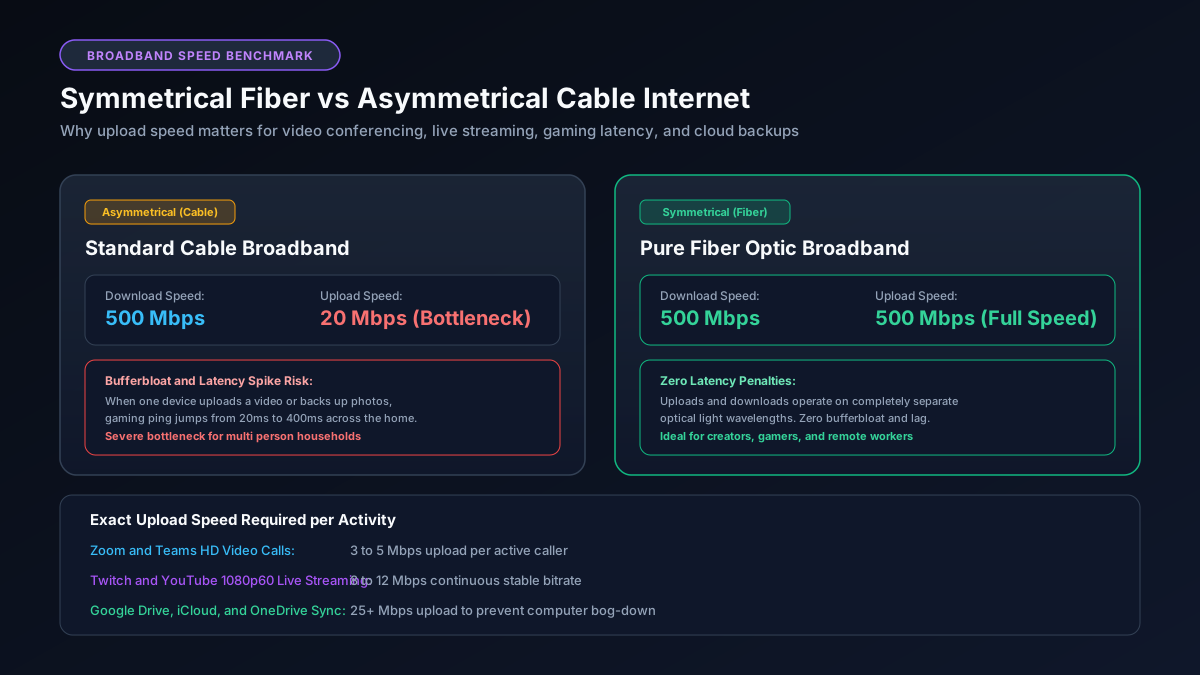
The vast majority of home internet connections in North America are asymmetrical. This means the speed you receive data is significantly faster than the speed you send data. A very typical cable internet package might offer an impressive 500 Mbps download speed paired with a measly 20 Mbps upload speed. This massive discrepancy exists entirely by design.
Cable internet networks operate on an aging infrastructure of coaxial cables originally designed for analog television broadcasts. These physical cables only have a limited amount of total bandwidth available to share among a neighborhood. Internet service providers made a calculated decision decades ago. They chose to allocate roughly ninety percent of that precious bandwidth to downloading data. They assumed the average customer cares infinitely more about streaming movies than hosting a website from their living room.
Fiber optic internet is the modern exception to this rule. A true fiber to the home connection uses strands of glass to transmit data via light signals. This incredible technology provides vastly more bandwidth than traditional copper cables. As a result, fiber internet providers typically offer symmetrical speeds. If you pay for a 500 Mbps fiber plan, you receive 500 Mbps for downloading and a full 500 Mbps for uploading. If you frequently transfer large files to cloud storage, you should convert your speed using our Mbps to Gbps calculator to see the immense benefit of fiber.
How Much Upload Speed Do Remote Workers Need?
The sudden shift to remote work exposed the limitations of many home internet connections overnight. The most demanding task for a remote worker is typically a high definition video conference. When you join a meeting, your computer must capture your video feed, encode it, and upload it to a server continuously. It must accomplish this task without introducing any noticeable delay or stuttering.
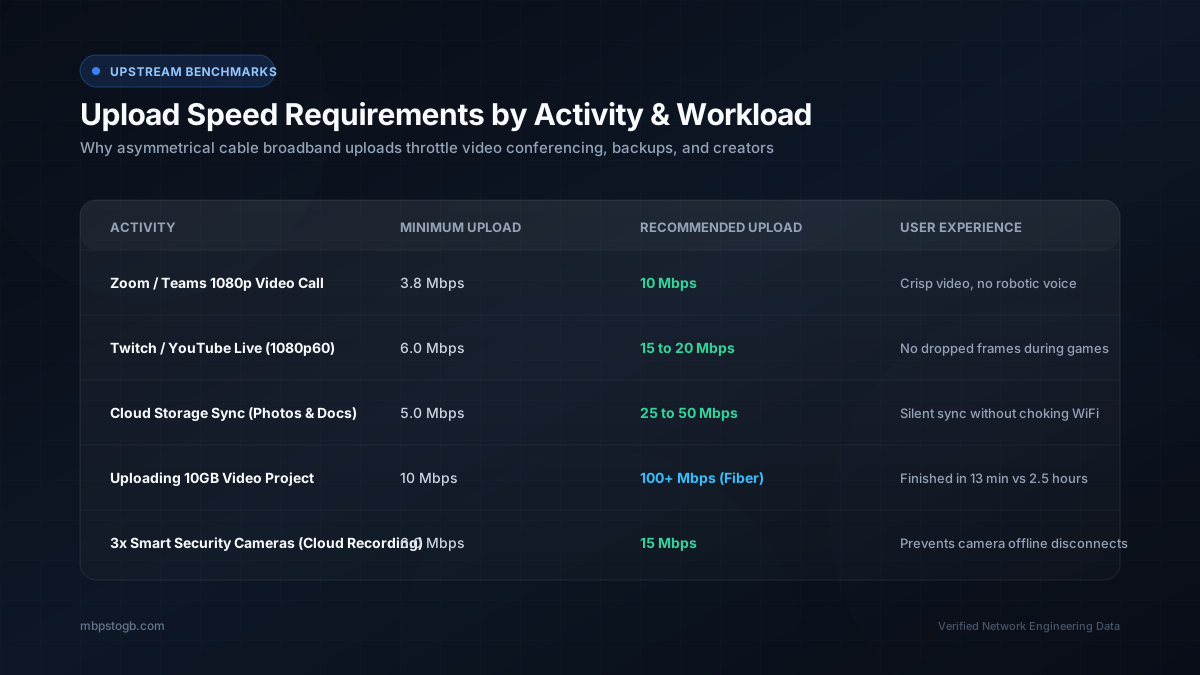
A standard high definition group call on a platform like Zoom requires a consistent upload speed of about 3 Mbps to 4 Mbps. You can learn more about this specific requirement in our detailed guide on Zoom video calls data usage. A 4 Mbps requirement might sound very low. However, remember that upload bandwidth is shared across your entire household.
If you have a 10 Mbps upload plan and your partner joins a video call in the other room, you are now sharing that limited capacity. If a child decides to backup a camera roll of photos to the cloud at the exact same moment, your entire network will instantly choke. Your video feed will degrade into a pixelated mess. Your audio will begin to drop completely. For a household with two remote workers, an upload speed of 20 Mbps should be considered the bare minimum for reliable daily use.
The Unique Demands of Content Creators
Content creators push home internet connections to their absolute breaking point. A modern video file recorded in 4K resolution is incredibly massive. An aspiring YouTuber might easily generate a video file that is 15 GB or larger. Uploading a file of this size on a standard cable internet connection is a test of patience.
If your upload speed is locked at a sluggish 10 Mbps, uploading a 15 GB video file will take roughly three and a half hours. During that time, your entire network will feel incredibly sluggish because the upload process is consuming every available drop of bandwidth. You can calculate these exact transfer durations using our YouTube upload time calculator. If uploading videos is a core part of your livelihood, a fiber internet connection is a mandatory business expense.
Live streaming is even more demanding because it requires a perfectly stable connection. You cannot simply wait a few hours for a file to upload. A streamer broadcasting gameplay to Twitch at 1080p resolution and sixty frames per second needs a rock solid 6 Mbps to 8 Mbps upload connection. To ensure absolute stability and prevent dropped frames, a serious streamer should aim for a plan with at least 25 Mbps of upload capacity.
Does Upload Speed Affect Online Gaming?
Online gaming is a very unique scenario. Playing a competitive multiplayer game actually uses a surprisingly small amount of total bandwidth. A fast paced shooter might only send and receive a few Megabytes of data per hour. Therefore, a massive upload speed will not magically make you a better player. You can read more about this misconception in our guide exploring is 500 Mbps good for gaming.
However, what gaming truly requires is a clear, uncongested path for data to travel. This concept is called latency or ping. When your upload bandwidth is completely saturated by a large file transfer, your small gaming data packets get stuck waiting in a long line at your router. This line causes a severe delay between you pressing a button on your controller and that action registering on the game server. This phenomenon is known as bufferbloat.
Having a higher upload speed provides a larger pipe for data to flow through. A larger pipe makes it significantly harder for a single device to completely block the path. If you only have a 5 Mbps upload speed, a single smartphone backing up a video will ruin your gaming session. If you have a 50 Mbps upload speed, that same smartphone backup will barely register on your ping.
Frequently Asked Questions
Is 10 Mbps a good upload speed?
A 10 Mbps upload speed is generally adequate for a single person. It can comfortably handle a high definition video call or casual online gaming. However, it will feel very slow if you frequently upload large video files.
Why is my upload speed so much slower than my download speed?
Most home internet connections are asymmetrical. Internet service providers dedicate the majority of their network capacity to download speeds because typical users consume much more data than they create. Fiber internet is the main exception to this rule.
What upload speed do I need for streaming on Twitch?
You should aim for an absolute minimum of 10 Mbps for a stable 1080p stream on Twitch or YouTube. A 20 Mbps upload speed provides a much safer buffer against frame drops during fast paced gameplay.
Does upload speed affect my ping in games?
Yes, a congested upload connection can severely increase your ping. If a device on your network is uploading a large file, your gaming packets will be delayed in a queue. This causes lag spikes and a frustrating gaming experience.
How can I increase my upload speed?
Unfortunately, you cannot magically increase your upload speed without upgrading your internet plan. Changing from a cable provider to a fiber optic provider is the most effective way to secure a massively improved upload speed.
Explore More Helpful Tools
- Download Time Calculator, find out exactly how long your large file transfers will take.
- Online Gaming Data Usage, see how much data your favorite multiplayer games consume.
- Why Am I Not Getting Gigabit Speeds, learn how to troubleshoot a slow home network connection.