If your internet connection measures a blazing 800 Mbps at 9:00 AM on a Tuesday, but crawls down to 45 Mbps at 8:30 PM on a Friday, your hardware is rarely broken. You are witnessing the physical reality of residential network oversubscription.
ISPs operate on the statistical assumption that not every customer will pull maximum bandwidth simultaneously. When that assumption breaks during peak evening leisure hours, traffic queues stack up at multiple points between your modem and the wider internet backbone. Below are the seven causal mechanisms responsible for evening speed degradation, and how to verify which one is impacting your home.
1. Neighborhood Node Oversubscription (DOCSIS CMTS Congestion)
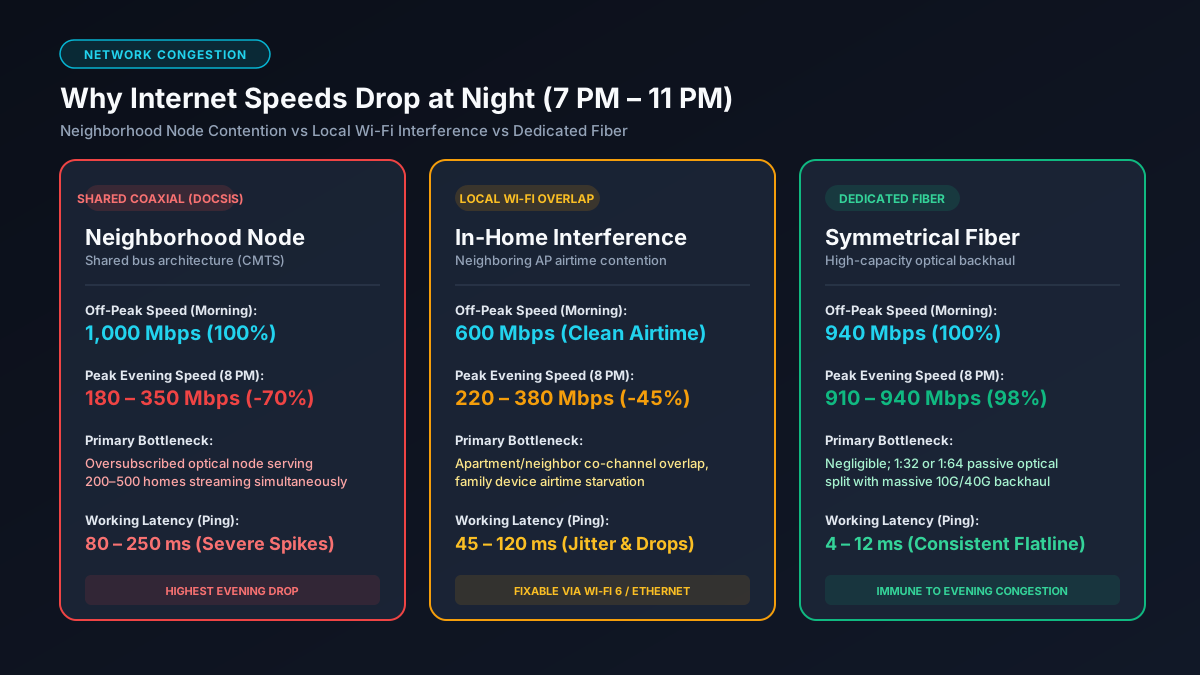
The most common reason for evening slowdowns is local ISP node oversubscription. If you subscribe to cable broadband, your home is wired via coaxial cable to a local optical node serving your street or neighborhood. This node converts light pulses from the ISP's fiber optic hub into electrical signals and connects to a Cable Modem Termination System (CMTS).
This optical node is a shared pipe with a fixed aggregate bandwidth pool. While your modem is capable of downloading at gigabit speeds, it shares the downstream QAM (Quadrature Amplitude Modulation) radio channels with 200 to 500 surrounding neighbors. When hundreds of nearby households simultaneously stream high-bitrate video on Netflix or download 100 GB game updates, the total bandwidth requested exceeds the CMTS downstream allocation. Your modem's time slots are throttled down as packets wait in queue.
2. Evening Wi-Fi Radio Frequency (RF) Airtime Contention
Not all nighttime slowdowns originate outside your house. Wi-Fi operates on unlicensed radio frequencies (2.4 GHz, 5 GHz, and 6 GHz). In apartments, condominiums, and suburban developments, your neighbors' wireless access points broadcast on overlapping wireless channels.
Under the IEEE 802.11 Wi-Fi standard, wireless communication relies on CSMA/CA (Carrier Sense Multiple Access with Collision Avoidance). A wireless router will not transmit data packets if it detects energy or transmission on the same channel. At night, when neighboring apartments boot up smart TVs, streaming sticks, and smartphones, available RF airtime collapses. Even if your ISP delivers 1,000 Mbps into your router, co-channel interference can crush your wireless throughput down to a fraction of its potential. You can read more about this in our guide to why Wi-Fi is slower than advertised.
3. Simultaneous In-Home Bandwidth Competition
During the day, your home network might support a single remote worker on occasional video calls. In the evening, network demand multiplies:
- Multiple 4K video streams running simultaneously across multiple rooms.
- Consoles downloading background game patches (often 50GB to 100GB). You can calculate exact file download durations on our Steam download time calculator.
- Smartphones automatically initiating cloud photo backups (iCloud / Google Photos) upon plugging into power chargers.
Without Active Queue Management or bandwidth prioritization on your router, a single unthrottled cloud backup or gaming download will monopolize your upstream and downstream buffers, degrading speed test results on every other device.
4. Upstream Channel Saturation & TCP ACK Starvation
Most cable internet plans are drastically asymmetrical (e.g., 500 Mbps download but only 20 Mbps upload). Every file you download relies on the TCP protocol, which requires your computer to send Return Acknowledgment (ACK) packets back to the transmitting server to confirm receipt of data blocks.
If someone in your home uploads a video, syncs files to Dropbox, or streams to Twitch in the evening, your narrow 15–25 Mbps upload pipe becomes 100% saturated. When outgoing TCP ACK packets are delayed or dropped due to an overfilled upload queue, external servers throttle your incoming download speed to prevent what they perceive as packet loss. A saturated upload pipe will choke an otherwise fast gigabit download.
5. Peering Transit Bottlenecks and Content Delivery Congestion
The internet is not a single entity; it is a network of networks connected at Internet Exchange Points (IXPs). During evening hours, congestion frequently occurs not on your local neighborhood line, but at the peering links between your ISP and major transit backbones (like Cogent, Lumen, or Telia).
According to official broadband performance measurement data by the Federal Communications Commission (FCC), residential ISP throughput during peak evening periods typically drops between 5% and 25% across national averages, with legacy cable networks experiencing significantly higher variability than direct fiber optic links.
Network Architecture Comparison: Nighttime Speed Resilience
How your internet holds up during peak hours depends directly on the physical transmission medium entering your property:
| Broadband Type | Contention Ratio | Evening Speed Loss | Peak Latency Impact | Underlying Cause |
|---|---|---|---|---|
| DOCSIS 3.1 Cable | 1:200 to 1:500 | 30% – 70% drop | +50 ms to +200 ms | Shared neighborhood coaxial node |
| FTTH Fiber (GPON) | 1:32 to 1:64 | 2% – 8% drop | +1 ms to +5 ms | Dedicated optical line with high backhaul |
| 5G Home Internet | Dynamic / Variable | 40% – 80% drop | +40 ms to +150 ms | Cell tower deprioritization vs mobile users |
| DSL (VDSL2) | 1:50 to 1:100 | 15% – 30% drop | +20 ms to +60 ms | Copper cross-talk & DSLAM backhaul limits |
How to Diagnose the Exact Bottleneck (Step-by-Step)
To isolate whether the evening slowdown is your ISP, your local Wi-Fi, or your own devices, follow this systematic diagnostic algorithm:
- Bypass Wi-Fi with a Direct Ethernet Connection: Connect a laptop directly to your router or modem LAN port using a Cat6 cable. Run a speed test at 9:00 AM, and repeat it at 8:30 PM. If your wired speed remains 900+ Mbps while Wi-Fi drops, your issue is purely local RF airtime congestion. If your wired speed also collapses, read our diagnostic on why you are not getting gigabit speeds.
- Check Modem Channel Power Levels & Corrected Errors: Log into your cable modem interface (typically
192.168.100.1) and inspect the downstream bonded channels. Look for uncorrectable codeword errors during peak hours. High uncorrectables indicate signal-to-noise ratio (SNR) degradation caused by heavy RF noise on the coaxial plant. - Execute a Traceroute Test (MTR): Run
tracert 8.8.8.8(Windows) ormtr 8.8.8.8(macOS/Linux) in the morning and at night. Note the round-trip latency on hop 2 (your ISP default gateway). If hop 2 latency surges from 10 ms to 150 ms at night, the congestion is directly on the neighborhood CMTS node. - Test with a Fast VPN: Connect to a trusted commercial VPN server. If your throughput improves on specific services (like video streaming), your ISP may be applying targeted protocol shaping or experiencing transit peering saturation.
Practical Solutions: How to Stop Nighttime Speed Drops
- Switch to the 5 GHz or 6 GHz Wi-Fi Band: The 2.4 GHz band only has 3 non-overlapping channels (1, 6, 11) and easily saturates. Migrate all high-bandwidth devices to 5 GHz (80 MHz channel width) or 6 GHz (Wi-Fi 6E/7) to escape neighborhood airtime interference.
- Enable Smart Queue Management (SQM): Modern routers supporting fq_codel or CAKE prevent local bufferbloat by pacing traffic and giving instant priority to small packets. We review top hardware options in our guide to the best routers for gigabit internet.
- Schedule Heavy Cloud Backups for 3:00 AM: Adjust Google Photos, iCloud, Steam game updates, and NAS backups to execute during the early morning hours rather than during prime evening family time.
- Upgrade to Pure Fiber (FTTH): If your cable node is chronically congested and the ISP refuses to perform a node split, switching to symmetrical fiber eliminates shared coaxial neighborhood bottlenecks entirely.
Frequently Asked Questions
Why does my internet speed drop specifically between 7 PM and 11 PM?
The 7 PM to 11 PM window is peak residential internet usage. On shared cable networks, hundreds of homes share an optical node. Simultaneous 4K streaming, gaming, and downloads saturate the CMTS channel pool, lowering everyone's throughput.
Does fiber optic internet experience evening slowdowns?
Typically no. Fiber networks use passive optical splitters with much higher capacity and lower contention ratios (1:32 or 1:64) compared to older coaxial nodes, meaning evening drops on fiber are negligible.
Is my ISP throttling my connection at night?
Most evening slowdowns are passive oversubscription (node congestion), not targeted throttling. You can verify this by running an encrypted VPN; if speeds remain slow across all servers, it is physical line congestion.
Can changing DNS servers fix evening speed drops?
No. DNS only resolves domain names to IP addresses; it does not change bandwidth throughput. While fast DNS (1.1.1.1) speeds up initial lookups, it will not increase download speeds on a congested line.
Explore Network Calculators & Troubleshooting Guides
- Mbps to GB Download Calculator — calculate actual data transfer volume based on your real-world evening speeds.
- Best Cable for 1Gb Ethernet — ensure your physical wiring is not artificially compounding your network bottlenecks.
- Bit vs Byte Explained — understand why a 100 Mbps internet plan yields 12.5 MB/s of real file download speed.