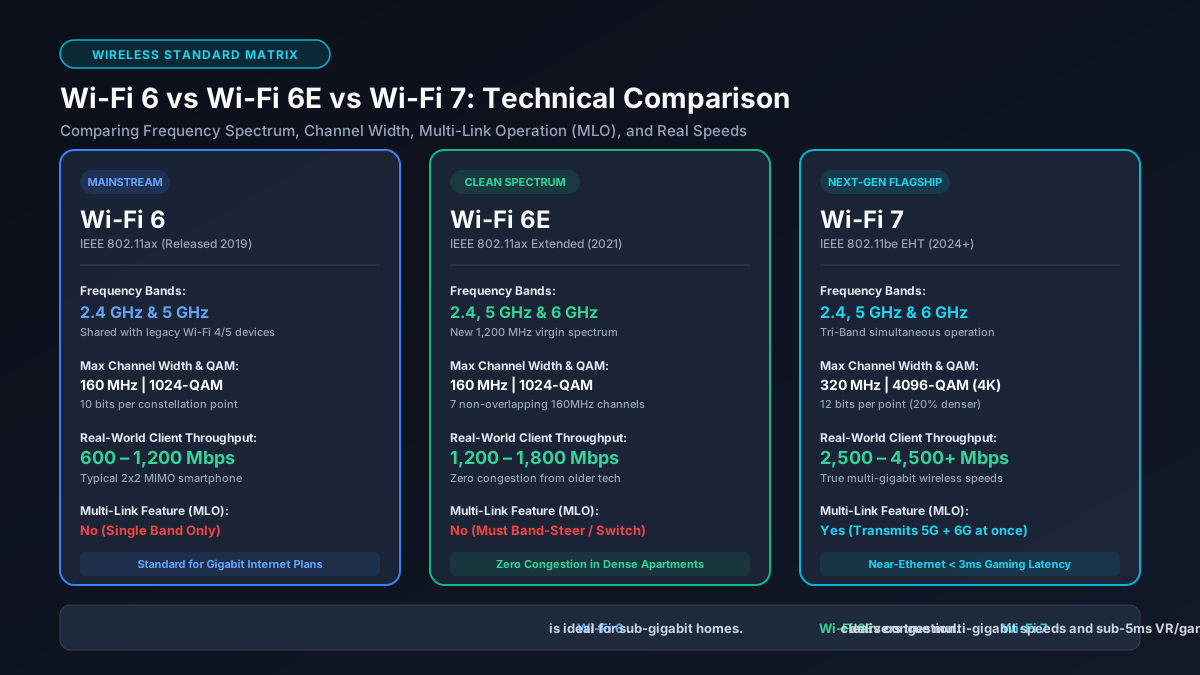
1. Evolution of Wi-Fi Standards: 802.11ax to 802.11be Architecture
Every few years, the IEEE working groups develop new wireless protocol amendments, which the Wi-Fi Alliance Official Certification Standards certifies under consumer-friendly generational branding:
- Wi-Fi 6 (IEEE 802.11ax - 2019): Replaced Wi-Fi 5 (802.11ac) by focusing heavily on spectral efficiency and client density rather than raw peak speed. It introduced Orthogonal Frequency-Division Multiple Access (OFDMA), 1024-QAM modulation, Target Wake Time (TWT) for battery conservation, and Uplink/Downlink MU-MIMO across the legacy 2.4 GHz and 5 GHz bands.
- Wi-Fi 6E (IEEE 802.11ax Extended - 2021): Maintained the exact same base physical layer (PHY) and MAC architecture of Wi-Fi 6, but expanded operational frequencies into the newly deregulated 6 GHz radio band (5.925 GHz to 7.125 GHz). This provided pristine, uncontested spectrum free from legacy device drag.
- Wi-Fi 7 (IEEE 802.11be Extremely High Throughput - 2024): An architectural overhaul engineered for ultra-low latency, massive concurrency, and multi-gigabit throughput. It doubles the maximum channel bandwidth to 320 MHz, upgrades modulation to 4096-QAM (4K-QAM), debuts Multi-Link Operation (MLO) for concurrent multi-band transmission, and implements advanced preamble puncturing to salvage congested spectrum.
2. Frequency Spectrum Allocation: 2.4 GHz, 5 GHz, and the Pristine 6 GHz Band
Radio frequency congestion represents the single largest bottleneck in residential wireless environments. For over two decades, home networks operated inside just two bands:
- 2.4 GHz Band: Provides excellent physical wave propagation through drywall and solid obstacles, but is limited to roughly 83 MHz of total spectrum with only three non-overlapping 20 MHz channels (Channels 1, 6, and 11). It suffers constant interference from Bluetooth beacons, microwave ovens, baby monitors, and neighboring networks.
- 5 GHz Band: Provides higher data capacity across UNII-1, UNII-2 (DFS), and UNII-3 sub-bands. However, the widest contiguous channels (80 MHz and 160 MHz) intersect Dynamic Frequency Selection (DFS) frequencies shared with airport Doppler radar and weather monitoring stations. When radar pulses are detected, routers must immediately drop transmission and vacate the channel, causing sudden lag spikes. Read more on why ping spikes happen on wireless connections.
- 6 GHz Band (Wi-Fi 6E & Wi-Fi 7): Adds up to 1,200 MHz of pristine, contiguous bandwidth (in North America) or 480–500 MHz (in the European Union). Crucially, legacy Wi-Fi 4 and Wi-Fi 5 client radios physically cannot broadcast on 6 GHz. This guarantees zero backwards-compatibility airtime contention, eliminating the performance penalties caused by older IoT devices.
3. Channel Bandwidth: 80 MHz, 160 MHz, and 320 MHz Channel Bonding
Channel width directly determines maximum potential data throughput. Think of wireless frequency bands as multi-lane highways: wider bonded channels allow more simultaneous data packets to traverse the air each second.
In Wi-Fi 6, standard deployments typically use 80 MHz channels, achieving a maximum physical link rate of 1,201 Mbps on standard 2x2 MIMO dual-antenna client devices. While Wi-Fi 6 supports 160 MHz, doing so in the 5 GHz band forces routers to use DFS channels that frequently trigger disconnections.
Wi-Fi 6E safely unlocked clean 160 MHz channels inside the 6 GHz spectrum, boosting the link rate to 2,402 Mbps. Wi-Fi 7 doubles this limit again with 320 MHz ultra-wide channels. By bonding 320 MHz of contiguous spectrum on 6 GHz, Wi-Fi 7 raises the peak 2x2 client link rate to an astonishing 5,764 Mbps. You can calculate how these megabit speeds translate into real-world file downloads on our Mbps to MB/s converter and our Gbps to Mbps speed calculator.
4. Modulation and Bit Density: 1024-QAM vs. 4096-QAM (4K-QAM)
Quadrature Amplitude Modulation (QAM) dictates how densely digital binary bits are packed into radio frequency waveform phases and amplitudes:
- 1024-QAM (Wi-Fi 6 & 6E): Each radio constellation point encodes 10 bits of data (210 = 1,024 constellation points per symbol).
- 4096-QAM / 4K-QAM (Wi-Fi 7): Each constellation point encodes 12 bits of data (212 = 4,096 constellation points per symbol).
Moving from 10-bit to 12-bit encoding delivers an immediate 20% increase in raw data throughput at any given channel width. However, because 4,096 points are packed so closely in the constellation diagram, receiving radios require an immaculate Signal-to-Noise Ratio (SNR) of roughly 35 dB or higher. In practice, clients negotiate 4K-QAM when located in the same room or within 15–20 feet of the router, falling back to 1024-QAM or 256-QAM as physical distance increases. Check your actual data transfer times with our download time calculator.
5. Multi-Link Operation (MLO): Aggregation (STR) and Low-Latency Modes
Historically, all Wi-Fi client devices could connect to only one frequency band at any given millisecond (e.g., either 2.4 GHz or 5 GHz). If your 5 GHz link suffered a momentary burst of interference, packets queued up, ping spiked, or the client initiated a slow, disruptive handoff.
Multi-Link Operation (MLO) is Wi-Fi 7's single most transformative breakthrough. MLO enables a client device and access point to transmit and receive data frames across multiple independent radio bands simultaneously:
- Simultaneous Transmit and Receive (STR Mode): True link aggregation. A client can transmit upload data on 5 GHz while simultaneously downloading data on 6 GHz, combining throughput for speeds exceeding 4 Gbps.
- Enhanced Multi-Link Single Radio (eMLSR Mode): Cost-effective hardware mode where the client dynamically listens on both bands and routes packets instantly over whichever band becomes available first.
- Packet Duplication / Low-Latency Mode: The router sends duplicate copies of every packet over both 5 GHz and 6 GHz simultaneously. Whichever packet arrives at the client first is accepted, while the redundant packet is discarded. This slashes wireless jitter to sub-2ms, making Wi-Fi 7 virtually indistinguishable from a hardwired cable for competitive gaming. Review our recommendations in the best router for gigabit internet guide.
6. Preamble Puncturing & Multi-RU: Eliminating Spectrum Fragmentation
In older Wi-Fi standards, wide bonded channels operated on an "all-or-nothing" rule. If a router bonded an 80 MHz or 160 MHz channel, and an external transmission occupied even a narrow 20 MHz slice within that block, the router was forced to back off and drop down to a narrow 40 MHz or 20 MHz channel entirely, discarding up to 75% of its available bandwidth.
Wi-Fi 7 makes Preamble Puncturing mandatory and granular. If a secondary 20 MHz channel experiences interference, the router simply "punctures" (notches out) that specific 20 MHz segment while continuing to transmit across the remaining 140 MHz or 300 MHz of clear spectrum. Combined with Multi-Resource Unit (Multi-RU) scheduling in OFDMA, Wi-Fi 7 ensures high efficiency even in densely congested airspace, directly mitigating bufferbloat and queue latency problems.
7. Real-World Speeds vs. Theoretical PHY Rates: Distance Benchmarks
Router retail packaging routinely advertises astronomical cumulative throughput ratings (like "BE19000" or "AX6000"). These figures are theoretical marketing aggregates created by summing every radio band's theoretical PHY ceiling under zero-interference lab conditions.
In real-world residential testing on a standard 2x2 client device (such as a laptop with an Intel BE200 Wi-Fi 7 card or a flagship smartphone), measured Layer 4 TCP throughput behaves as follows:
Real-World Measured TCP Speed (Same Room, Line of Sight)
Through two standard drywall interior walls (approx. 25 feet distance), 6 GHz signal attenuation causes throughput to scale down: Wi-Fi 7 delivers approximately 800–1,200 Mbps, Wi-Fi 6E provides 400–600 Mbps, and Wi-Fi 6 maintains 300–450 Mbps. If your wireless speed tests fall significantly below these metrics, consult our diagnostic checklist on why Wi-Fi is slower than advertised and see how long a 100 GB game download takes across each tier.
8. Comprehensive Comparison Matrix: Wi-Fi 6 vs. Wi-Fi 6E vs. Wi-Fi 7
This technical matrix outlines the key architectural specifications across all three wireless generations:
| Technical Specification | Wi-Fi 6 (802.11ax) | Wi-Fi 6E (802.11ax-6E) | Wi-Fi 7 (802.11be) |
|---|---|---|---|
| Frequency Bands | 2.4 GHz, 5 GHz | 2.4 GHz, 5 GHz, 6 GHz | 2.4 GHz, 5 GHz, 6 GHz |
| Maximum Channel Width | 80 MHz (160 MHz DFS) | 160 MHz | 320 MHz |
| Modulation Density | 1024-QAM (10 bits) | 1024-QAM (10 bits) | 4096-QAM (12 bits) |
| Peak Theoretical Link (2x2) | 1,201 Mbps (80 MHz) | 2,402 Mbps (160 MHz) | 5,764 Mbps (320 MHz) |
| Real-World TCP Throughput | 750 – 850 Mbps | 1,400 – 1,750 Mbps | 2,800 – 3,850 Mbps |
| Multi-Link Operation (MLO) | No | No | Yes (Full Multi-Band STR) |
| Preamble Puncturing | Basic (Optional) | Basic (Optional) | Mandatory & Adaptive |
| Spatial Streams (MIMO) | 8x8 MU-MIMO | 8x8 MU-MIMO | 16x16 MU-MIMO |
9. Upgrade Decision Framework: Which Standard Fits Your Broadband Plan?
Deciding which router standard to purchase comes down to your home broadband tier, local interference levels, and budget:
- Keep Your Existing Wi-Fi 6 Router if: Your broadband speed tier is 500 Mbps or below and you live in a single-family home with minimal neighbor interference. Wi-Fi 6 easily handles multiple concurrent 4K streams, remote video calls, and gaming without maxing out its wireless airtime capacity. Learn more in our 4K streaming bandwidth guide.
- Skip Wi-Fi 6E: Wi-Fi 6E was a transitional stopgap standard. With Wi-Fi 7 routers now available at competitive price points, purchasing a Wi-Fi 6E system today leaves you without 320 MHz channels, 4K-QAM, and MLO. There is virtually no scenario where 6E offers better value than a budget-friendly Wi-Fi 7 unit.
- Upgrade to Wi-Fi 7 if: You subscribe to 1 Gbps, 2 Gbps, or 5 Gbps fiber internet, live in a crowded apartment complex surrounded by dozens of competing 5 GHz networks, or want wireless latency comparable to wired Ethernet for VR streaming and esports gaming. If you are upgrading, make sure your backhaul cabling is properly rated with our best Ethernet cable guide and Cat6 vs Cat7 vs Cat8 breakdown.