Browse any online electronics retailer for an Ethernet cable, and you will be inundated with listings boasting "Cat7 10Gbps Ultra-High Speed" and "Cat8 40Gbps Gaming Ethernet" for under twenty dollars. To consumers trying to eliminate lag or future-proof their smart home, buying a higher number seems like an obvious upgrade.
However, the cabling industry is plagued by aggressive marketing, pseudo-specifications, and standards confusion. Below is the unvarnished engineering breakdown of Cat6, Cat7, and Cat8, explaining why Cat7 was never recognized by American telecommunications standards, why Cat8 was designed strictly for server racks, and which cable is actually optimal for your home.
1. Standards Divide: ANSI/TIA-568 vs ISO/IEC 11801 Cable Governance
The primary source of consumer confusion regarding Ethernet categories stems from a split between two competing standards organizations:
- ANSI/TIA (Telecommunications Industry Association): The governing standard for North America and much of the global tech industry, published by TIA. TIA officially recognizes Category 5e, Category 6, Category 6A, and Category 8. TIA pointedly skipped Category 7 and Category 7A because they abandoned the universal 8P8C (RJ45) modular connector.
- ISO/IEC (International Organization for Standardization): The international standards body (ISO/IEC 11801). ISO standardized Class F (Category 7) in 2002 and Class FA (Category 7A) in 2008, designed around specialized shielded connectors rather than standard plastic RJ45 jacks.
Because consumer routers, PCs, gaming consoles, and smart TVs exclusively use standard RJ45 ports, buying cables based on competing international standards creates major electrical mismatches. You can check your raw transmission requirements using our Mbps to MB/s converter.
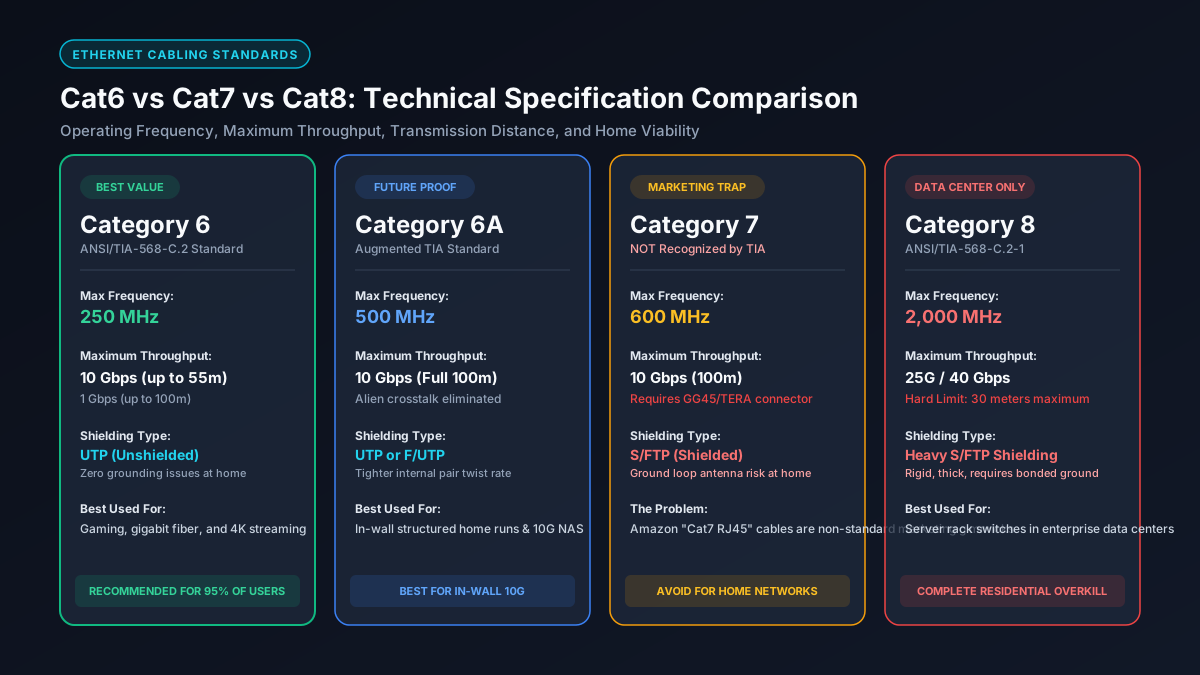
2. The Cat7 RJ45 Dilemma: Proprietary Connectors and the Consumer Marketing Trap
The single most important fact for consumers to know is: there is no official ANSI/TIA standard for an RJ45 Cat7 cable.
When ISO created Category 7 in 2002 to handle 600 MHz frequencies, standard plastic RJ45 connectors could not prevent internal pin-to-pin crosstalk at that frequency. Consequently, the ISO Class F specification required proprietary non-RJ45 connectors—specifically GG45 (GigaGate 45) or TERA connectors developed by Siemon.
Because consumers refused to purchase expensive proprietary connectors and patch panels, IEEE later engineered 10GBASE-T to operate over standard RJ45 connectors using advanced digital signal processing (DSP). This became Category 6A (augmented Category 6, rated to 500 MHz over 100 meters). Cat6a completely rendered Cat7 obsolete before it ever gained traction.
Today, virtually every "Cat7" cable sold on Amazon or eBay with molded plastic RJ45 jacks is a marketing misrepresentation. When tested on calibrated enterprise Fluke cable analyzers, the vast majority of cheap online Cat7 patch cords fail even baseline Cat6a certification.
3. Cat8 Reality Check: 40 Gbps Speeds Constrained by the 30-Meter Data Center Limit
Category 8 (ANSI/TIA-568-C.2-1) is a legitimate standard, but it was engineered for an entirely different environment: enterprise data center server racks (top-of-rack and end-of-row switch links).
Cat8 operates at an enormous frequency of 2,000 MHz (2 GHz), supporting throughput speeds of 25 Gbps (25GBASE-T) and 40 Gbps (40GBASE-T). However, high-frequency electromagnetic signals over copper suffer from severe attenuation (signal loss over distance). To achieve 40 Gbps without melting copper wires or requiring unviable amplification, the TIA standard strictly caps Cat8 at:
A maximum channel distance of 30 meters (98 feet), consisting of 24 meters of solid horizontal cable and 6 meters of patch cords.
If you run a Cat8 cable across a two-story home, through an attic, or down into a basement over 30 meters, the signal attenuates past the acceptable noise floor, forcing the link to negotiate down to standard 10 Gbps speeds—the exact same speed delivered effortlessly by Cat6a over 100 meters.
4. Shielding Demystified: UTP vs F/UTP, S/FTP, and Floating Ground Loops
Ethernet cable naming conventions describe the internal shielding of the twisted pairs and the overall outer jacket:
- UTP (Unshielded Twisted Pair): Standard Cat6. Contains no metallic foil. Relies entirely on tightly twisted copper pairs and an internal plastic spline (cross-separator) to cancel out internal electromagnetic interference and alien crosstalk. Highly flexible and trivial to terminate.
- F/UTP (Foiled Unshielded Twisted Pair): Common in Cat6a. An overall aluminum foil shield encloses all four unshielded pairs.
- S/FTP (Shielded Foiled Twisted Pair): Mandatory in Cat7 and Cat8. Each individual copper pair is wrapped in foil, and an overall braided metal shield encloses the entire bundle.
While shielding sounds appealing, it introduces a major pitfall in residential environments: ground loops and floating antenna interference. Shielded cable requires end-to-end electrical grounding through metal-jacketed RJ45 connectors, shielded keystone jacks, and an enterprise patch panel bonded directly to the building's electrical earth ground.
If a homeowner plugs a shielded Cat7 or Cat8 cable into a standard plastic router port, the metallic foil remains ungrounded (floating). In an ungrounded state, the shield acts as a radio antenna, absorbing ambient electromagnetic interference from Romex AC electrical wiring, fluorescent ballasts, and appliances, degrading network throughput and packet stability.
5. Frequency and Attenuation: 250 MHz vs 600 MHz vs 2000 MHz Across Distances
Bandwidth frequency (measured in Megahertz) represents the width of the electrical highway—the number of signal state transitions a copper wire can transmit per second without error:
- Cat6 (250 MHz): Handles 1 Gbps up to 100 meters (328 feet), and 10 Gbps over short distances up to 37 to 55 meters depending on ambient crosstalk. Learn more in our guide on the best Ethernet cable for 1Gb speeds.
- Cat6a (500 MHz): The gold standard for modern infrastructure. Handles full 10 Gbps speeds over the maximum allowable 100-meter (328-foot) distance with zero signal degradation.
- Cat7 (600 MHz): Handles 10 Gbps over 100 meters, but requires proprietary non-RJ45 hardware to maintain certification.
- Cat8 (2,000 MHz): Handles 25 Gbps / 40 Gbps, but only within a strict 30-meter channel length.
6. Comprehensive Specification Matrix: Cat6, Cat6a, Cat7, and Cat8 Compared
The table below provides a factual engineering comparison of modern twisted-pair copper Ethernet categories:
| Specification | Cat6 | Cat6a | Cat7 (Class F) | Cat8 (Class I/II) |
|---|---|---|---|---|
| Recognizing Body | ANSI/TIA & ISO/IEC | ANSI/TIA & ISO/IEC | ISO/IEC Only (Not TIA) | ANSI/TIA & ISO/IEC |
| Standard Connector | Standard RJ45 (8P8C) | Standard RJ45 (8P8C) | Non-RJ45 (GG45 / TERA) | Shielded RJ45 |
| Rated Frequency | 250 MHz | 500 MHz | 600 MHz | 2,000 MHz (2 GHz) |
| Max Throughput Speed | 1 Gbps (10G up to 55m) | 10 Gbps | 10 Gbps | 25 Gbps / 40 Gbps |
| Max Distance @ Top Speed | 55 meters (10G) | 100 meters (328 ft) | 100 meters (328 ft) | 30 meters (98 ft) |
| Typical Shielding | UTP (Unshielded) | UTP or F/UTP | S/FTP (Individual Foil + Braid) | S/FTP or F/FTP |
| Cable Thickness / Flexibility | Thin & Highly Flexible | Moderate Thickness | Thick & Rigid | Extremely Thick & Stiff |
| Recommended Installation | Standard Home Patching | Permanent In-Wall Runs | Avoid for Consumer Use | Data Center Server Racks |
7. Power over Ethernet (PoE): Heat Dissipation in High-Wattage Bundles (PoE++)
Ethernet cables increasingly carry electrical direct current (DC) alongside data to power Wi-Fi access points, PTZ security cameras, and VoIP phones via Power over Ethernet (PoE).
Under modern high-power standards like PoE++ (IEEE 802.3bt Type 3 and Type 4), up to 90 Watts of power flows over all four twisted pairs. Electrical resistance in thin copper conductors generates internal thermal heat:
- Copper Gauge Matters (AWG): Cat6 typically uses 23 AWG or 24 AWG solid copper wire. Cheaper patch cables often use thin 26 AWG or 28 AWG wire. Thin conductors produce higher resistance and significant heat buildup when tightly bundled in drywall or conduits.
- Beware of Copper-Clad Aluminum (CCA): Counterfeit Ethernet cables frequently use Copper-Clad Aluminum (aluminum cores coated with a microscopic copper wash). CCA cables pose a severe fire hazard under PoE loads and fracture easily when bent. Always verify cables are certified 100% Solid Bare Copper.
- Thermal Attenuation: As copper cables heat up inside bundled walls, signal attenuation increases, shortening the maximum reliable transmission distance. Cat6a handles high-power PoE heat dissipation significantly better than standard Cat6.
8. Buyer's Decision Checklist: Which Cable Should You Actually Install?
Follow this straightforward decision protocol to choose the correct Ethernet cable for your home or office:
- For In-Wall Residential Construction: Choose Solid Cat6a (CMR/CMP). Cat6a guarantees full 10 Gbps speeds across the entire 100-meter maximum length, handles PoE++ without thermal throttling, uses standard RJ45 jacks, and future-proofs your home for the next 20 years.
- For Short Desk Patching & Console Gaming: Choose Cat6 UTP. Standard Cat6 patch cables are inexpensive, highly flexible, easy to route around baseboards, and effortlessly handle up to 10 Gbps over typical room-to-room distances (under 35 meters). Check our guide on why hardware bottlenecks prevent gigabit speeds.
- Avoid Cat7 Completely: Do not buy Cat7 patch cables with plastic RJ45 jacks. They are uncertified consumer gimmicks that provide zero electrical advantage over Cat6a.
- Leave Cat8 in the Data Center: Unless you are connecting two 40-gigabit switch ports located within 10 meters of each other in a dedicated server rack, Cat8 is an expensive, rigid, and unnecessary cable for residential use.
- Inspect Cable Markings Before Installing: Ensure the outer jacket is stamped with "Pure Bare Copper" (avoid CCA), the proper fire rating (CMR Riser or CMP Plenum for in-wall drops), and verified ETL or UL safety certifications. Read our guide on diagnosing Ethernet cable faults.
Explore Network Calculators & Troubleshooting Guides
- Best Cable for 1Gb Ethernet — discover whether Cat5e or Cat6 is the optimal choice for standard gigabit residential broadband.
- Why Is Ethernet Slower Than Wi-Fi? — diagnose auto-negotiation fallbacks, broken connector pins, and damaged pairs.
- Why Am I Not Getting Gigabit Speeds? — troubleshoot router ports, switches, and network card bottlenecks.
- Mbps to MB/s Converter — convert network transfer speeds to real-world megabytes per second.