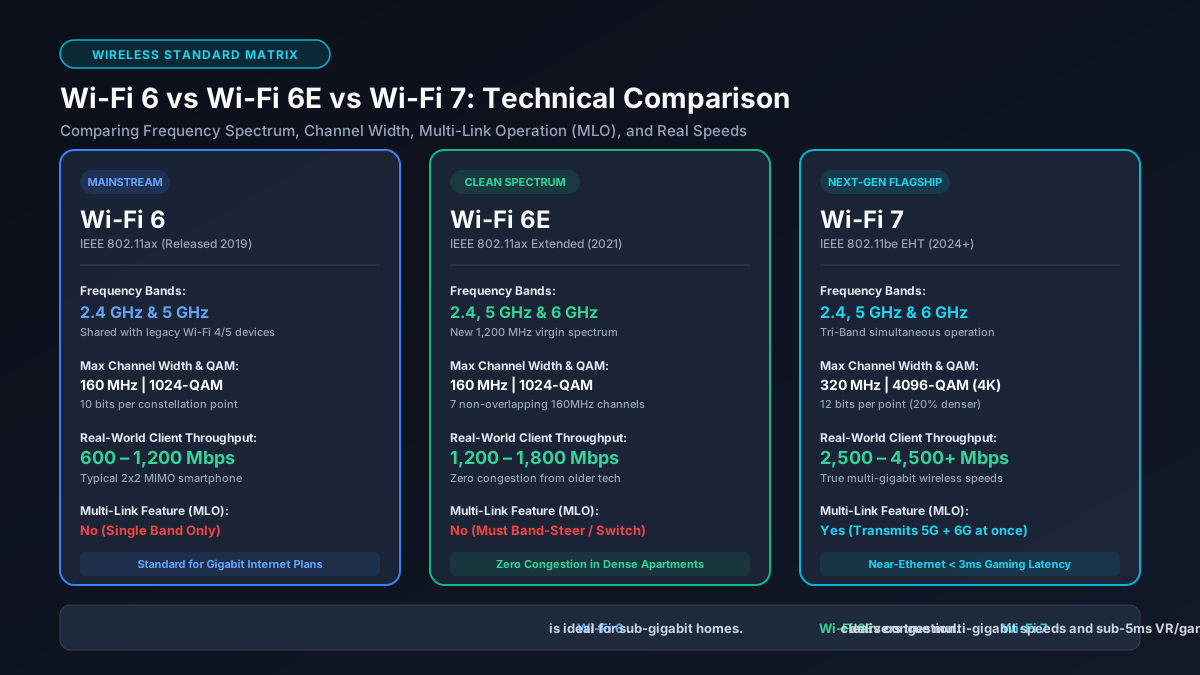
1. Evolución de los estándares Wi-Fi: De 802.11ax a 802.11be
Las redes inalámbricas atraviesan el salto generacional más importante de las últimas décadas. Entre Wi-Fi 6 (802.11ax), Wi-Fi 6E (banda de 6 GHz) y Wi-Fi 7 (802.11be), elegir el router adecuado genera dudas. Analizamos canales, modulación y rendimiento real.
Every few years, the IEEE working groups develop new wireless protocol amendments, which the Estándares oficiales de certificación de Wi-Fi Alliance certifies under simplified consumer naming conventions:
- Wi-Fi 6 (IEEE 802.11ax - 2019): Introduced Orthogonal Frequency-Division Multiple Access (OFDMA), 1024-QAM, and Target Wake Time (TWT), focusing on network efficiency and device density across 2.4 GHz and 5 GHz.
- Wi-Fi 6E (IEEE 802.11ax Extended - 2021): Took the proven architecture of Wi-Fi 6 and expanded it into the newly deregulated 6 GHz spectrum, providing 1,200 MHz of pristine, contiguous bandwidth free from legacy interference.
- Wi-Fi 7 (IEEE 802.11be Extremely High Throughput - 2024): Quadrupled channel capacity with 320 MHz wide channels, upgraded modulation to 4096-QAM (4K-QAM), and debuted Multi-Link Operation (MLO) to aggregate multiple bands simultaneously.
2. Bandas de frecuencia: 2.4 GHz, 5 GHz y el espectro limpio de 6 GHz
The core limitation of consumer wireless has always been radio frequency congestion. For twenty years, home networks relied strictly on two frequency bands:
- 2.4 GHz Band: Exceptional wall penetration and long range, but limited to three non-overlapping 20 MHz channels (Channels 1, 6, and 11). Heavily congested by baby monitors, microwaves, and Bluetooth.
- 5 GHz Band: High speed and broader bandwidth, but fragmented by Dynamic Frequency Selection (DFS) radar channels. In metropolitan areas near airports or weather radars, routers must periodically drop client connections to vacate DFS spectrum.
- 6 GHz Band (Wi-Fi 6E & 7): Adds up to 14 additional 80 MHz channels or 7 ultra-wide 160 MHz channels. Crucially, legacy Wi-Fi 4/5 devices cannot transmit on 6 GHz, ensuring zero airtime contention from older devices.
3. Ancho de canal y rendimiento: Canales de 80 MHz, 160 MHz y 320 MHz
Channel width directly dictates maximum data throughput. Think of channel width as highway lanes: wider channels allow more parallel data streams to flow concurrently.
While Wi-Fi 6 typically operates on 80 MHz channels (yielding a peak theoretical client link of 1,201 Mbps on 2x2 MIMO), Wi-Fi 6E unlocks 160 MHz channels without DFS radar interference (2,402 Mbps link rate). Wi-Fi 7 pushes this boundary further with massive 320 MHz channels, doubling theoretical throughput again up to 5,764 Mbps on a standard dual-antenna mobile phone or laptop. Learn how this translates to file transfer speeds on our Mbps to MB/s converter.
4. Modulación QAM explicada: 1024-QAM frente a 4096-QAM (4K-QAM)
Quadrature Amplitude Modulation (QAM) dictates how densely digital bits are packed into radio frequency waveforms:
- 1024-QAM (Wi-Fi 6 & 6E): Each radio symbol encodes 10 bits of data ($2^{10} = 1024$ constellation points).
- 4096-QAM / 4K-QAM (Wi-Fi 7): Each radio symbol encodes 12 bits of data ($2^{12} = 4096$ constellation points).
4K-QAM provides an immediate 20% raw throughput gain over 1024-QAM at identical channel widths. However, because the constellation points are packed so tightly, 4K-QAM requires an immaculate Signal-to-Noise Ratio (SNR), meaning you will achieve 4K-QAM rates when located within the same room or short range of the router.
5. Multi-Link Operation (MLO): La función revolucionaria de Wi-Fi 7
Historically, Wi-Fi client devices could connect to only one frequency band at a time (e.g., either 2.4 GHz or 5 GHz). If 5 GHz experienced interference, the client experienced ping spikes or was forced to negotiate a slow handoff to 2.4 GHz.
Multi-Link Operation (MLO) fundamentally eliminates this limitation in Wi-Fi 7. MLO allows a single client device to transmit and receive data packets across multiple bands (e.g., 5 GHz + 6 GHz) simultaneously:
- Link Aggregation (STR Mode): Combines 5 GHz and 6 GHz throughput for blisteringly fast local multi-gigabit transfers.
- Seamless Packet Redundancy (Low Latency Mode): Sends duplicate packets across both bands; whichever arrives first is accepted. This slashes wireless jitter to sub-millisecond levels, making Wi-Fi 7 perform virtually identically to wired Ethernet for competitive gaming. Explore more in our guide on the best routers for gigabit connections.
6. Velocidades teóricas máximas frente a velocidades reales medidas
Router packaging prominently advertises astronomical theoretical speeds (such as 'BE19000' or 'AX6000'). These numbers aggregate every band's theoretical ceiling. Real-world measured throughput across realistic residential distances is considerably different:
| Wi-Fi Standard | Advertised Max Rate (2x2) | Real-World Throughput (Same Room) | Real-World Throughput (2 Walls) |
|---|---|---|---|
| Wi-Fi 6 (80 MHz, 5 GHz) | 1,201 Mbps | 750 – 850 Mbps | 300 – 450 Mbps |
| Wi-Fi 6E (160 MHz, 6 GHz) | 2,402 Mbps | 1,400 – 1,750 Mbps | 400 – 600 Mbps |
| Wi-Fi 7 (320 MHz, 6 GHz + MLO) | 5,764 Mbps | 2,800 – 4,200 Mbps | 800 – 1,200 Mbps |
If your wireless speed tests fall well short of these figures, consult our diagnostic checklist on why Wi-Fi is slower than advertised.
7. Matriz técnica comparativa: Wi-Fi 6 vs. 6E vs. 7
| Feature | Wi-Fi 6 (802.11ax) | Wi-Fi 6E (802.11ax-6GHz) | Wi-Fi 7 (802.11be) |
|---|---|---|---|
| Frequency Bands | 2.4 GHz, 5 GHz | 2.4 GHz, 5 GHz, 6 GHz | 2.4 GHz, 5 GHz, 6 GHz |
| Max Channel Width | 80 / 160 MHz | 160 MHz | 320 MHz |
| Modulation | 1024-QAM (10-bit) | 1024-QAM (10-bit) | 4096-QAM (12-bit) |
| Multi-Link Operation | No | No | Yes (True Simultaneous) |
| Preamble Puncturing | Basic (Optional) | Basic (Optional) | Mandatory & Advanced |
8. Guía de compra: ¿Qué estándar merece la pena comprar hoy?
Deciding which router standard to purchase depends on your home broadband tier, budget, and device ecosystem:
- Stick with Wi-Fi 6 if: Your broadband speed is 300 to 500 Mbps and you live in a single-family house with minimal neighbor interference. Quality Wi-Fi 6 routers cost between $60 and $120, offering exceptional value.
- Skip Wi-Fi 6E: Wi-Fi 6E was an interim transitional standard. Wi-Fi 7 routers have already dropped significantly in price and include all Wi-Fi 6E features plus 320 MHz channels and MLO. Investing in 6E today is rarely cost-effective.
- Buy Wi-Fi 7 if: You subscribe to 1 Gbps to 5 Gbps fiber internet, live in a crowded apartment building with dense Wi-Fi interference, or demand the absolute lowest wireless latency for competitive gaming and VR streaming. Pair your router with certified Ethernet cabling from our best Ethernet cable guide.