1. What Does a Modem Actually Do? (Physical & Data Link Demodulation)
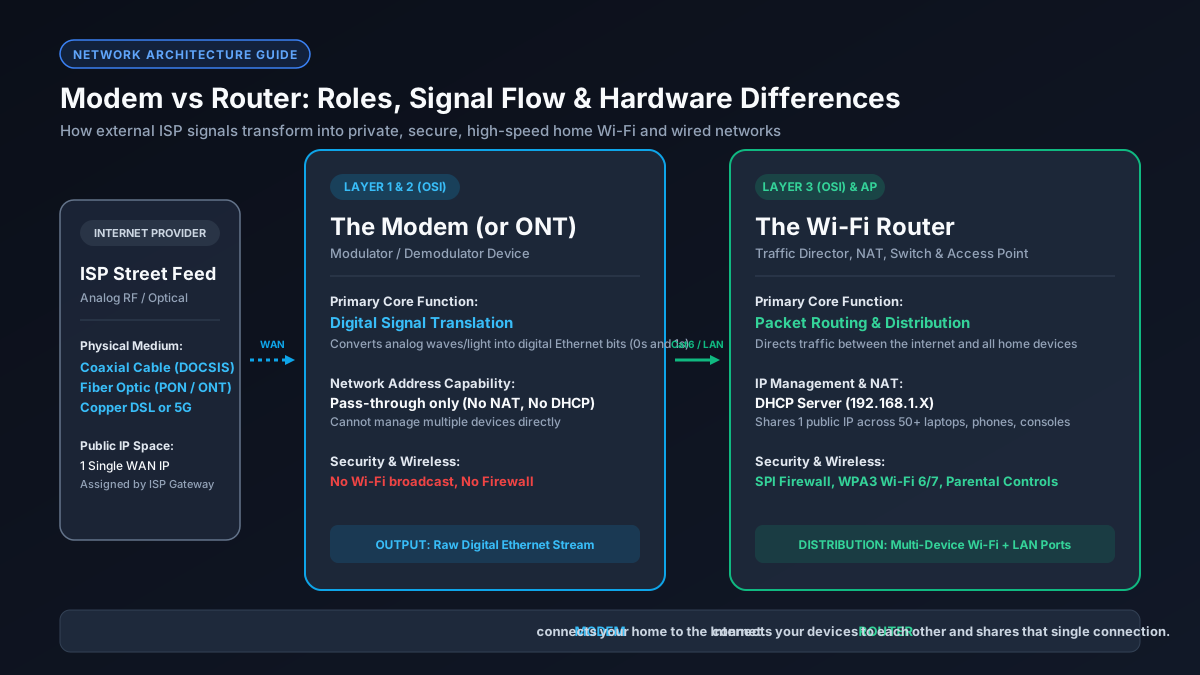
The term modem is an abbreviation for modulator-demodulator. Operating at Layer 1 (Physical) and Layer 2 (Data Link) of the OSI network model, its sole engineering purpose is to translate signals between the analog or optical physical infrastructure of your Internet Service Provider and the digital binary code (zeros and ones) understood by home computer networks.
External ISP lines transmit data across neighborhoods using physical mediums that consumer computers and phones cannot natively process:
- Cable Internet (DOCSIS 3.0 / 3.1 / 4.0): Radio frequency (RF) electrical waves travel through copper coaxial lines, standardized under specifications developed by the IEEE Standards Association and CableLabs. The modem's internal tuner decodes High-Frequency Quadrature Amplitude Modulation (QAM) signals into digital Ethernet frames.
- Fiber Internet (FTTH): High-speed pulses of infrared light travel over microscopic glass fibers, requiring an Optical Network Terminal (ONT) to convert photonic light pulses into electrical Ethernet signals.
- DSL Internet: High-frequency electrical audio tones travel over legacy twisted-pair copper telephone wiring.
The modem terminates this incoming feed, verifies your subscriber account authorization with the ISP's central office (CMTS or OLT), and outputs a single Ethernet connection assigned with your public WAN IP address. Without a modem or ONT, your home network cannot physically communicate with the outside world.
2. What Does a Router Do? (Layer 3 Routing, NAT, DHCP & SPI Firewall)
While the modem brings the internet to your front door, the router distributes that connection safely across all the devices inside your home. Operating primarily at Layer 3 (Network) and Layer 4 (Transport), a router manages your local private network (LAN), isolates internal device traffic from the wider web, and protects hardware from malicious inbound attacks.
A standalone consumer router performs four critical networking tasks simultaneously:
- Network Address Translation (NAT): Your ISP allocates you exactly one public IP address. NAT assigns unique private local IP addresses (such as
192.168.1.15) to every connected laptop, phone, gaming console, and smart TV, routing outbound packets so returning data arrives back at the exact device that requested it. - Dynamic Host Configuration Protocol (DHCP): Automatically coordinates and assigns local IP addresses, subnet masks, and DNS server settings whenever a new wired or wireless client connects.
- Hardware Firewall & Stateful Packet Inspection (SPI): Analyzes packet headers and rejects unsolicited inbound connection attempts, port scans, and DDoS traffic from bad actors on the public internet.
- Local Switching & Wireless Transmission: Acts as a local network switch for Ethernet LAN ports and powers the 2.4 GHz, 5 GHz, and 6 GHz Wi-Fi radios. Learn how to choose the right model in our best router for gigabit internet guide.
3. Technical Comparison: Hardware Architecture, Ports & Network Roles
This technical matrix outlines how engineering responsibilities and hardware components divide between a dedicated modem and a standalone router:
| Hardware Characteristic | Dedicated Modem (or Fiber ONT) | Wi-Fi Router |
|---|---|---|
| OSI Architectural Layer | Layer 1 (Physical) & Layer 2 (Data Link) | Layer 3 (Network) & Layer 4 (Transport) |
| Primary Function | Demodulates RF/Light into Digital Data | Routes Packets, Manages NAT & Firewall |
| Physical Input Connection | Coaxial F-Connector, Fiber SC/APC, DSL RJ-11 | RJ-45 Ethernet WAN Port (from modem) |
| Local Device Addressing | None (Passes through 1 Public IP) | Assigns Private Subnet IPs via DHCP |
| Wi-Fi Capabilities | None (Purely hardwired passthrough) | Broadcasts 2.4 GHz, 5 GHz, & 6 GHz Wi-Fi |
| Security & Firewall | Basic physical line encryption | SPI Firewall, NAT Isolation, DoS Shield |
| Typical Output Ports | 1 or 2 Ethernet Ports (Gigabit / 2.5 Gbps) | 4 to 8 Gigabit/2.5G LAN Ports + Wi-Fi |
4. Combo Gateways (2-in-1 Units) vs. Standalone Separate Modem and Router
Most major internet service providers (such as Xfinity, Spectrum, and AT&T) supply residential subscribers with an all-in-one unit called a Gateway. A gateway houses both a modem and a wireless router inside a single plastic chassis. While an integrated gateway minimizes equipment footprint, separate standalone hardware delivers superior performance for demanding users:
2-in-1 Gateway Advantages
- Single power plug and minimal cabling clutter on desks.
- Setup and configuration managed through your ISP's mobile app.
- Single technical support point of contact for line issues.
Separate Standalone Units Advantages
- Saves $120–$180 annually by eliminating monthly ISP rental fees.
- Upgrade to Wi-Fi 7 without having to replace your DOCSIS 3.1 cable modem.
- Prevents Wi-Fi CPU heat from thermal-throttling modem line processing.
- Enables advanced Smart Queue Management (SQM) to eliminate bufferbloat.
If you subscribe to Comcast Xfinity, pairing an approved standalone modem like the ARRIS S33 or S34 from our best modem for Xfinity guide and ARRIS S33 vs S34 comparison with a dedicated gaming router will significantly improve network responsiveness.
5. The Double NAT Problem: Why Chaining Two Routers Causes Lag & Packet Drops
A widespread mistake made by home network owners is connecting a third-party wireless router directly into an ISP combo gateway without modifying gateway settings. This creates a severe networking flaw known as Double NAT.
When Double NAT occurs, outgoing and incoming packets must traverse two separate Network Address Translation tables sequentially (e.g., from 192.168.1.x to 10.0.0.x to the Public WAN IP). This dual translation layer breaks several critical real-time protocols:
- Strict NAT in Gaming: Consoles (PlayStation 5, Xbox Series X, Nintendo Switch) fail UPnP negotiation, resulting in "Strict" or "Type 3" NAT. You will experience failed matchmaking, broken voice party lobbies, and frequent lobby disconnects.
- VPN Tunnels & Remote Access: IPSec and WireGuard VPN tunnels fail to establish persistent handshakes, dropping remote desktop and corporate connections.
- Port Forwarding Failures: Inbound ports forwarded on your router remain blocked by the outer ISP gateway firewall.
The Fix: Log into your ISP gateway's web administration panel (typically 192.168.0.1 or 10.0.0.1) and enable Bridge Mode (or IP Passthrough). This completely disables the gateway's internal router, DHCP server, firewall, and Wi-Fi radios, turning it into a pure transparent modem.
6. Cable Modem Signal Diagnostics: Downstream Power, SNR & Codewords
A major advantage of owning a dedicated cable modem is accessing raw hardware telemetry. By entering 192.168.100.1 into any web browser, you can inspect your modem's RF diagnostic page to verify if line noise or weak ISP signal levels are causing disconnects:
| Diagnostic Metric | Healthy Optimal Range | Troubleshooting Action if Out of Spec |
|---|---|---|
| Downstream Power Level | -7 dBmV to +7 dBmV | Below -10 dBmV causes drops; remove unnecessary splitters on the coaxial line. |
| Downstream SNR / MER | > 33 dB (> 40 dB for OFDM) | Low SNR indicates radio frequency ingress; inspect connectors for corrosion or loose crimping. |
| Upstream Power Level | +40 dBmV to +49 dBmV | Above +52 dBmV forces modem to reboot under load; request an ISP technician line rebalance. |
| Uncorrectable Codewords | 0 (or near zero relative to total) | High uncorrectables prove physical packet loss; verify with our speed troubleshooting guide. |
7. Fiber ONT vs. Cable Modem: Understanding Optical vs. Coaxial Termination
If you have fiber optic internet (such as AT&T Fiber, Verizon Fios, or Google Fiber), you do not use a traditional cable modem. Instead, your ISP provides an Optical Network Terminal (ONT).
While a cable modem tunes into radio frequency bands over copper coax, an ONT uses a semiconductor photodiode to receive pulses of infrared light across single-mode fiber optic cables. Because fiber signals do not suffer from the electrical interference and distance attenuation inherent in copper coaxial lines, ONTs provide identical symmetrical upload and download speeds. You plug an Ethernet cable directly from the ONT's LAN port into your Wi-Fi router's WAN port. Compare your speed capacity using our Mbps to MB/s converter.
8. Performance Impact: Gaming Latency, Bufferbloat & Local Network Transfers
Many users assume internet speed is solely dictated by the speed tier purchased from their ISP. In reality, router processing power and queue algorithms play a massive role in actual network responsiveness:
- Bufferbloat Elimination: Cheap ISP gateway routers use basic First-In, First-Out (FIFO) buffers. When a family member starts downloading a file, bulk packets clog the queue, inflating gaming ping from 15 ms to over 300 ms. A quality router with Smart Queue Management (SQM CAKE or fq_codel) dynamically prioritizes interactive packets, maintaining ultra-low ping. Learn how in our guide to what bufferbloat is and how to fix it.
- Local File Transfers & NAS Backups: The modem has zero effect on file transfers between devices inside your home. If you transfer video files to a local Network Attached Storage (NAS) drive, the speed is governed exclusively by your router's Ethernet switch and Wi-Fi throughput.
- Wired Ethernet Backhaul: For maximum reliability, connect gaming PCs and consoles with certified cables. Review our tested recommendations in the best cable for 1Gb Ethernet guide.
9. Buyer's Guide: Should You Rent Your ISP's Gateway or Buy Your Own Gear?
Deciding between renting an ISP combo unit or purchasing separate standalone equipment comes down to economics and technical requirements:
- Rent an ISP Gateway if: You have fiber internet where the ONT/gateway is provided for free, your ISP bundles unlimited data only when using their gateway, or you prefer having customer support handle every technical problem and equipment replacement.
- Buy Your Own Separate Modem & Router if: Your cable ISP charges $12 to $15 per month for equipment rental. Purchasing an approved DOCSIS 3.1 cable modem ($130–$180) and a high-performance Wi-Fi 6 or Wi-Fi 7 router ($100–$200) pays for itself completely in 18 to 24 months. Furthermore, owning your hardware grants you total control over DNS privacy, parental controls, VPN client configurations, and low-latency gaming optimization. Check your transfer time expectations on our download time calculator.