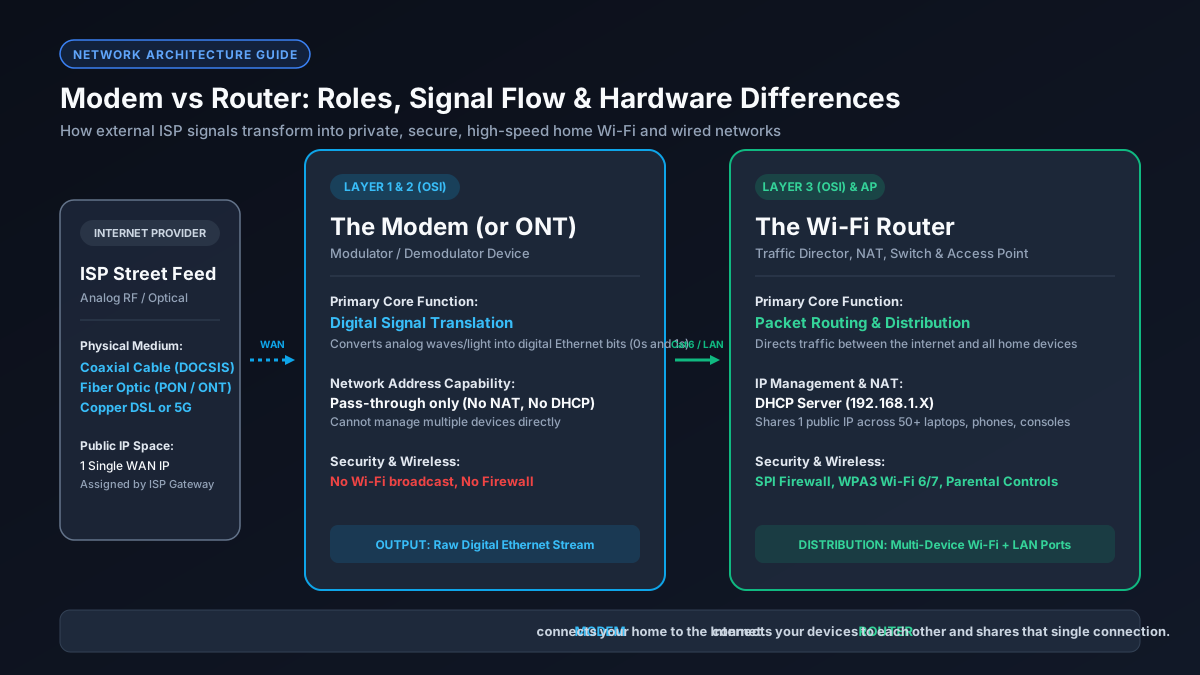
Quel est le rôle exact d'un modem ? (Démodulation du signal)
Bien que beaucoup utilisent les termes 'modem' et 'routeur' de manière interchangeable – ou possèdent une box opérateur unique –, ces appareils accomplissent des missions réseau totalement distinctes. Le modem convertit le signal extérieur du FAI en données numériques, et le routeur distribue et sécurise ce flux pour vos appareils domestiques.
External ISP infrastructure transmits data across long distances using physical media that are not natively compatible with consumer electronics:
À quoi sert un routeur ? (Routage de paquets, NAT et DHCP)
While the modem brings the internet to your door, the router distributes that connection safely across all the devices inside your home. Operating at Layer 3 of the OSI network model, a router manages internal local traffic, creates a Private Local Area Network (LAN), and protects your devices from inbound external cyber threats.
- Network Address Translation (NAT)
- Dynamic Host Configuration Protocol (DHCP)
- Hardware Firewall & SPI
- Wireless Access Point (Wi-Fi 6/7) & Switching
Matrice comparative : Spécifications techniques Modem vs Routeur
| Hardware Component | Modem (ONT) | Wi-Fi Router |
|---|---|---|
| OSI Layer | Layer 1 & Layer 2 | Layer 3 (Network) & AP |
| Input Source | Coaxial, Fiber Optic, DSL | Ethernet WAN (RJ45) |
| Local IP Assignment | Pass-through Public IP | Private Subnet via DHCP |
| Wi-Fi Broadcasting | None | 2.4 GHz, 5 GHz, 6 GHz |
Box tout-en-un (Passerelle) vs Appareils indépendants dédiés
Most internet service providers supply customers with a single physical unit known as a Gateway (a 2-in-1 modem-router combo). While a gateway saves physical shelf space and simplifies initial setup, enthusiastic home network users and gamers often debate whether an integrated combo or standalone separate devices yield superior performance.
Qu'est-ce que le mode pont (Bridge Mode) et quand l'activer ?
If your ISP forces you to use their combo gateway—or if you have a fiber ONT that integrates rudimentary routing functions—and you wish to connect your own high-end Wi-Fi 7 router, you encounter a serious networking flaw called Double NAT (Network Address Translation).
The definitive solution is to log into the ISP gateway's web administration panel and enable Bridge Mode. Bridge Mode deactivates the gateway's internal router, DHCP server, firewall, and Wi-Fi radios, converting the unit into a transparent, 'dumb' standalone modem. The gateway then forwards the raw public IP directly to the WAN port of your personal router, ensuring pristine Layer 3 routing and an Open NAT status.
Avez-vous besoin d'un modem et d'un routeur pour la fibre, le câble ou la 5G ?
The short answer is yes, every home network requires the functions of both a modem and a router to access the internet across multiple wireless and wired devices. However, depending on your physical connection medium, what the physical modem looks like varies considerably:
- Cable: DOCSIS 3.1 modem + Wi-Fi router.
- Fiber: Optical Network Terminal (ONT) + Wi-Fi router.
- 5G: Integrated cellular receiver + router gateway.
Comment le modem et le routeur impactent le débit et le ping
When internet speeds fail to reach advertised tiers, users frequently misdiagnose which piece of hardware is causing the bottleneck. A modem and a router constrain network performance in distinct ways:
Conversely, a router bottleneck affects local throughput and latency. If your router has older 100 Mbps Fast Ethernet ports instead of Gigabit ports, your wired speed will be hard-capped at 94.8 Mbps. In addition, weak router CPUs cannot process simultaneous data streams from multiple smart TVs and downloads, leading to bufferbloat queue delays that spike your in-game ping from 20ms to over 250ms. To verify real throughput, convert your rated internet speed with our Mbps to MB/s converter.
Protocole de diagnostic : Déterminer si le problème vient du modem ou du routeur
- Bypass the Router: Plug PC directly into modem.
- Inspect LED Lights: Check upstream and downstream bonding.
- Test LAN Ping: Ping default gateway (192.168.1.1).
- Check Diagnostic Page: Check SNR and uncorrectable errors on 192.168.100.1.