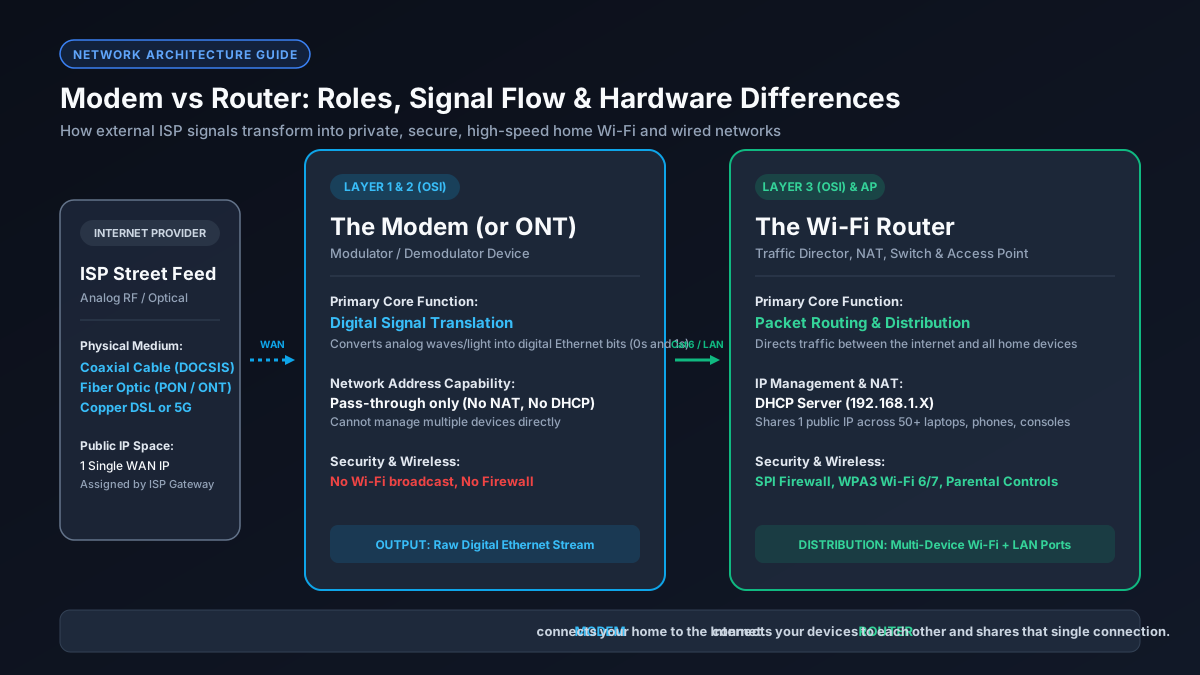
Что именно делает модем? (Демодуляция физического сигнала)
Хотя многие пользователи путают модемы и роутеры — или используют единый комбайн от провайдера —, с инженерной точки зрения это абсолютно разные устройства. Модем преобразует физический сигнал линии связи в цифровой поток Ethernet, а роутер управляет локальной сетью, защищает устройства брандмауэром и раздает Wi-Fi.
External ISP infrastructure transmits data across long distances using physical media that are not natively compatible with consumer electronics:
Для чего нужен роутер? (Маршрутизация пакетов, NAT и DHCP)
While the modem brings the internet to your door, the router distributes that connection safely across all the devices inside your home. Operating at Layer 3 of the OSI network model, a router manages internal local traffic, creates a Private Local Area Network (LAN), and protects your devices from inbound external cyber threats.
- Network Address Translation (NAT)
- Dynamic Host Configuration Protocol (DHCP)
- Hardware Firewall & SPI
- Wireless Access Point (Wi-Fi 6/7) & Switching
Сравнительная таблица: Технические характеристики модема и роутера
| Hardware Component | Modem (ONT) | Wi-Fi Router |
|---|---|---|
| OSI Layer | Layer 1 & Layer 2 | Layer 3 (Network) & AP |
| Input Source | Coaxial, Fiber Optic, DSL | Ethernet WAN (RJ45) |
| Local IP Assignment | Pass-through Public IP | Private Subnet via DHCP |
| Wi-Fi Broadcasting | None | 2.4 GHz, 5 GHz, 6 GHz |
Комбинированные шлюзы 2-в-1 против раздельных устройств
Most internet service providers supply customers with a single physical unit known as a Gateway (a 2-in-1 modem-router combo). While a gateway saves physical shelf space and simplifies initial setup, enthusiastic home network users and gamers often debate whether an integrated combo or standalone separate devices yield superior performance.
Что такое режим моста (Bridge Mode) и когда его включать?
If your ISP forces you to use their combo gateway—or if you have a fiber ONT that integrates rudimentary routing functions—and you wish to connect your own high-end Wi-Fi 7 router, you encounter a serious networking flaw called Double NAT (Network Address Translation).
The definitive solution is to log into the ISP gateway's web administration panel and enable Bridge Mode. Bridge Mode deactivates the gateway's internal router, DHCP server, firewall, and Wi-Fi radios, converting the unit into a transparent, 'dumb' standalone modem. The gateway then forwards the raw public IP directly to the WAN port of your personal router, ensuring pristine Layer 3 routing and an Open NAT status.
Нужны ли модем и роутер для оптоволокна, кабеля и 5G?
The short answer is yes, every home network requires the functions of both a modem and a router to access the internet across multiple wireless and wired devices. However, depending on your physical connection medium, what the physical modem looks like varies considerably:
- Cable: DOCSIS 3.1 modem + Wi-Fi router.
- Fiber: Optical Network Terminal (ONT) + Wi-Fi router.
- 5G: Integrated cellular receiver + router gateway.
Как модем и роутер влияют на скорость интернета и пинг
When internet speeds fail to reach advertised tiers, users frequently misdiagnose which piece of hardware is causing the bottleneck. A modem and a router constrain network performance in distinct ways:
Conversely, a router bottleneck affects local throughput and latency. If your router has older 100 Mbps Fast Ethernet ports instead of Gigabit ports, your wired speed will be hard-capped at 94.8 Mbps. In addition, weak router CPUs cannot process simultaneous data streams from multiple smart TVs and downloads, leading to bufferbloat queue delays that spike your in-game ping from 20ms to over 250ms. To verify real throughput, convert your rated internet speed with our Mbps to MB/s converter.
Диагностический чек-лист: Как понять, завис модем или роутер?
- Bypass the Router: Plug PC directly into modem.
- Inspect LED Lights: Check upstream and downstream bonding.
- Test LAN Ping: Ping default gateway (192.168.1.1).
- Check Diagnostic Page: Check SNR and uncorrectable errors on 192.168.100.1.