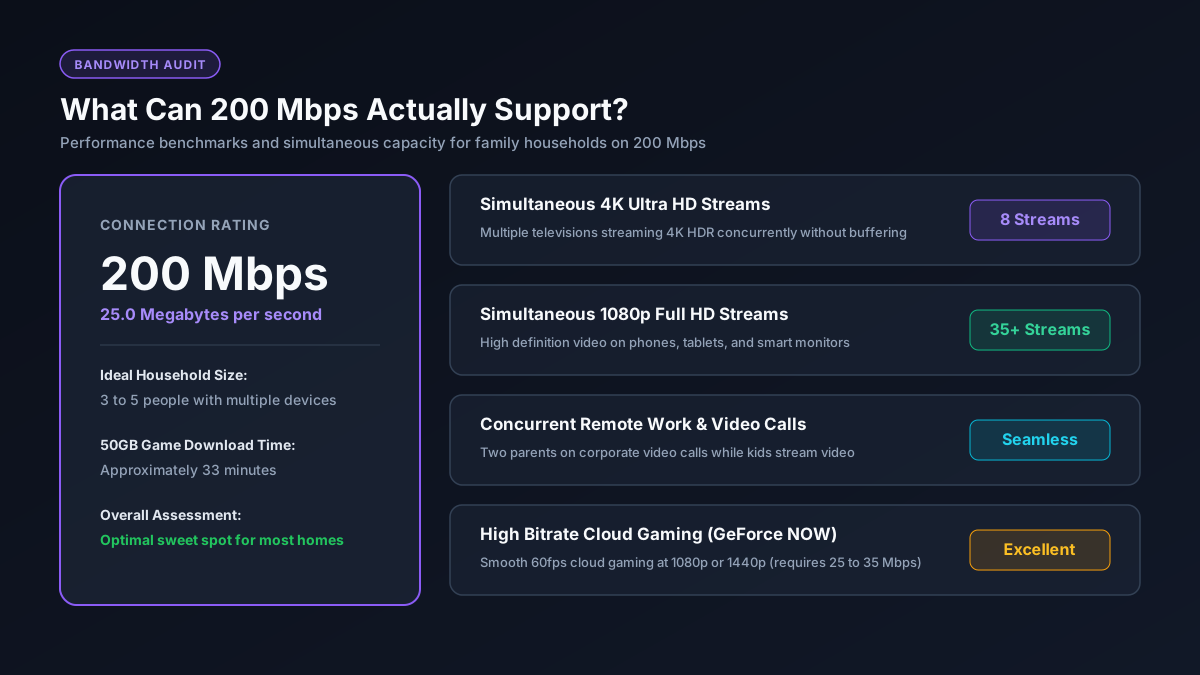
Quick Answer: What Does 200 Mbps Deliver?
How Fast is 200 Mbps in Real World File Downloads?
A 200 Mbps internet connection transfers files at an actual speed of 25 Megabytes per second (MB/s) under ideal conditions. Internet service providers advertise connection speeds in Megabits per second (Mbps with a lowercase b), whereas operating systems, Steam, and file downloads measure data in Megabytes (MB with a capital B).
Because eight bits make up one byte, you simply divide your plan speed by eight to find your maximum theoretical download rate (200 divided by 8 equals 25 MB/s). If you want to understand this unit difference in depth, check our dedicated Mb vs MB converter or calculate precise times using our download time calculator.
| File Type & Example | File Size | Download Time (200 Mbps) |
|---|---|---|
| High Quality MP3 Song | 10 MB | 0.4 seconds |
| Mobile App or Mobile Game | 1 GB | 40 seconds |
| Full HD 1080p Movie | 4 GB | ~2.7 minutes |
| 4K Ultra HD Feature Film | 20 GB | ~13.3 minutes |
| Standard Modern Game | 50 GB | ~33.3 minutes |
| Massive AAA Title (Call of Duty or Baldur's Gate 3) | 100 GB | ~1 hour 6 minutes |
| Heavy Game with DLC Expansions | 150 GB | ~1 hour 40 minutes |
Visual Bandwidth Allocation: What Can 200 Mbps Handle Simultaneously?
A major advantage of a 200 Mbps plan is headroom. Even during peak evening hours when family members are simultaneously streaming television shows, participating in video calls, and playing online multiplayer games, the connection rarely experiences congestion.
Simultaneous Activity Bandwidth Footprint (Out of 200 Mbps)
As displayed in the visualization, even with two separate 4K streams running alongside business video conferences and online gaming, the household uses only 80 Mbps. That leaves 120 Mbps of untouched bandwidth, preventing screen stuttering or audio drops.
Is 200 Mbps Good for Gaming?
Yes, 200 Mbps is exceptional for gaming. Online multiplayer matches in titles like Fortnite, Valorant, Call of Duty, and Apex Legends demand only 3 to 10 Mbps of active network bandwidth. You can review detailed bandwidth requirements in our guide on good Mbps for gaming.
In competitive gaming, what dictates your hit registration and smoothness is ping latency and packet stability, not whether your bandwidth is 200 Mbps or 1,000 Mbps. Connecting your PC or console through a wired Ethernet cable will reduce latency far more effectively than upgrading to a more expensive speed tier. For game installations, 200 Mbps is fast enough that a 50 GB game takes approximately 33 minutes to download, which you can verify on our Steam download calculator.
The Cable vs Fiber Upload Speed Reality
When evaluating a 200 Mbps plan, examine the upload speed carefully. Internet providers deliver connections through different physical infrastructures:
- Fiber Internet: Usually delivers symmetrical bandwidth, meaning you receive 200 Mbps download and 200 Mbps upload. This setup is ideal for video creators, Twitch broadcasting, and uploading large cloud backups.
- Cable Internet (DOCSIS): Often provides asymmetrical bandwidth, giving you 200 Mbps download but restricting upload speeds to 10 Mbps or 20 Mbps. While 10 Mbps is sufficient for basic Zoom calls, having multiple people upload files simultaneously can saturate the link.
200 Mbps vs Other Broadband Tiers
How does 200 Mbps stack up against neighboring speeds? Review the comparison below to find the right balance between cost and performance:
| Speed Plan | Real Download Rate | 50 GB Game Install | Max 4K Streams | Best Fit Household |
|---|---|---|---|---|
| 100 Mbps | 12.5 MB/s | ~66 minutes | Up to 4 | 1 to 3 users with basic streaming |
| 200 Mbps | 25.0 MB/s | ~33 minutes | Up to 8 | 3 to 5 users, hybrid work, active streaming |
| 300 Mbps | 37.5 MB/s | ~22 minutes | Up to 12 | Larger households with regular large downloads |
| 500 Mbps | 62.5 MB/s | ~13 minutes | Up to 20 | Enthusiast gamers and creative media professionals |
| 1,000 Mbps (1 Gbps) | 125.0 MB/s | ~6.7 minutes | 40+ | Power users, local homelabs, and server hosts |
If you are comparing lower or higher tiers, check our dedicated reviews on whether 100 Mbps is fast enough or if your household requires 300 Mbps broadband.
Official Speed Recommendations
Government regulators provide clear guidance regarding necessary home bandwidth. According to the official Federal Communications Commission Broadband Speed Guide, general browsing and streaming require modest baseline speeds, whereas multiple concurrent high demand users benefit from modern high speed tiers. At 200 Mbps, your household operates at twice the official US minimum broadband threshold of 100 Mbps, ensuring strong longevity as digital media resolutions expand.
When Should You Consider an Upgrade Beyond 200 Mbps?
For most homes, 200 Mbps is the sweet spot between monthly subscription costs and real capability. However, upgrading to 500 Mbps or 1 Gbps makes sense in specific situations:
- You have six or more people in your home frequently downloading large software packages at the same time.
- You regularly download 100 GB to 150 GB modern games and dislike waiting thirty minutes for installation.
- You work full time producing 4K video content and need to push massive gigabyte archives to clients on a daily basis.
- Your current provider offers a symmetrical fiber plan at a promotional price comparable to your current cable bill.