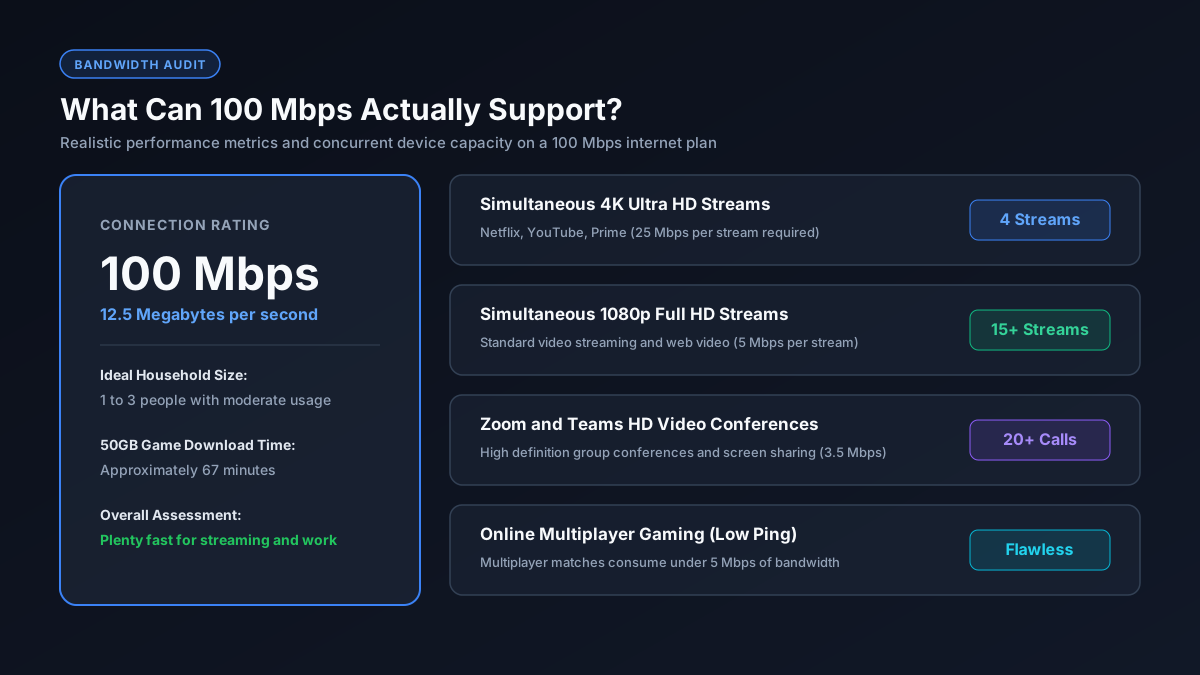
Quick Answer: What Does 100 Mbps Deliver?
How Fast is 100 Mbps in Real World File Downloads?
A 100 Mbps internet plan provides an actual transfer speed of 12.5 Megabytes per second (MB/s) under optimal conditions. Internet service providers market connection speeds in Megabits per second (Mbps with a lowercase b), whereas storage files and operating systems measure sizes in Megabytes (MB with a capital B).
Because eight bits make up a single byte, simply divide your advertised speed by eight to determine your maximum real download throughput (100 divided by 8 equals 12.5 MB/s). You can verify network calculations directly on our download time calculator.
| File Type & Example | File Size | Download Time (100 Mbps) |
|---|---|---|
| High Quality MP3 Song | 10 MB | 0.8 seconds |
| Mobile App or Update | 250 MB | 20 seconds |
| Full HD 1080p Movie | 4 GB | ~5.3 minutes |
| 4K Ultra HD Movie | 20 GB | ~26.7 minutes |
| Standard Modern Game | 50 GB | ~1 hour 6 minutes |
| Massive AAA Title (Call of Duty Warzone) | 100 GB | ~2 hours 13 minutes |
Visual Bandwidth Allocation: What Can 100 Mbps Handle at Once?
A frequent concern for families is whether 100 Mbps will bottleneck when multiple family members go online simultaneously. Modern digital tasks require surprisingly modest baseline bandwidth, provided nobody starts an unthrottled massive file download in the background.
Simultaneous Activity Bandwidth Footprint (Out of 100 Mbps)
As illustrated above, even when one person streams 4K video, two people conduct business video meetings, and another plays online multiplayer games, the household consumes only roughly 41 Mbps, leaving nearly 60% of the pipe untouched as safety buffer against buffering.
Is 100 Mbps Good for Online Gaming?
Yes, 100 Mbps is more than adequate for competitive multiplayer gaming. Contrary to marketing hype, online gameplay in competitive titles such as Fortnite, Valorant, Counter Strike, and Rocket League consumes merely 3 to 10 Mbps of active network throughput. For complete gaming speed recommendations, read our detailed guide on good Mbps for gaming.
What truly matters in competitive gaming is latency (ping) rather than total bandwidth. Low latency depends on a stable local network, server proximity, and using a wired Ethernet cable rather than crowded wireless signals. The primary limitation of a 100 Mbps connection for gamers is downloading large game updates, which takes roughly 1 hour for a 50 GB game or over 2 hours for a 100 GB game.
100 Mbps vs 300 Mbps vs 500 Mbps vs 1 Gbps
Choosing the ideal broadband tier depends on your household headcount, concurrent media habits, and patience during software installations:
| Internet Plan | Actual Download | 50 GB Game Time | Max 4K Streams | Best Fit |
|---|---|---|---|---|
| 100 Mbps | 12.5 MB/s | ~66 minutes | Up to 4 | 1 to 4 users with standard streaming |
| 300 Mbps | 37.5 MB/s | ~22 minutes | Up to 12 | Active families with multiple gamers |
| 500 Mbps | 62.5 MB/s | ~13 minutes | Up to 20 | Heavy gamers and digital creators |
| 1,000 Mbps (1 Gbps) | 125 MB/s | ~6.7 minutes | 40+ | Large tech households and server hosting |
If you regularly find yourself waiting on massive game patches or transferring massive 4K video project archives, consider exploring our review on whether 300 Mbps is fast enough for high intensity media demands.
The Official Broadband Benchmark Standard
In March 2024, the United States regulatory authority officially redefined high speed broadband. According to the Federal Communications Commission (FCC) broadband speed benchmark report, the minimum threshold for broadband connectivity is now officially set at 100 Mbps download and 20 Mbps upload. This regulatory change confirms that 100 Mbps is recognized as the modern baseline standard for modern residential connectivity.
When Should You Consider an Upgrade?
While 100 Mbps serves most everyday situations admirably, you may want to upgrade to 300 Mbps or higher if your living situation matches any of the following scenarios:
- Your home contains five or more active internet users streaming and downloading concurrently.
- Multiple gamers frequently install 80 GB to 150 GB game updates and refuse to wait over an hour.
- You work as a professional video editor, streamer, or photographer transferring massive gigabyte cloud files daily.
- Your internet service provider severely caps upload speeds (for instance, 100 Mbps download but only 5 Mbps upload on legacy copper cable networks), which can cause video calls to hitch during cloud syncing.