Upgrading to a beautiful new 4K television is an exciting moment for any home theater enthusiast. The picture quality is stunning. The colors are incredibly vibrant. The detail is so sharp you feel like you are looking through a window. But all of that visual magic comes to a screeching halt the moment a spinning loading wheel appears on your screen.
Buffering is the enemy of a great movie night. The most common culprit behind endless buffering is an inadequate internet connection. Streaming ultra high definition video requires a massive amount of data to be delivered to your television continuously. If your internet speed cannot keep up with the demands of the stream, your television is forced to pause the video while it waits for more data to arrive.
This leaves many people wondering exactly how much speed is truly necessary. Internet service providers often try to upsell expensive gigabit packages. They claim you need blazing fast speeds for basic video streaming. The reality is much more nuanced. You might already have enough speed to stream 4K content flawlessly. Let us dive into the details and figure out exactly how many Mbps you need for the perfect viewing experience.
The Bare Minimum Speed for 4K Streaming
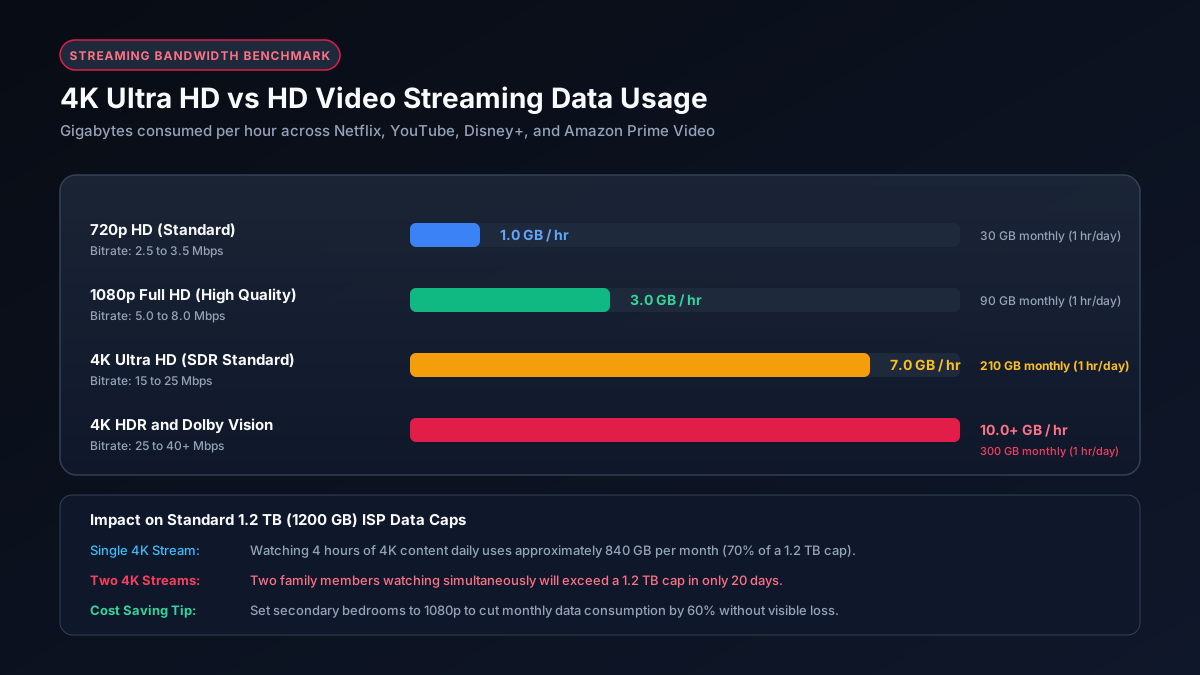
Most major streaming platforms agree on a baseline requirement. Netflix, Amazon Prime Video, and Disney Plus all state that a steady 25 Mbps connection is the absolute minimum needed to stream a single 4K video. YouTube is a bit more forgiving and sometimes recommends 20 Mbps. These numbers represent the lowest possible threshold for a functional stream.
However, that baseline speed comes with a very large caveat. When a streaming service says you need 25 Mbps, they mean you need 25 Mbps dedicated entirely to that specific device. They are assuming absolutely nothing else is happening on your network. In the real world, this is rarely the case.
Think about a typical evening in a modern home. You might be settling in to watch a 4K movie on the living room television. Meanwhile, a family member could be scrolling through a social media feed in another room. Your smart home devices are quietly communicating with the internet in the background. A smartphone might decide to download a large software update. All of these background activities consume a portion of your total bandwidth.
If you only pay for a 25 Mbps internet plan, any extra activity on your network will instantly steal bandwidth away from your 4K stream. The moment your television drops below that required 25 Mbps threshold, the video quality will degrade. The picture will become blurry and pixelated. If the speed drops further, the video will pause completely to buffer. Therefore, relying on the bare minimum 25 Mbps is a recipe for frustration in any multi person household.
How Fast Should Your Internet Actually Be?
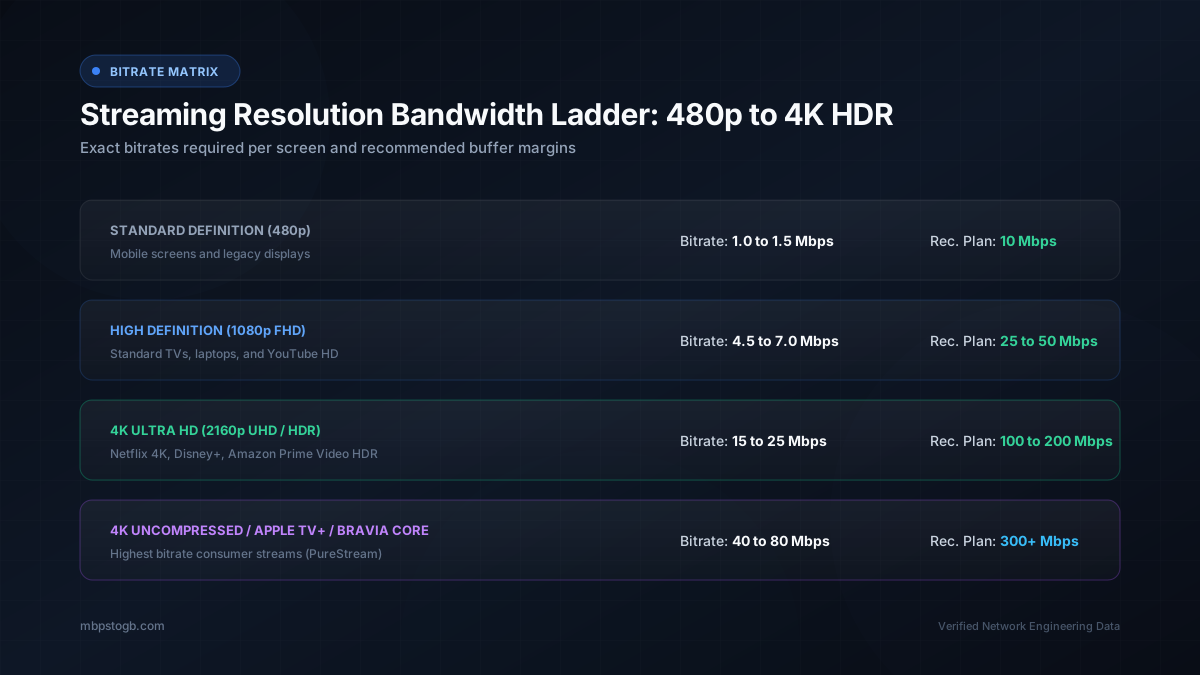
To avoid buffering completely, you need to factor in headroom. Headroom is the extra bandwidth available on your network to absorb sudden spikes in data usage. When calculating your ideal internet speed, a good rule of thumb is to double the minimum requirement for every 4K stream in your home.
If you live alone and only ever watch one 4K stream at a time, a 50 Mbps connection provides plenty of headroom. You can comfortably watch a movie while your phone updates apps in the background. If you have a partner and you occasionally stream different 4K shows in separate rooms, a 100 Mbps plan is the perfect sweet spot. This allows two concurrent 4K streams with plenty of bandwidth left over for casual web browsing on your laptops.
For larger families with teenagers, the demands grow quickly. Imagine a scenario where three people are streaming 4K video simultaneously. A fourth person might be playing a competitive online multiplayer game. In this situation, a 200 Mbps to 300 Mbps internet plan is highly recommended. This ensures that a massive 100GB game download does not completely ruin the movie watching experience for everyone else in the house.
The Difference Between Megabits and Megabytes
It is very common to confuse internet speed with file sizes. Internet speed is typically measured in Megabits per second, or Mbps. File sizes and data caps are usually measured in Megabytes, or MB. There are eight bits in a single byte. This means that a connection speed of 25 Mbps is actually transferring data at a rate of roughly 3.1 Megabytes per second.
This distinction is crucial when you start looking at your monthly data usage. Streaming a 4K movie for two hours will consume a staggering amount of data. A single hour of 4K video on a platform like Netflix uses approximately 7 Gigabytes of data. You can read more about this in our detailed breakdown of Netflix data usage.
If you have an internet plan with a strict monthly data cap, 4K streaming is the fastest way to exceed your limit and incur hefty overage charges. If you find yourself frequently hitting a data cap, you might want to consider the benefits of upgrading. Our guide on unlimited vs capped data plans can help you make an informed decision.
Why Am I Still Buffering on a Fast Connection?
Many people upgrade to an expensive gigabit internet plan only to find their television still struggles to play a 4K movie smoothly. If your speed test shows you are receiving hundreds of Megabits per second but your stream still buffers, the problem is not your internet service provider. The problem is almost certainly happening inside your house.
Wi Fi is notoriously unreliable for consistent high bandwidth tasks like 4K streaming. A weak wireless signal caused by distance from the router is the number one cause of buffering on fast networks. Physical obstructions like thick walls, large furniture, and even metal appliances can severely degrade a Wi Fi signal. Additionally, interference from a neighbor's router can cause momentary drops in speed.
The best solution to eliminate buffering permanently is to bypass Wi Fi entirely. Run a physical Ethernet cable from your router directly into the back of your television or streaming device. A wired connection is completely immune to wireless interference. It guarantees that the full speed of your internet plan reaches your device with zero fluctuation. If you are curious about the technical differences, our article on Mbps vs GB explains how data travels through your home network.
If running a wire is physically impossible, you must optimize your wireless network. Ensure your television is connecting to the 5GHz Wi Fi band rather than the slower 2.4GHz band. The 5GHz band offers significantly faster speeds over short distances. You may also need to invest in a modern mesh Wi Fi system to blanket your home in a strong, consistent signal. Finally, make sure your router is placed in a central, elevated location rather than hidden away inside a cabinet or tucked behind a large television.
Frequently Asked Questions
Is 25 Mbps enough for 4K streaming?
Yes, 25 Mbps is the bare minimum recommended by most streaming services for a single 4K stream. However, if other people in your home are using the internet at the same time, you will likely experience buffering.
Why does my 4K stream buffer if I have a 100 Mbps connection?
Buffering on a fast connection is usually caused by a weak Wi Fi signal. It can also be caused by an old router or network congestion during peak hours. Try using an Ethernet cable directly to your TV.
Does 4K streaming use a lot of data?
Yes, 4K streaming consumes a massive amount of data. You can expect to use about 7 GB of data per hour of 4K streaming. If you have a data cap, this can drain your allowance very quickly.
Do I need gigabit internet for 4K streaming?
No, gigabit internet is absolute overkill for just streaming 4K video. A 100 Mbps or 200 Mbps plan is more than enough for a large household to stream multiple 4K movies simultaneously.
Can I stream 4K on a cellular connection?
You can stream 4K on a strong 5G connection. However, cellular networks are prone to fluctuation. Most mobile plans also throttle video resolution to save bandwidth unless you pay for a premium add on.
Explore More Data Guides
- Download Time Calculator, see exactly how long your large files will take to download.
- Family Data Usage Per Month, calculate your household's total internet needs.
- Mbps to GB Converter, easily convert your network speed into file transfer rates.