Mobile carriers frequently offer 50GB hotspot add-ons on unlimited cellular plans. When you see fifty gigabytes written on paper, it sounds like an enormous quantity of data. But once you connect a laptop, a tablet, or a streaming device, that data can disappear surprisingly fast.
The speed at which you consume 50GB depends entirely on your online behavior. Reading emails and checking websites consumes minimal bandwidth. In contrast, streaming modern high-definition video or letting your laptop download software updates in the background will drain your allowance rapidly. To better understand how raw transmission speed translates into data volume, check out our explainer on Mbps vs GB.
Exact Hours 50GB Lasts Across Popular Activities
Here is an honest, real-world estimate of how long a 50GB hotspot allowance will last if dedicated exclusively to one specific task:
| Online Activity | Data Burn Rate | Hours from 50GB | Practical Duration |
|---|---|---|---|
| 4K Ultra HD Streaming | ~7.0 GB per hour | ~7 Hours | About 3 to 4 feature movies |
| 1080p Full HD Streaming | ~2.5 GB per hour | ~20 Hours | About 10 movies or 25 TV episodes |
| 720p Standard HD Video | ~1.2 GB per hour | ~41 Hours | Roughly 1.5 hours daily for 1 month |
| 480p Standard Definition | ~0.7 GB per hour | ~71 Hours | Over 2 hours daily for an entire month |
| 1-on-1 Zoom Video Call | ~0.8 GB per hour | ~62 Hours | Over 3 hours per working day (20 work days) |
| Group Zoom Call (720p HD) | ~1.5 GB per hour | ~33 Hours | Roughly 1.5 hours per working day |
| Competitive Online Gaming | ~0.08 GB per hour | ~600+ Hours | Virtually unlimited live gameplay |
| Spotify / Apple Music (High) | ~0.12 GB per hour | ~400+ Hours | Continuous music streaming for 16 days |
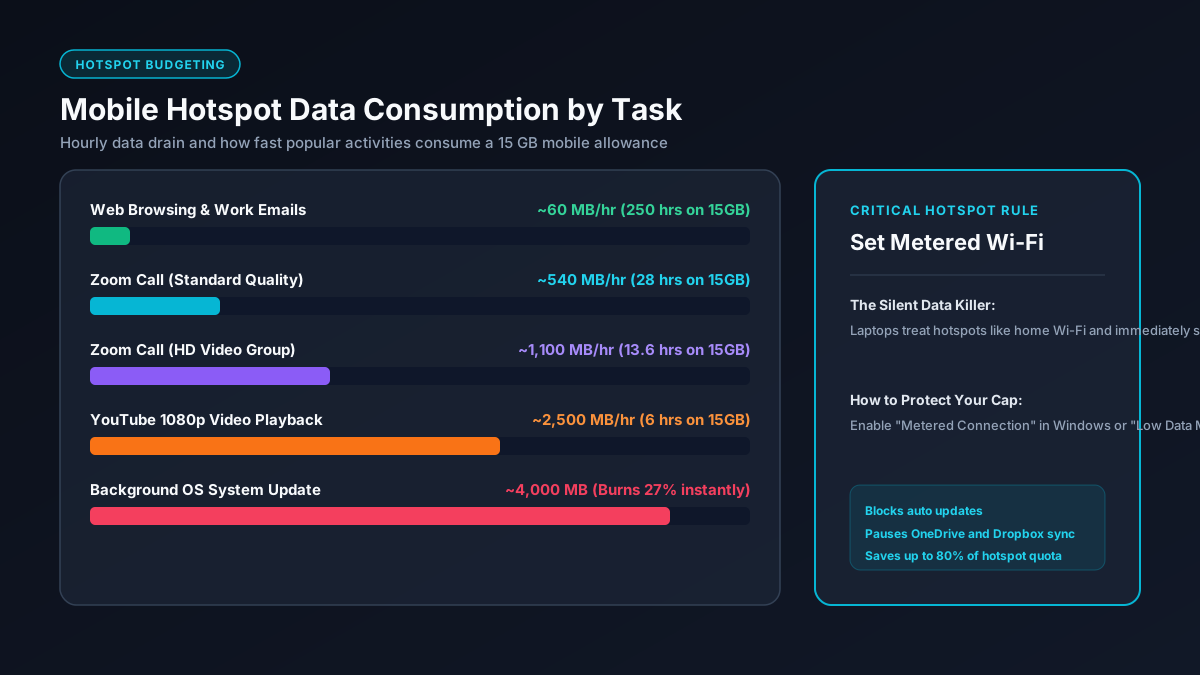
How 50GB Behaves for Remote Work (WFH)
If you plan to use a 50GB hotspot as your primary internet connection while working from home, you must pay close attention to your daily video meetings. General office tasks such as Slack messages, Google Docs editing, sending spreadsheets, and responding to emails require negligible bandwidth, consuming less than 300MB across a typical eight-hour workday.
Video conferencing is the primary driver of consumption. A standard 720p group video call on Zoom or Microsoft Teams consumes approximately 1.5GB per hour. If you average two hours of group video meetings every workday, you will burn roughly 3GB per day. Across twenty standard working days in a month, that totals 60GB, exceeding your 50GB allowance without factoring in any other tasks. You can learn more about specific application rates in our Zoom data usage guide.
Streaming Video: The Fastest Way to Exhaust 50GB
Video streaming services represent the highest data risk for hotspot users. Modern streaming platforms like Netflix, YouTube, and Prime Video automatically adjust their video resolution based on the speed of your connection. Because modern 5G mobile hotspots often deliver speeds between 100 Mbps and 300 Mbps, streaming apps will quietly default to 4K Ultra HD.
At 4K resolution, Netflix burns between 7GB and 8GB every sixty minutes according to official Netflix bandwidth specifications. A user watching a three-hour film will consume nearly half of their entire monthly 50GB allotment in a single sitting. If you manually lower your video resolution to 720p or 1080p, you can stretch the same 50GB to cover twenty to forty hours of watching. See our detailed breakdown in our Netflix data usage analysis.
Four Actionable Tips to Make 50GB Last 3x Longer
If you are relying on a 50GB hotspot plan, you can implement several simple operating system adjustments to avoid unexpected throttling:
- Enable "Metered Connection" on Windows and macOS: When your laptop connects to a mobile hotspot, it treats it like home fiber by default. Setting your Wi-Fi network to "Metered" blocks automated Windows updates and pauses background cloud syncs from OneDrive and Google Drive.
- Manually cap streaming video resolution: Never leave video quality set to "Auto" on YouTube or Netflix. Manually locking video quality to 720p reduces data consumption by more than 75% compared to 4K with minimal noticeable difference on small laptop screens. Explore our guide on how to reduce streaming data usage.
- Pause game platform updates: Clients like Steam, Epic Games, and Battle.net frequently download background game updates ranging from 10GB to 40GB without prompting you. Always close these background processes when tethering.
- Use browser data-saver extensions: Enabling browser ad blockers and text-only modes blocks high-bandwidth video advertisements and tracking scripts from consuming mobile megabytes.
Summary: Is 50GB of Hotspot Data Enough for You?
For casual travelers, weekend road trips, and light remote workers who avoid intensive video conferences, a 50GB hotspot plan offers plenty of freedom. However, if your daily routine involves streaming 4K movies or uploading large media files, you will easily hit your data threshold within days. You can calculate custom download estimates with our interactive hotspot calculator.