Bit vs Byte: What's the Difference?

Bits and bytes are the two fundamental units of digital data. Confusing them is the number one reason people think their internet speed is slower than advertised. Here is the simple explanation.

SK
Written by
Software Engineer & IT SpecialistLab Tested & Fact-Checked
Updated: September 2026
Quick Answer • Key Takeaways

The core difference between bits and bytes is simple: 8 bits equal 1 byte. Internet service providers advertise connection speeds in Megabits per second (Mbps, lowercase 'b'), while file sizes, downloads, and storage are measured in Megabytes (MB, uppercase 'B'). Always divide your Mbps speed by 8 to find your real-world download speed.

Conversion Ratio8 bits = 1 Byte
Network SpeedsBits (Mbps)
File SizesBytes (MB/GB)
100 Mbps Equals12.5 MB/s
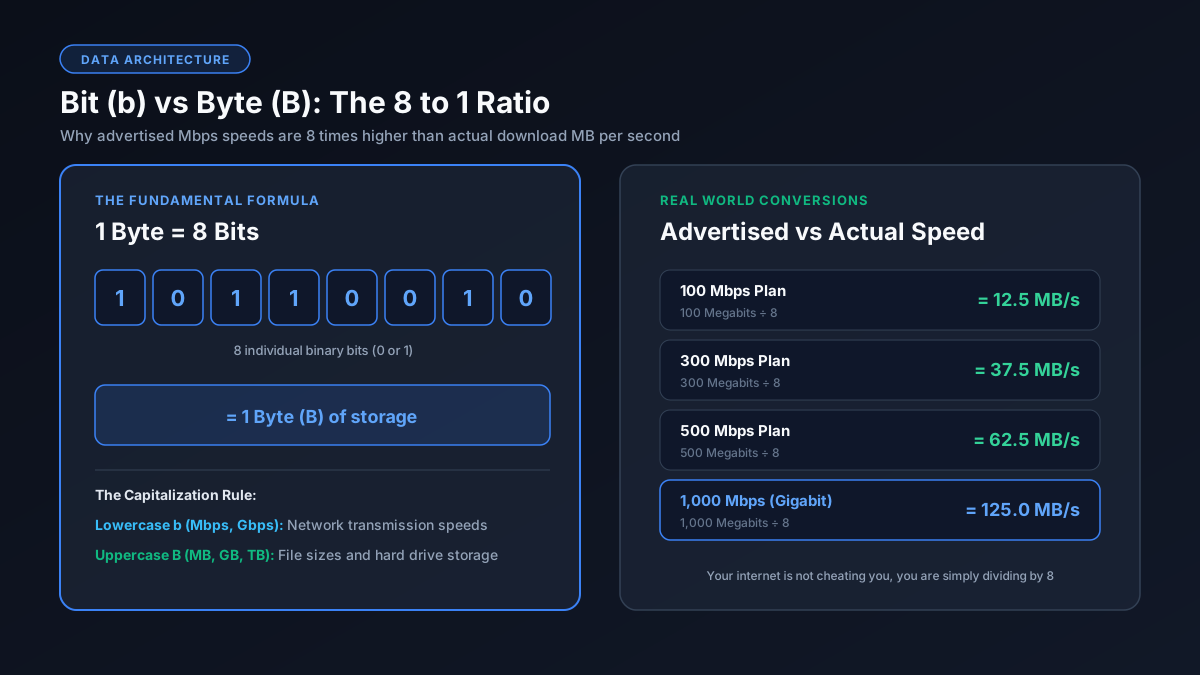
Bit vs byte ratio explanation showing 8 bits equals 1 byte and 100 Mbps equals 12.5 MB per second
The fundamental 8 to 1 ratio explaining why advertised Mbps speed is eight times higher than MB per second download speed

The Core Difference

A bit is the smallest unit of digital data. It can only be a 0 or a 1. A byte is a collection of 8 bits. That is the essential rule: 8 bits = 1 byte. This single conversion factor explains almost every confusing speed number in modern computing.

Why This Matters for Internet Speed

Internet service providers advertise network bandwidth in Mbps, which stands for Megabits per second. However, web browsers, Steam, and file download managers display transfer rates in MB/s, meaning Megabytes per second. Because 1 byte equals 8 bits, your speed in MB/s will always look 8 times smaller than your speed in Mbps.

For example, a 100 Mbps connection divided by 8 yields an actual download throughput of 12.5 MB/s. Your connection is performing as promised; you are simply viewing the data in bytes instead of bits.

Bits vs Bytes at a Glance

  • Bits (lowercase 'b'): Used for data transmission and network speeds like Kbps, Mbps, and Gbps.
  • Bytes (uppercase 'B'): Used for storage space and file sizes like KB, MB, GB, and TB.

The Metric and Binary Prefixes

Both bits and bytes use similar prefixes, which adds to the confusion:

  • Kilo = 1,000 (or 1,024 in binary computing)
  • Mega = 1,000,000
  • Giga = 1,000,000,000
  • Tera = 1,000,000,000,000

One Megabit equals 1,000,000 bits, while one Megabyte equals 8,000,000 bits. They remain exactly 8 times apart across every tier.

Frequently Asked Questions

What is the difference between a bit and a byte?

A bit is the single smallest unit of data, either 0 or 1. A byte contains 8 bits. Internet speeds use bits (Mbps), while files and storage drives use bytes (MB, GB).

Why does 100 Mbps internet only download at 12.5 MB/s?

Internet speed is measured in Megabits (Mb) and download progress in Megabytes (MB). Divide your 100 Mbps connection by 8 to get your true download speed of 12.5 MB/s.

Is Mbps bits or bytes?

Mbps stands for Megabits per second. The lowercase 'b' always denotes bits. A capital 'B' in MB/s denotes Megabytes.

How many bits are in a Gigabyte (GB)?

One Gigabyte (GB) equals 8 Gigabits, which is 8,000 Megabits or 8,000,000,000 bits in decimal notation.

Which is bigger, a bit or a byte?

A byte is much bigger. One byte consists of 8 bits, so a Megabyte is 8 times larger than a Megabit.

Related Guides & Converters